Data Recovery, recovering Hard Drive data, RAID data recovery

Let’s Get Green($): Redeploying old Hard Drives

This blog regularly focuses on the issues around data recovery and important considerations in maintaining your storage devices. But today I’d like to highlight an interesting service from Memofix through a guest post by our CEO, Chris Rathgeber. – David Foster

Memofix has more than two decades of experience in providing warranty depot service for technology manufacturers, computer resellers and businesses of all size. We provide solutions for a variety of devices but we have a particular focus and passion for all things related to storage. This has allowed us to build some unique customer programs that reduce risk and recover value for assets that have been deemed obsolete.

Hard drive shipments world-wide continue to increase with some 300 million delivered in the first half of 2012 (IHS.com). IT managers are replacing thousands of hard drives each month across Canada and we deal with the asset disposition process for a significant amount, either directly or through our partnerships with manufacturers or resellers. They may be upgrading to newer technologies, like SSD, or adding capacity or simply reducing the number of storage devices by relying on cloud based solution providers. These IT refresh or upgrade projects end up displacing an equal or greater amount older storage devices.
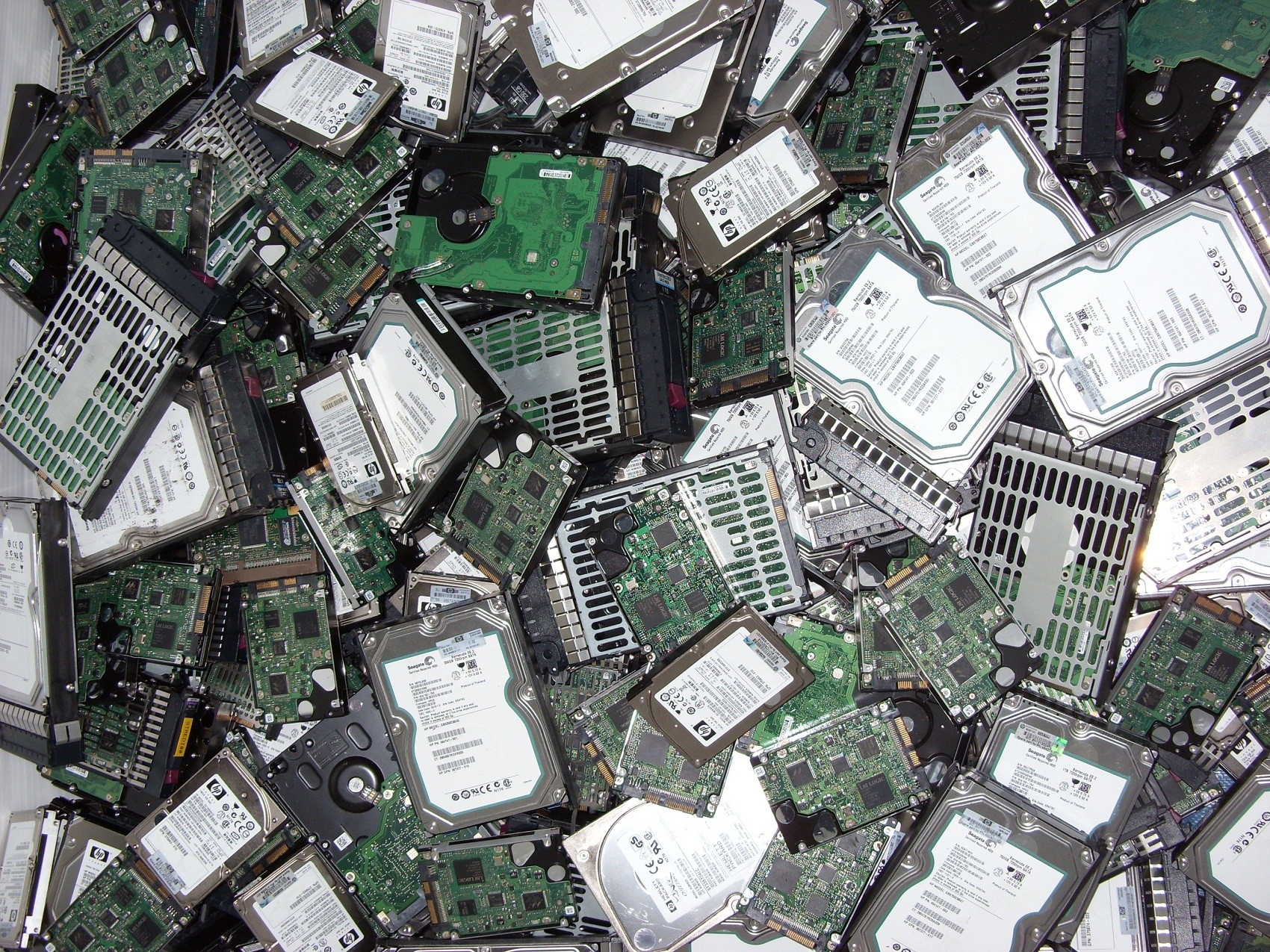
All IT managers should be exploring the possible trade-in value for any storage devices that are replaced in their environment. Many can be sold to other companies who are increasing storage capacity in a network environment that is standardized on older technology. Hard disks and tape drives, once audited and refurbished, can be sold as service spares to a wide variety of customers. Some may have more value to be broken down into key components and used as spare parts. Our team has been able to find customers for older hard disks of all capacities, tape drives, network drive enclosures, tape libraries, auto-loaders and other storage related components.


The most critical issue for any customer, when considering the re-marketing of hard drives from their facility, will be data security. There is always a concern that one of their hard disks will be resold with information that can be accessed by a potential future buyer. We believe that Memofix delivers a level of security that customer can rely on, that no data can be retrieved and they can extract full value for the re-marketed device. In the 25 years that we have been delivering data recovery solutions, hard drive repairs and data destruction services we have never had a single incident of a data breech. The manufacturing leaders in storage technology rely on us for this level of security as do some of the largest IT departments in Canada. Once devices have gone through our audit and data wipe process, they can be re-marketed and the recovery value can underwrite the replacement units or future operational costs.
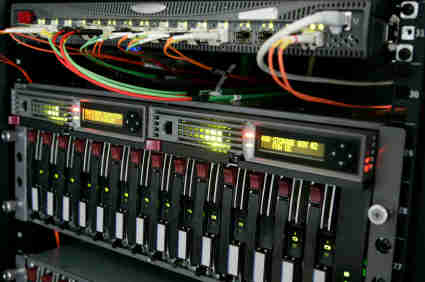
We’re a bit obsessive about the details when we take on an asset disposition project for our clients. We establish a secure chain of custody that matches our customer’s need for security. All assets are received and detailed reports are created that allow us to track each asset through our various phases of audit, test, data wipe, refurbishing, packaging and ultimate payment to the client. These reports account for every asset and ensure that they can be removed from the customer’s accounting application. We utilize our data recovery division to random test devices during the data wipe process to guarantee that our procedures are working as expected. Approximately 25% of drives cannot be wiped effectively because the device does not function properly. These are degaussed and shredded to endure data security standards are met.

Memofix is known as a quality supplier of refurbished storage with all products backed by warranties that are best in the industry. A hard drive with a single bad sector will fail our testing process and will not be resold. This level of quality means we demand premium prices for our refurbished inventory which results in higher trade-in values paid to our asset disposition customers. All hardware that fails while in testing, or that has no re-marketing value, is recycled responsibly meeting strict Canadian ewaste guidelines.
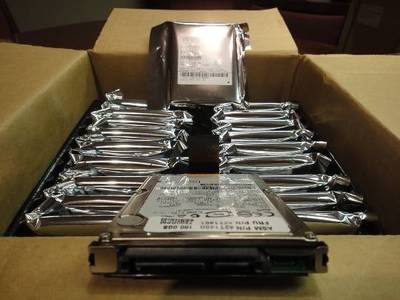
We regularly manage the physical destruction of thousands of hard drives as directed by our customers despite our knowledge that many have value in the re-marketing and service channel. Some companies have no appetite for risk and will remove all storage devices for shredding and recycling and we follow instructions accordingly. But we will provide an analysis of the potential trade-in value of all devices so the client can weigh the benefits of pursuing that option. For several customers their confidence in our secure processing has resulted in valuable recovery dollars flowing back into their IT operations.

Please consider partnering with Memofix as a key supplier for asset disposition services focused on storage technology. Whether your project is large or small, or you deal with us directly or through a trusted computer reseller, we can provide data wipe solutions and re-marketing programs that give you peace of mind for your retired assets along with funds for extending your IT budget.

Chris Rathgeber, CEO Memofix
RAID Disaster Area!

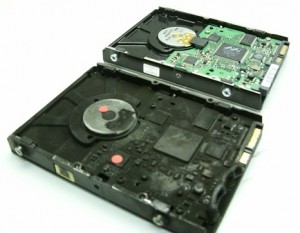
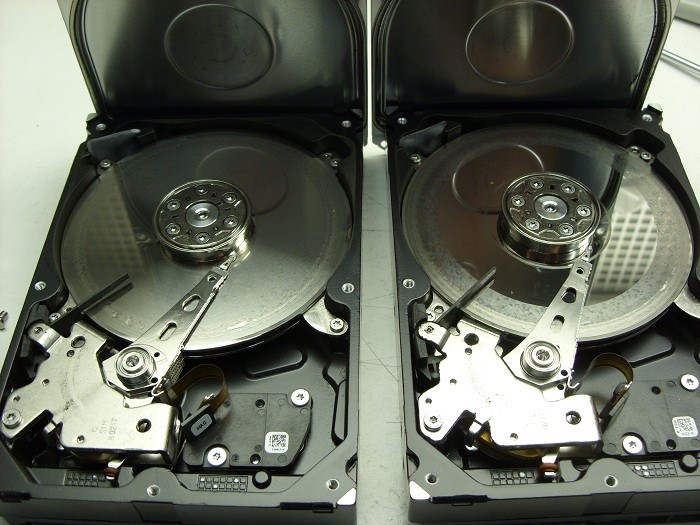
It’s been a while since I’ve posted any astonishing pictures of actual data recovery cases we receive. This morning we received a pair of matching Seagate 7200.11 500GB SATA hard drives that were in such bad shape I just had to share …

2 crashed seagates

They were part of a 2 drive RAID-1 set which means they were exact copies of each other. The client assumed having two copies of their data on two drives would ensure they would be safe. Unfortunately they were wrong.

Their assumption of safety is flawed on a several accounts by my reckoning.

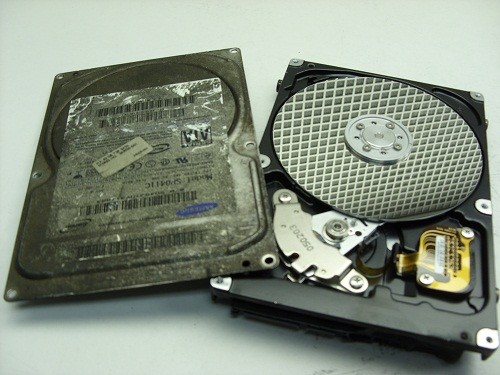
First, both drives are physically in the same box . So if one falls off the table, they both fall of the table. And judging by the physical damage of these two hard drives, this might very well be what happened. Notice the scoring and rings forming all across the disks or platters of both drives. This is a real physical crash where the magnetic coating that was used to retain the data has been scraped off and left scattered through out the drive’s internals as a fine black powder.

Regardless, of how the physical damage happened, it is also apparent that the drives were running for sometime in this state. Typically minor crash debris is collected by a filter located in the top left corner of each drive. The filter is originally white in color but as you can see in the picture, both filters are now black. Crashes like this are also very audible and for a sample of what this sounds like, listen to the recording of one of these drive below.

Secondly, RAID box vendors often recommend you use two identical hard drives as was the situation here. Again, this does not sound like such a good practice to me. If one drive has a manufacturing defect, then there is a good chance the 2nd drive will have the same manufacturing defect, especially if the drives are bought at the same time from the same vendor. And even if the hard drives have no manufacturing defects, their life spans are bound to be very similar. Once one drive fails, the odds of the next one failing shortly after are quite high as well.

If your data is valuable, nothing beats a good back up on a separate distinct device that is stored in a different physical location. But should you find yourself without a backup and a failing RAID box, do your data a favor and shut yourRAID array down immediately and contact Memofix Data Recovery Services for immediate assistance.


another view


Levels of Data Recovery for Hard Drives

Toronto, Ontario, Canada.

Data Recovery Service Providers often categorize hard drive data recoveries into different levels and Memofix Data Recovery Services is no exception. While we don’t provide flat level pricing to individual consumers, we often provide our MACC or Memofix Authorized Care Centre partners with flat rate pricing based on three categories or levels of data recovery. Our definitions of these levels are described below and can be helpful in preparing yourself for the costs and degree of difficulty involved with each increasingly complicated recovery scenario.

LEVEL 1

Level 1 is the lowest level and requires the least expertise and resources. Level 1 means the hard drive is still 100% fully functional. It is recognized by the computer and if the user was to reformat their hard drive they would be able to continue to use it, albeit without their original data.

Level 1 type problems are NOT the fault of a failing hard drive. Level 1 type problems ARE the result of damage, corruption or deletion of all or part of a hard drive’s file system. These actions could have been done deliberately, accidentally, or even unknowingly. The file system is “actual data” written on the hard drive and for our purposes, it can be thought of as a big index that points to the locations on the hard drive where a particular file or folder is stored.

If that index is damaged or corrupted, the operating system may not be able to locate a particular file or folder. Or if the index is for a file or folder used by the operating system, then the drive may not be able to boot or be accessed using conventional methods.

Examples of Level 1 type problems would include;

  • Deleting a file or folder
  • Formatting your hard drive
  • Restoring the operating system
  • Boot Virus Infection

Many level 1 data loss situations can be remedied by a tech-savvy end-user using readily available data recovery software. However there are precautions and the peace of mind that only a professional data recovery service company can give you, so if your data is absolutely CRITICAL to retrieve, do NOT attempt this. However, if you can afford to take the risk or just can’t afford the cost of professional help please read an earlier blog I wrote on the subject of do-it-yourself data recovery … http://www.memofixdatarecovery.com/blog/index.php/diy-data-recovery-do-it-yourself/


LEVEL 2

Level 2 is the middle level and requires more expertise and resources then level 1. Level 2 means the hard drive is not functioning properly but the problem(s) will not require work to be done in a clean room environment. Level 2 data loss situations are normally something an end-user cannot solve themselves. Nowadays even switching a PCB is not a simple process, as the drives HDA (head disk assembly) is fine tuned to work with the same PCB it was manufactured with. In fact, the drive’s PCB contains stored values which determine critical settings used by the heads to position and read data optimally. PCBs from the same model hard drive and with the exact firmware can NOT be simply swapped out unless these stored values are first transferred to the new replacement PCB.

Examples of Level 2 type problems would include;

  • Defective PCB or Printed Circuit Board electronics
  • Overwrite or corruption to the hard drive’s “system area” (special files used exclusively by the hard drive for its own operation and maintenance.
  • Corruption to the drive’s firmware.
  • Excessive read errors or hard media defects that are not the result of weak or bad heads.
  • Issues with full disk encryption or file encryption


LEVEL 3

Level 3 problems indicate a major failure with the hard disk drive. Level 3 means the hard drive WILL require extensive cleanroom work to enable any recovery. Typical level 3 recoveries involve head crashes where the drive’s heads have come into contact with the disk surfaces. This usually causes damage to the both the disks and the heads. To recover any data the drive must first be made functional again. First we purge the sealed head disk area of any free particles and then we replace the heads from a new and exact version of the original hard drive. Then we attempt to copy off the used areas of the bad hard drive. During this process the heads will often go bad again due to the damage on the disks. So we must repeat this procedure until we have imaged or copied off all of the used areas on the bad hard drive. This process can take 2 days to 2 months in extreme cases. In the worst cases, the damage is so severe that newly installed heads are instantly destroyed and no recovery will be possible. Another common level 3 scenario occurs when a hard drive is dropped and the spindle motor that spins the disks is seized. This requires the transfer of the disks onto a new motor and typically requires multiple head xplants as well.

Examples of Level 3 type problems would include;

  • Damaged heads and disks
  • Seized or non-spinning spindle motors
  • Stiction, where the heads have become stuck to the disks
  • Fire or water damage
  • Dropped, knocked over, bumped, or physically abused hard drives


So to be brief and to summarize,

  1. If a client or user has deleted a file/folder or reformatted AND their hard drive was and is still working perfectly, then it is a LEVEL1 data recovery scenario.
  2. If the drive was physically abused in any way, or if it makes any unusual noises it is likely a LEVEL 3 data recovery scenario.
  3. For anything else, a LEVEL 2 data recovery scenario is most likely.

In a future blog we will discuss USB flash, camera cards and SSD data recovery levels.

Data Recovery & House Fires

If you’ve ever been the victim of a house fire, you understand what a mess it can create. But interestingly enough, a lot of the mess can be attributed to the actions used to extinguish the fire, versus the fire itself. In particular, the spraying of water and other firefighting liquids can create a wet soggy environment which is definitely not friendly for electronic devices such as your computer or the hard disk drive that resides inside.

Recovering data from hard drives which have been exposed to heat, fire, and water is not as exponentially difficult as some data recovery companies may lead you to believe. Even a hard drive as badly burnt as the one below was a fairly easy recovery for our skilled data recovery technicians located in Toronto. Notice the difference in color due to the soot and smoke, as well as the melted PCB and plastic connectors.

Will my data be recoverable after a fire?


But what really determines if the data will be recoverable or not? We can replace melted PCBs. We can replace damaged head assemblies. We can rebuild missing NVRAM data. But it is the condition of the disks or platters that are most important when determining the chances of successfully recovering the data on any damaged hard drive. In most of the fire cases we see, the hard drive’s pressure equalization valve and lid seal are successful in protecting the disks from exposure to the fire or fire retardant liquids. In those where the seal was penetrated we may find some water residue which can usually be cleaned successfully.

And when we open this fire burned drive, we see a pristine gleaming disk with no apparent water, soot, or other residues being present. And as is typical with most house fires the heat was not severe enough to warp or bend the disk(s) in anyway. So once we replaced or rebuild the damaged components we were able to get the hard drive functioning long enough to create a sector by sector image of the hard disk drive. We then successfully recovered all the client’s files from this image.


Inside a fire burned or well done hard drive.

Not all recoveries are as simple as this burn victim, but our extensive expertise allows us to successfully recover data from over 90% of the burned hard drives we receive for data recovery. If your hard drive is the victim of fire and you need your data recovered, we would recommend that you seal the disk drive in a zip lock baggie as soon after the fire as possible. This will prevent any water residues from evaporating and leaving mineral deposits on the disk surfaces which may hamper our recovery attempts. And remember, even if things look grim, we can often put a smile back on your face. www.memofixdatarecovery.com


Hard Drive Substitutes or Data Killers?

Since shortly after the inception of the hard drive into the PC or personal computer, there have been doubters! Even as hard drives grew larger, faster and more reliable, there have been those who constantly called for its replacement. No other product has improved at a faster pace in every measurable specification than the hard drive, and yet it still gets no respect! The hard drive is still here and still going strong after more than 50 years. Has the time come for a new champ?

data recovery toronto

Back in 1985, I repaired my first hard drive. It was a 5MB hard drive made by Seagate called the ST506. The ST506 had actually been introduced a few years earlier at a list price of $1400! It was the 1st hard drive mass produced for the emerging personal computer market and its interface quickly became the world’s standard … well at least for a few years. The ST506 hard drive had 156 tracks or concentric rings of data on each disk surface. In comparison todays modern hard drives have over 200,000 tracks, can hold up to 4TB or 4,000,000 MB and often cost less than a $100. For a visual comparison, I dug up an old ST506 out of our inventory and took a picture of it along with a modern 500GB laptop hard drive.

Today we have two contenders trying to put the old disk drive out to pasture: the SSD or Solid State Drive and Web Based Storage. Both are worthy contenders offering advantages a hard drive just can’t compete with. An SSD offers lightning fast access times and the reliability of no moving mechanical parts. Web based storage offers the convenience of having your data available around the world 24/7, 365 days a year and the perceived reliability of virtual storage. But are these storage methods the end and be all?

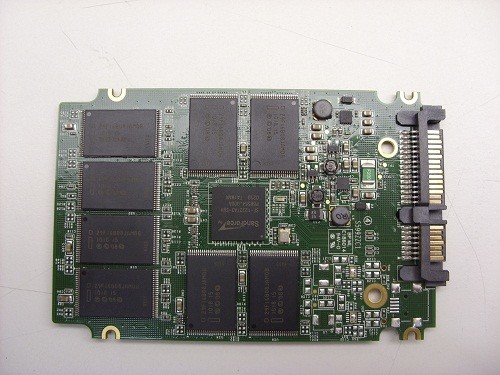
Contender#1 … SSDs or Solid State Drives with their blazing speed and growing capacities appear to be a fantastic replacement for the hard disk drive, but be aware they are far from being the perfect digital storage device.

SSD data recovery

These early days of Solid State Drives, reminds me a lot of the hard drive industry as it was first developing. In those early days there were over a hundred different manufactures of hard disk drives. Now there are just 3, Seagate, Toshiba, and Western Digital. Similarly, today we find well over a hundred companies manufacturing SSDs. And just like the hundreds of early hard drive manufactures, each one is trying to distinguish it’s technologies as the best and capture the most market share. Some of their ideas will be fantastic and will be quickly adopted as standards. Other not so good ideas, may result in the demise and eventual death of many of these companies.

A quick search on the web uncovers hundreds of complaints regarding the early failure of various models of Solid State Drives. The point is … there will be a weeding out process where the weaker products and companies are culled from the herd. And as a consequence it is still a little too soon to know which SSDs and technologies to trust, and which to avoid.

There is also an ongoing debate over the life expectancy of SSDs and whether they can withstand the same amount of lifetime write cycles as a typical hard drive. And while I don’t believe this is, or will remain a problem to be concerned about, there is another rarely mentioned quirk with SSDs. If you copy data to an SSD and detach it from any computer or power source, the data will eventually disappear! This is because SSDs use electronic components which are “charged” to represent a digital 1 and over time this charge leaks out and all the bits return to digital zeroes. So if you think you can copy your precious baby pictures to an SSD and put it away for 10 or 20 years, think again! Actually, just how long the data will be retained is open to argument and something no manufacture appears to mention. I have heard data retention times as low as 1 or 2 years and perhaps as high as 10 years from some authorities. So be careful, or be sure to periodically attach your SSD to a computer or power source so that the data will be refreshed. By the way, I have connected and booted up an old 20MB Seagate ST225 hard drive that has been sitting on a shelf for just under 20 years and all the data was intact and readable.

Contender#2 … Online or web based storage really does promise perfection, or at least so it appears on the surface. But what guarantees do you really have that your data will be there when you need it? Everything is out of your control. And if the web is down or inaccessible, then you basically have no data.data recovery Ontario

To illustrate my concerns, a recent experience of mine may help. Having used Google’s Gmail for almost 10 years with never a problem, I recently persuaded my wife to open her own Gmail account for her own personal emails. Then six months after the switch, her emails suddenly disappeared. Of course it was my fault for persuading her to switch over to Gmail, so I was tasked with getting her emails back … What I found was rather discerning; there is no real process, and definitely no person to help you recover your mailbox data should such a calamity bestow you. Google basically says “Oh well, what do you expect when something is free?” To which what can one say? Of course the solution is to use an email agent like Eudora and download your emails to your local machine. But then doesn’t that defeat the purpose of on-line storage?

Not to pick on Google, (they should be prepared to defend their “web only” cheerleading), but I have another example based on their product, Google Docs. It is touted as a web based replacement for MS Office. It allows a user to create, edit and store MS Office type documents on the web. But after my experience with Gmail, I must wonder what recourse there will be if suddenly all your documents go missing? I hope this problem of no accountability for the safety of a user’s data is isolated to those offering free storage services. But with Google setting the precedent of giving storage away for free I am afraid other web based program providers will do the same.


Top 5 Worst Mistakes A HDD User Can Make!

Or Mistakes I See Every Day That Can Be Easily Avoided
A Diatribe by Rob Armstrong, Memofix Data Recovery Engineer

Every day in Data Recovery labs across the globe, hard drives (HDDs) are received from people who were convinced they knew what to do when their HDDs failed. Unfortunately, most have been horribly misinformed by friends, family, sweaty nightmare, rumor and/or innuendo, or even worse poor Search Engine results written by non-professionals who think they know HDDs inside and out. The truth is, I have been in the Data Recovery industry for close to seven years, and I learn more about hard drives and each manufacturer and model EVERY DAY. It is not a simple or straightforward undertaking, and is unfortunately one of those things in life that is best left up to the professionals…for no other reason than most, if not all, Data Recovery Labs have a free evaluation service. If you attempt to “fix” your HDD at home, you could conceivably damage the drive beyond the point where it can be recovered – even by an accredited lab.
So here is the advice of a Data Recovery Tech who just wants the public to be better informed as to what they should do when the unthinkable happens (and yes, I am aware that if people heed my advice, we will be receiving fewer cases for recovery):

1. If the HDD is Dropped or Physically Traumatized in Any Way

Whether the device is running or not, once dropped, you should not apply power again. If you are truly concerned with not losing your data – send it in to a data recovery lab right away. Some would advise to apply power just once to see if you can get access – even for a short window of time – to copy off everything on there before it fails for good. Here’s the problem with that thinking: if you dropped the drive and the heads inside the drive physically bent due to the impact, then when you apply power, the heads now come into physical contact with the platters (whereas before the trauma they floated above the surface by several microns) and your data is scraped off at 7200 rotations per minute – becoming unrecoverable.

2. If You Have Sporadic Access to Your HDD

While working, you see the “hourglass” icon come up…too many times…or it takes waaaay too long to save, or sometimes your HDD boots to Windows OK, sometimes it doesn’t. Your HDD defaults to the “blue screen of death” sometimes – but not every time – you boot. These could be indicators that your drive is failing either physically or logically as bad sectors proliferate (reported as “Read Errors”) or your hardware may be slowly failing. In any case, the next time you have access to your HDD, COPY IT! All of your critical files and folders, profiles, e-mail documents, anything you deem important. You may never get another chance, and I’ve heard of many instances where consumers just kept rebooting until they had access – then did not back up once they have it. And no - putting your HDD into a refrigerator is not going to help.

3. If a Drive Fails in Your RAID Array

Hard drives can fail at any time without any type of warning (I know – you didn’t want to hear that), and therefore quite often, one drive in a RAID array will fail well before the others. Obviously, the way in which the data is written to a RAID makes it extremely simple to rebuild should one drive fail (with parity, each drive’s contents are re-buildable using the other drives). However, when multiple drives fail simultaneously – send the array into a Data Recovery lab. Once again, you will get a FREE evaluation, which will determine EXACTLY what is wrong with the RAID and what it will take to recover the data. Too many times have we seen RAID arrays where the consumer has replaced too many drives, kept the power on damaged drives too long, or “accidentally” reformatted the whole RAID after rebuilding didn’t work right away. Again, how important is your data?

4. If You Use One External for Both Mac and PC

Stop it. You just stop that right now. In this day and age, external HDDs are cheap enough to buy one for each of your O/S’s, and moving your HDD from one system to the other and back can cause your HDD to fail. In the end, it comes down to filesystem difference and the incompatibility of the two O/S’s. The way data is stored and written in a Mac environment is VERY different from the way a PC writes, and most systems have a difficult time resolving both O/S’s. You can’t mount a Mac drive in Windows (unless using a third-party program), and vice-versa, so you shouldn’t be using the same HDD with both systems. I’m sure some of you will yell and scream after hearing this advice, and have used one external HDD for both Mac and PC without any problems – but if the possibility exists that you will lose everything, isn’t it worth two externals?

5. If You Use Your USB Device for Storage

Again, stop it. Years ago, I assisted a Data Recovery company with customer service while also working in their lab, and many an argument was had with consumers over the definition of a “backup”. A backup is a secondary copy of your data. That means it exists not only in two locations or folders, but on two completely separate drives. This is the only way to become completely secure in the knowledge your data is safe from loss. As such, USB devices (aka thumb drives, USB sticks) should be used only for transferring data from one HDD to another immediately. Too many USB devices have been received that were smashed because it ended up forgotten and on the bottom of the purse, or lost and chewed up by the family dog (no, really). Do not store any data on your USB device that is critical for any extended period of time – unless you have a true backup on another HDD.

So there you have it. The early days of Data Recovery were a lot like the introduction of Science into public discourse hundreds of years ago. There were scientific methods we were using along with basic computer know-how to recover data – proven methods – but there was also a “fringe” element to recovery, mixing science and…guesswork. We would adjust the lid on a drive, believing that by doing so, the airflow inside the drive or magnetic field would affect the voice coil to get better results. I even remember sitting at my workstation all day and holding a drive, because I believed that if I let go of the drive it would stop working – some superstitious nonsense about my personal electromagnetic field affecting the HDD. Basically if the method worked for one person, we would all try it – regardless of how little sense it made. That was then.
Now, we as Data Recovery Technicians know exactly how to recover data from any HDD, using proven scientific method – no more guesswork. And that is why you should ignore rumor and poor forum scuttlebutt when it comes to the recovery of your critical data, and just send the drive in for a free evaluation. When the unthinkable happens. Which it shouldn’t, now that I’ve given you 5 ways to avoid it!

RAID Data Recovery and Physical Damage

One of our best Toronto data recovery partners recently had a RAID data recovery case involving eight hard disk drives configured in a RAID 5 setup. As you may know, RAID 5 allows the failure of any 1 hard drive and can be rebuilt with no data loss. But unfortunately in this RAID data recovery situation, there were two defective hard drives. Further investigation revealed that one one of the hard drives had actually failed 5 months ago and the stale data residing on it was of no value to the client. This left our data recovery partner with all their hopes pinned on the one remaining defective disc drive which had apparently just failed and was the ultimate reason for their RAID failure.

When they contacted Memofix later that morning, we asked them if there were any loud clicking or other unusual noises coming from the hard disk drive. They said no, but they noted that the hard drive model was not being reported properly by the SCSI BIOS at boot up. The model was displayed properly, BUT the capacity was indicated as 0 bytes!

After conferring with a few of our RAID data recovery techs we advised the client that the problem was most likely a corrupted module in the hard drive’s “system area” and we suggested we could fix it very easily. The “system area” is a storage area on the hard drive reserved by the drive itself for storing unique settings required by the hard drive to function. If a hard drive can’t read some of the modules, it often reports a zero byte size which prevents any access to the stored data.

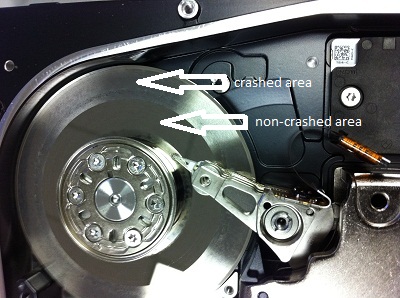
As we are located in the Toronto area, the partner packaged up the defective hard drive and brought it immediately to Memofix for further analysis. When we first hooked up the drive, there was a very light, almost indecipherable ticking noise. It did not sound serious and in fact our data recovery experts still believed the problem was related to a corrupted system area. However our attempts to repair the module were unsuccessful as the hard drive could not write back the changes we made. It appeared we had an issue with the hard drive’s head assembly that would need to be fixed first. So we opened up the hard drive under class 100 conditions in our Toronto data recovery lab to get a better look. And boy did we get a better look … see the picture we took below. 🙁 Notice the heavily crashed area where the smooth platter surface has been roughed up severely as well as an additional ring of damaged at the inner hub of the platter.

There will be no data recoverable from this crashed hard drive! It just goes to show you that even the best data recovery specialists can be fooled as it’s not always possible to hear severe damage with your ear.

By the way, even though this 8 drive RAID array had two bad hard drives, Memofix was still able to rebuild the RAID with the one stripe being bad throughout the RAID. This results in the recovery of 5 good chunks of data , followed by 1 bad chunk of data through out the volume. The RAID data recovery results may not be exactly stellar but the client was able to regain many smaller document type files.

raid recovery toronto
badly crashed SAS or Serial Attached SCSI hard drive
SAS SCSI Drive involved in a terrible crash

Toronto Data Recovery

As the morning sun peeks through the skyscrapers of downtown Toronto and the warmth of its rays tickle your face, your world seems so safe, so tranquil, so at peace. You press the power on your laptop computer and are mildly surprised when the familiar beeps fail to materialize. Looking at your screen you see nothing but a flashing cursor. So with minimal concern you reset the power, gaze out over a waking Toronto and diligently wait for the familiar beeps before heading for your coffee. But unbeknownst to you, today will be a little different than the last 934 days. Today your computer won’t boot! Today you lost your data! Today you need data recovery!

Panic sets in as your brain begins to assess the gravity of the situation. You remember the 37 page proposal you’ve been working on non-stop for 3 weeks. Usually you would have copies of your data stashed on your desktop at work or even on your computer at home. But again, this time is different, there is no backup! GULP! The most important client you’ve had in years is expecting it tomorrow. If you get the contract, your worries will evaporate for months to come, maybe even years. If you don’t, well things could get really tough around here. ..

data recovery Toronto
Toronto Data Recovery

Every day in thousands of businesses and homes across the Toronto GTA, across Canada and across the world, a similar scenario is unfolding. Data is being lost!

What would you do? Where would you seek help? Are you located in the Toronto area or close by in the golden horseshoe, perhaps Hamilton, Oakville, Kitchener, Waterloo, or even Markham?

If you’re like our Toronto friend above, Thomas McAllister, you called your IT manager for help. Once the IT manager determined that the hard drive had an operational problem, he recommended Memofix Data Recovery Services, Toronto’s oldest data recovery service provider.

Thomas called us just after 9 am Toronto time and the severity of his situation was not hidden in his voice. It was apparent he needed his data recovered by tomorrow’s sunrise or he would need to start working on his resume. To Thomas the situation was that critical. After discussing his case with him, we were able to assure him we had the parts in stock at our Toronto facility and we’re ready to attempt his data recovery within the hour of it being received.

By 11am we received his Toshiba laptop for hard drive data recovery. A quick analysis determined that one of the 4 heads was no longer functional. Within an hour we had replaced the complete defective head assembly and had the hard drive imaging, albeit with some read errors. Thankfully the disk drive was only 160GB and by 3pm our imaging of the used areas was complete. Although the data recovery had some damaged files as a result of the read errors, the most critical file was in pristine shape and was tested with no errors. Due to the small size of the file we were able to email it to Thomas at his office in downtown Toronto. By 3:30pm, Thomas was breathing a little easier and our mission was complete.

Now, not all our data recovery cases can be completed this fast, but if you’re in the Toronto area, be aware that our data recovery service lab, located in Vaughan, has the most extensive inventory of hard disk drive parts in Canada. While other Toronto data recovery service providers must wait days for parts and likely even charge more, we are often able to complete a data recovery in the same day. If time is not your friend … call on Toronto’s Memofix Data Recovery Services.