Data Recovery, recovering Hard Drive data, RAID data recovery

Warning: USB Flash Devices FAIL!

There exists a belief that USB flash drives, also referred to as USB flash sticks, memory sticks, thumb drives, or USB jump drives, are robust, reliable and a very secure alternative for storing your data! But every month we routinely service dozens of data recovery cases involving USB flash devices from the Toronto area, so we can tell you from experience that this belief is just plain WRONG!

recovering data from USB flash sticks
Do you need Data Recovery for a USB Flash drive?

Perhaps it is the knowledge that these USB flash devices use solid state flash memory chips for storing the data and consequently there are no moving parts to become defective. Or maybe people just don’t treat them with the same respect and care they would with a hard disk drive.

I know I often use them for bringing home files I plan to work on over the weekend. And yes I throw them in my pocket, carry them for days, forget about them, take them motorcycling or fishing in the rain for a weekend , and even have the wife wash and dry them, as I forget to remove them from my pocket on wash day, (YES, my wife refuses to check pockets). Sometime they work after and sometime they don’t.

But and its a big BUT, I never store anything on them that I haven’t already backed-up on some computer. And that is the correct way to use these USB flash devices; as temporary storage locations used to move existing data from one location to another. They are NOT intended to be long term storage devices and they should NEVER hold the ONLY copy of anything!

Besides deleting files or formatting your flash device, the USB flash devices we receive for data recovery suffer from either physical or ESD (electro static discharge) damage. Typical scenarios may include;

  • USB device has been inserted into a running computer and someone comes along and inadvertently bumps into the USB flash device and causes it to physically break off
  • OR in the same scenario as above, it bends enough to cause some of the connections to touch each other and short out electrically
  • Users often try to force an incorrectly oriented flash stick into a USB connection and cause physical or electronic damage
  • USB flash devices are often stepped on or even run over with a vehicle.
  • Flash devices are often accidentally dropped or immersed in liquids ie. coffee cups, toilets and washing machines.
  • Carry a USB flash drive in your pocket can often cause static electricity to build up and it can discharge causing electronic damage.

Canadians in need of our services can click here for our Toronto USB data recovery services.

Or if the topic interests you further, please wait for my next post where we will discuss the challenges in recovering data from USB flash devices and why the process is so complicated and not always even possible. To ensure you don’t miss any of any of my new posts be sure to subscribe to the Memofix data recovery blog.
Data Recovery for Dr. Dell in Haiti

Data Recovery is often a thankless business. We can spend hundreds of dollars on parts and many late days attempting to recover someone’s critical data files. And in the end, if we are unsuccessful, we don’t get paid and rarely do we get a thanks for our efforts, no matter how hero like our recovery efforts may have been. So when we receive a great big thank you and some pictures showing the fruits of our labour in use, we really like to soak it up. 🙂

“Hi Bob,

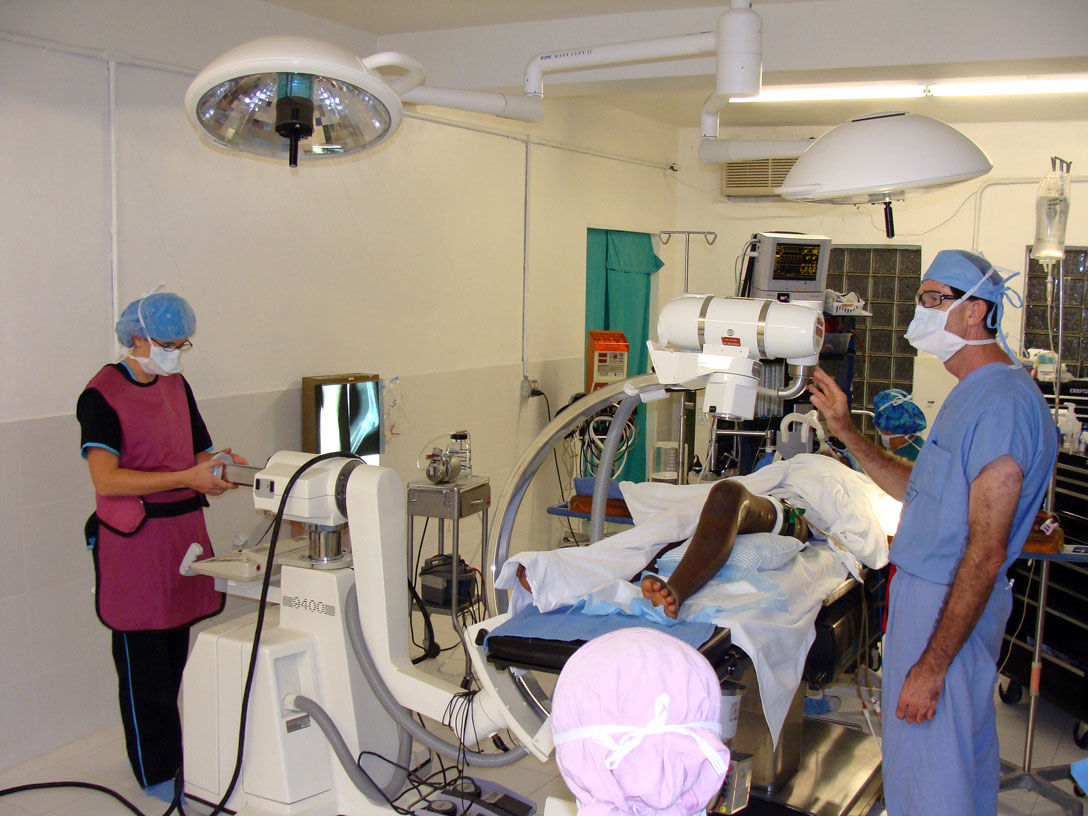
you probably remember me from a few months ago. I had the hard drive from an X-ray machine in Haiti that had failed due to a power surge. I though you may be interested to know that thanks to the drive your company recovered the machine is now working again. I’ve attached some pictures for you from the mission in Haiti including pictures of the C-arm being used during a knee operation. The surgeon in the picture is Dr. Dell who covered the cost of the recovery. This surgery to implant a plate in a patient’s damaged knee would not have been possible without a working x-ray. I thought your team would appreciate seeing the results of a job well done.

Thanks and Blessings, Geoff “

The Real Doctor of Recovery, Dr. Dell doing his thing in Haiti

Back in August, Geoff, an associate of Dr. Dells asked if we could recover data from an old Quantum hard drive being used in an older X-ray machine in Haiti. It was a 52 MB hard drive, yes 52MB or .052GB or .0000052TB, small by today’s standards that’s for sure. As the disk drive was very old and few data recovery companies other then Toronto’s Memofix Data Recovery Services had the experience or parts to deal with it, we were asked to attempt the hard drive recovery in Toronto.

As it turns out the hard drive had been damaged by a power surge and it’s printed circuit board or PCB was fried. Additionally and more detrimental to our data recovery efforts, the surge damaged a small pre-amp chip that is located on the head assembly inside the sealed disk drive compartment. The chip is used to amplify the signals from the individual heads to the PCB and without its proper operation, no recovery would be possible.

On a current modern hard drive, we would simply replace the entire head assembly but this older Quantum hard drive used a unique hybrid positioning system for controlling the heads and it could not be simply replaced with a new one if the data was to be recovered. This hybrid positioning system used a combination of an optical encoder for rough head positioning and an embedded servo system for fine positioning. As a result the relationship between the two positioning methods was critical and could not be altered or replaced with anything but the original mechanical parts.

With Memofix’s grey haired experience in repairing legacy hard disk drives we were able to replace the pre-amp chip on the original head assembly and restore the hard drive to an operating state. We then created an exact image of the entire original hard drive onto a new Quantum 52AT hard drive. Interestingly enough, we had a new Quantum hard drive sitting in our stock, still sealed in a bag we received directly from the now defunct manufacture in the early 90’s.

Sometimes it’s good to be a pack rat that’s been around forever! Especially when our efforts in Toronto help a good doctor spread heath and healing through a country that really needs everyone’s help. May the forces of good be with the people of Haiti!


Data Recovery after a MAC Format

In my last post we discussed the consequences of formatting your hard disk drive using Windows XP, Windows Vista or Windows 7 and whether data could be recovered after such an event. In this post we will shed some light on how Apple implements formatting on the MAC, and the implications of their methods on data recovery.

First it should be noted that Apple does not use the standard Windows terminology when referring to formatting a hard disc drive. Apple calls their format process “Erase”, but in essence it perform the same tasks as a Windows Format command. The hard drive is re-initialized to appear as a fresh and empty drive volume with all of the disk space free for use.

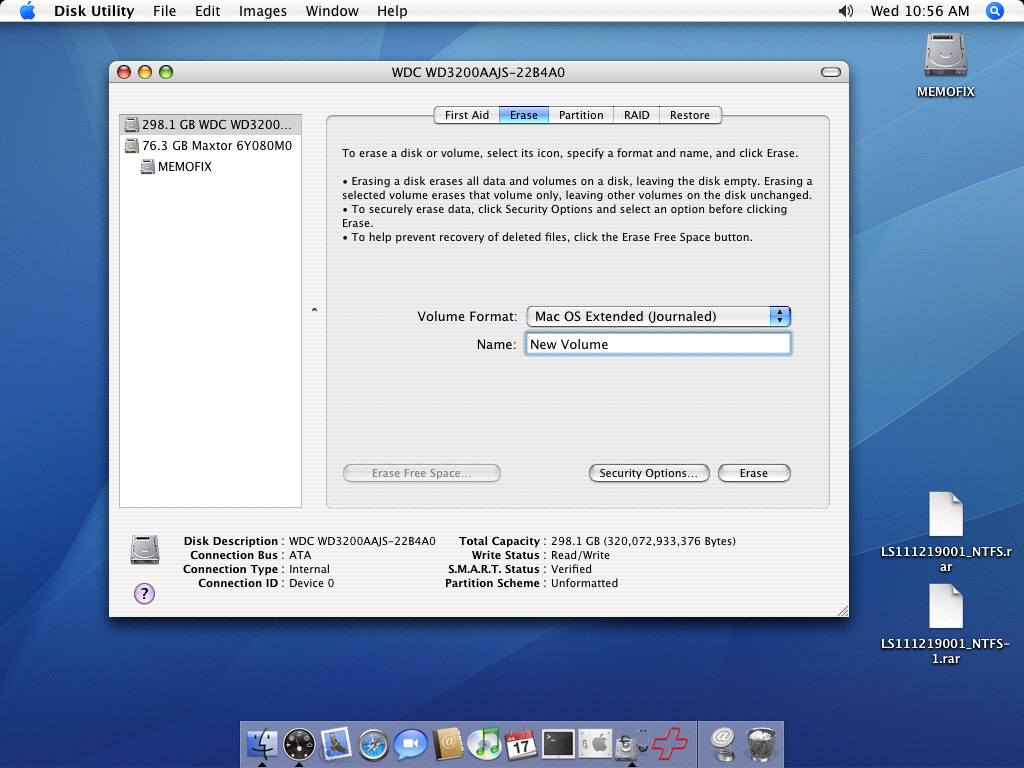
Mac’s Disk Utility can be invoked from the “Go-> Utilities” tab. A screen shot of the disk utility can be seen below. When a hard drive is selected you can then choose the type of Volume Format and a name for the new drive volume.

MAC Erase and Format Utility


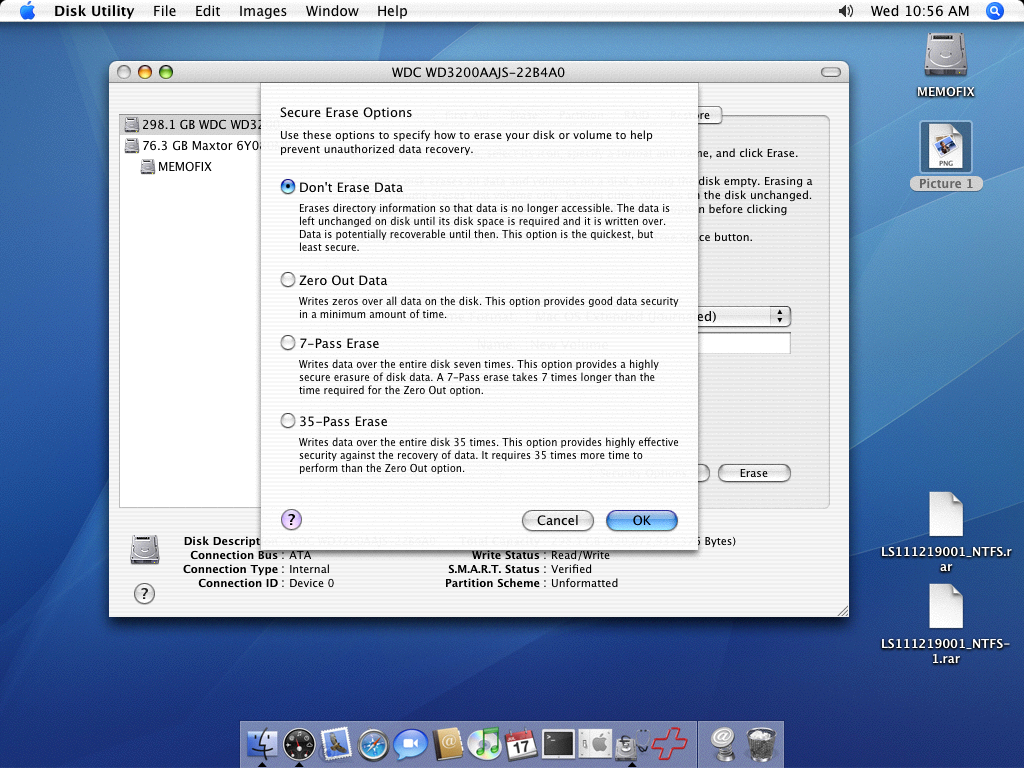
If you were to now press the Erase button, the drive would be formatted or erased according to the Security Options that are set. To see what options are selected, press the Security Options button and you will see the screen shot below.

By default, an Erase is set to the “Don’t Erase Data” option. This option overwrites all the directory information used to find and access a file. It does not however erase the actual data. In this case, data recovery should be possible. This option is equivalent to a quick format on a Windows based PC.

Secure Erase Options on the MAC


The use of any of the other options will result in permanent data loss. Whether you overwrite the data 1 time, 7 times or even 35 times makes no difference in the real world of data recovery. The data will be gone, so be careful.

Recovering Data After a Format

For many years it’s been common knowledge among the more technically savvy computer enthusiasts, that even if you format your hard drive, the data can be recovered. Any simple data recovery software program and even most computer stores with a service department should be able to quickly restore your hard disk drive data after a format. And while this rule has been true for many years, there’s now a new sheriff in town, and he plays by different rules. With the advent of Vista and Windows 7, formatting your disc drive may now permanently destroy your computer data. Read on for the details …

In Windows, there are two types of formats that can be implemented; a quick format and a regular format. In the picture below, a quick format is selected, while un-checking the box would perform a regular format.

Data Recovery Services
Windows Format Screen

On older versions of Windows, up to and including Windows XP, a quick format overwrites the beginning of the MFT or Master File Table. The MFT is an index of all the files stored on a volume. Formatting re-initializes the MFT to appear to contain no data files by truncating the length of the known MFT. However, the orphaned index entries from before the quick format are still intact and can be used to recover all the previously existing files. With older versions of Windows, a regular format does exactly the same but it also tests for bad sectors across the entire drive. This test is non-destructive and does not overwrite any other data areas, so again all data files should be recoverable.

On newer versions of Windows, from Vista on and including Windows 7 and 8, a quick format does the same as with older versions and the data should be recoverable. BUT the regular format has changed substantially. It now overwrites “every” sector on the hard drive and as a result no data will be recoverable once this command is executed.

So why would Microsoft change the regular format to now erase every trace of data? Personally I believe it is in response to the increased awareness over data security and in particular the news coverage of personal data being discovered on tossed computers (see this interesting story on one couples adventure with leftover data files). Now, with just a simple regular format, Microsoft allows an end user to effectively do a complete and secure erase of all your hard drive’s personal content.

With new power comes new responsiblity, so be sure you know what you’re doing before formatting any hard disk drive, because even your friends at Memofix Data Recovery Services may not be able to help you.

Data Recovery Second Chances

Here is a story that our head of client services in Toronto wishes me to tell. It’s a story that happens just a little bit too often …

A few weeks back we had a gentleman drop by with a Western Digital hard disk drive for possible data recovery services. The client was quite anxious so we did a while-u-wait evaluation and quickly discovered the disc drive couldn’t spin up because it had a defective PCB or printed circuit board. After reading off the original NVRAM memory contents* and transferring them onto a compatible PCB we soon had the drive spinning again. However we still couldn’t access the client’s data and further analysis revealed there was a second more complicated problem with the drive’s SA or “system area” modules, (kind of a secret operating system stored on the drive’s disks or platters and for its own exclusive use). After some attempts to repair the damaged SA modules it became apparent that it would take further research and time to solve the corruption. We did however believe we had enough information to quote the customer and we proceeded to do just that.

With multiple hard drive problems we don’t typically charge twice as much but we do add a premium and this recovery was quoted at $800. And as often happens, the client was aghast at the figure and decided to decline our data recovery quote. Fair enough, we realize the real value of the data can only be determined by the owner so we packed up the case and handed it back to the gentleman. See this older blog post “Data Recovery Pricing and Why were not the Cheapest” to better understand the data recovery pricing process.

A week or so goes by and we get another visit from the same gentleman. This time he is ready to agree to our quote and he leaves the drive with us. However, once we get the disk drive back into the lab, we see stickers on it from one of our competitors, the largest data recovery company in the world ! And worse yet, the drive’s bubble or sealed environment where the disks are located had been opened.

Oh oh, why would they open the drive? Our initial evaluation revealed no problems with the actual disc media or the read/write heads, so we better take a look. Under class100 clean room conditions we open the hard drive and find a crash forming on the top surface minimally. The crash has formed a ring and can only be created by continuing to operate a crashing hard drive. We then remove the head assembly and inspect each head for damage and contamination. This process reveals additional crashes have developed on the lower disk surfaces. The damage is so severe; the odds are against us recovering anything of value!

We contact the client who admits he did bring it to a competitor BUT he swears it was only for another evaluation and quote. He was trying to find a better price. After “evaluating” his hard drive recovery for 2 days, the other data recovery company told him it was unrecoverable!

This is where the illusion of two totally different outcomes must be addressed and the difference in data recovery processes exposed! Here’s what happened …

The world’s largest data recovery company receives a hard drive for data recovery. The drive is received and they immediately attempt to recover all the data possible. If they can’t recover any data they declare it unrecoverable. If they can recover some data they send the client a list of what they can recover and a firm quote. The recovery is already attempted, the results are already in. There is no proper “do no harm” evaluation or diagnosis. There is little chance of anyone doing any better once they are finished with it. Any 2nd chances are effectively destroyed!

What makes matters worse is what happened with this case. What would have been a 99% chance of a successful recovery with Memofix Data Recovery Services turns into a 100% unrecoverable situation. Whether the new damage was caused by mishandling during its transportation or whether it occurred during our competitors “evaluation” cannot be said, BUT I can tell you the result is the same. Somebody is not going to see their data ever again.

IF a data recovery company can’t give you an evaluation without doing further harm to your hard drive then they don’t know what they are doing, period! Memofix stands by every evaluation we perform and furthermore our processes do NO harm. Consequently if you get a 2nd opinion after a Memofix diagnosis it should confirm exactly what we discovered. Of course actual data recovery pricing for the same diagnosis may differ between competitors, especially in Toronto.

IF a data recovery company uses a process where they attempt to recover the data immediately from any data recovery case they receive, don’t use them. Even if they successfully recover your data, their attempts may have denied anyone else a chance of recovering your data AND consequently they can hold you over a barrel as they have the last obtainable copy of your data in the world.

Remember, the 1st attempt at recovering data from a hard disk drive is typically the most successful. The longer a failing hard drive is operated, the worse your chances of seeing your data again. Choose a data recover provider with the same care that you would use to choose a surgeon, your data may depend on it.

*PCB swapping on most HDDs is not a straight exchange (even with an exact firmware PCB), as the PCB stores settings specifically tuned for its original set of disks and heads. .


Toronto and Vaughan RAID Data Recovery

Enterprise level RAID arrays often use SCSI or SAS (serial attached SCSI) hard disk drives. Compared to PATA and SATA IDE hard drives, SCSI and SAS are not as common. And as a result few data recovery companies have much experience with them.

Fortunately, Memofix (located in Vaughan, Ontario) has been around for so long that we still remember when all servers and RAID arrays used SCSI hard drives. I too have been “around” for a long time and during my 12 years at ActionFront and Seagate Recovery Services I was the “go to guy” for SCSI recoveries. By the end of my career at these Toronto GTA based recovery companies, I was full-time management with the exception of working exclusively on cases that used SCSI hard drives. As a result, I became thee expert at resurrecting dead SCSI and SAS drives. And as they were most often used in RAID arrays, my skills at rebuilding and recovering RAID data was also very good.

At Memofix this expertise has been passed on, but I still personally monitor every SCSI, SAS and RAID array we receive. I believe we are the best in the industry whether that RAID is used on a MAC. Windows, Unix or even a Solaris operating system. If you need some expertise on your failing RAID call the professionals. http://www.memofixdatarecovery.com/data-recovery-raid.php

Data Recovery Machine, Myth or Reality?

Vaughan, Ontario, Canada.

Some people believe that data recovery service companies have automated “data recovery machines”. Basically, a data recovery technician physically removes an individual disk or platter from the inaccessible hard drive, inserts the disk into the machine and automatically reads off the data. While several recovery companies have attempted to create such a data recovery machine, in reality there exists NO such device!

Even if such a machine existed it could’nt solve “all” the data loss situations. In many cases the physical damage to the hard drive’s discs prevents any chance of reading the discs and successfully recovering data. The drive’s disks are coated with an extremely thin layer of magnetic material and when a crash develops on the disks it physically removes this coating and turns it into a black magnetic dust. That dust is the actual data and nothing will ever be able to put it all back together …period.

But the real problem with developing a data recovery machine would be the customization required to support the overwhelming number of different hard drive families in existence. Each family shares similar hardware, architecture, and encoding schemes. When you send data to a hard drive to be written, it is typically encoded 5 different times before it is actually written on the physical disks. These encoding schemes are usually quite different between families of hard drives and are constantly being updated in pursuit of higher data densities. In my estimation there are thousands of different schemes that would need to be reverse engineered in order to decipher data from just today’s current drive models, let alone the equal amount of non-current hard drives still in use.

Back in the late 1990’s there was a Scandinavian data recovery company called Ibas that developed a data recovery machine called the Patan for Pattern Analyzer. http://www.ibas.com/technology/hard-disk-repair.htm Of course the company claimed, ambiguously that it could recover data from independent hard drive platters or disks, but in reality it

Data Recovery Machine
PATAN Data Recovery Machine

could recover data from just one family of Seagate hard drives, and even then it was a non-current family of MFM hard drives. (ST4000 series) MFM drives use an interface with 2 ribbon cable connectors and haven’t been manufactured since the early 90s.

More recently (early 2000’s) in my prior life at a leading data recovery company, we developed a machine to read data off the disks of a Western Digital SCSI hard drive and a few other similar PATA models. http://www.channelscience.com/files/Drive-Independent_Data_Recovery.pdf But again, the device took talented engineers many years to develop, could recover data from just a few specific models and required constant tweaking and attention. As of today, it’s my understanding that this dust gathering machine has been largely used as a slick marketing tool.

Due to the extreme and constant technical advancements in hard drive technology and the presence of several distinct and competitive hard drive manufacturers I doubt we will see any additional attempts at creating a drive independent data recovery device. And with many of the newer data recovery techniques we have developed, the need for such a machine is becoming a distant memory. So, once again don’t forget Memofix Data Recovery Services www.memofixdatarecovery.com for those occasions when you just can’t live without your data.