Data Recovery, recovering Hard Drive data, RAID data recovery

Data Recovery & Encryption, foe or friend ?

Toronto, Ontario, Canada.

To most of us, the word “encryption” conjures up images of spies and secret disks containing information that must be guarded at all costs. Few of us realize that we all rely on and use encryption almost every day in our normal lives. Whether making a cell call, sending an email, buying something with your debit card, or accessing the web wirelessly, we are using and being protected by this not so simple process.

What is encryption? Encryption is the process used to transform and disguise data so that it is unreadable or undecipherable to anyone without a pre-determined secret code or password. Basically, the data to be encrypted is sent through an elaborate algorithm using the secret code or password to scramble the data into indistinguishable rubbish.

Please note, that password protection is NOT encryption. Password protection “may” prevent access to the data, but it does not alter the actual data. Password protection can be easily bypassed.

Encryption has also become common place for protecting data on computer based storage device like hard drives and USB flash sticks. Encryption can be used to protect an entire volume, a folder or even a single file. There are several distinct implementations available:

  • SOFTWARE, Users can buy or use free encryption programs that make it possible to encrypt files, folders or even their entire hard drive or flash device using software routines to intercept and modify the data on the fly. The entire encrypting and decrypting process is handled by your computer’s CPU or processor. Popular examples include SafeGuard, SecureDoc, PGP, TrueCrypt and Safeboot. Starting with XP Professional, Microsoft includes a built in folder and file encryption feature called Encrypting File System or EFS for short. Software encryption methods are popular as they are inexpensive and can be implemented on any existing storage device. However, they are generally much slower, typically 20% slower than hardware based methods.
  • HARDWARE, There are external hard drive devices that use a standard hard drive connected through a “hardware based” encryption interface board. In many cases this encryption process is performed without the user even being aware. Many Western Digital external boxes use this method allowing 100% data protection if the drive is ever removed from the enclosure and its encrypting interface board. Hardware techniques are considerably faster than software methods.
  • SELF ENCRYPTING, Users can now buy hard drives and SSDs that utilize on-board hardware to encrypt and decrypt the data on the fly. These devices encrypt the entire contents of a storage device and are referred to as SEDs or self-encrypting devices or drives. These drives carry a premium price tag but are the ultimate in safety and speed. Some hard drive manufactures such as Seagate may also refer to this self-encrypting as FDE or Fixed Disk Encryption.

Why use encryption? Most of us have heard a story or two about personal financial data falling into the wrong hands due to a corporate laptop being stolen or lost. Or the often recreated news story about reporters picking computers out of the trash and finding “valuable” info left abandoned. Yes it does happen, as someone who regularly buys previously used hard drives can attest. But just how many of us actually have super sensitive data on our computers in the first place? If you are one of the few that must keep your data from prying eyes, then by all means encrypt away. But if you don’t need to … DON’T!

Besides the potential loss in performance, there are several other reasons not to use encryption.

  • LOSS OF PASSWORD OR KEYFILE: If you can’t remember the password or can’t find the keyfile you made 3 years ago, you will NOT get your data back, period. While there are numerous recovery techniques for decrypting or accessing encrypted volumes, they all require some form of a username/password combo or a special key file created by the encryption software.
  • OPERATING SYSTEM FAILURE: If an encrypted drive’s operating system becomes corrupted, perhaps due to a simple virus and the drive is no longer bootable or accessible, there is no easy way to repair the file system and regain access. To resolve the issue you must first decrypt the entire volume. Again you will need a user/password or keyfile (and specialized programs) to perform such an operation. Once the volume is decrypted, the file system damage can then be repaired using the file system’s own repair utilities, i.e. chkdsk.exe
  • READ ERRORS: Over time storage device can easily develop read errors and if these read errors affect the operating system files or an area used to store pertinent encryption parameters, it can become impossible to access your data. As above, complicated procedures will be required to decrypt the volume and access the data. A single read error can stop everything.

Is encryption breakable? Theoretically, with enough computing power and enough time, any encryption scheme can be broken. But if the process takes a thousand years, the value of the data may be very limited. And fortunately the increase in computing power to break the key is easily outstripped by the exponential increase in difficulty by adding an additional bit to the encryption key. Presently, most credit card companies recommend transactions using 128 bit encryption keys. 128 bits keys are considered by the experts to be safe until about 2030 although some recommend 256 bit keys due to the advent of the “quantum computer” where theoretically the difficulty may be halved.

There are 2 basic ways of breaking encryption. The hacker either breaks the password by guessing the password or the hacker uses crypto analysis to guess the message based on the natural frequency and composition of the characters in a given language. To guess a password is often very easy as people tend to use real words and they are often chosen from an individual’s personal life or interests. Even brute force using a pre-created word list is often successful. To be sure your password can’t be compromised in your lifetime it has been recommended that your password should be at least 20 random characters. Of course few of us can remember such a long sequence.

In the real world, getting around the encryption is often much easier than either of these methods. Keyboard recorders are simple to install devices that can be used to record all the keystrokes of a user including their passwords. Or perhaps a hidden camera could provide the same results. Another technique can be utilized if a user leaves their computer unattended, as the contents of RAM memory are not encrypted and there are ways to dump the RAM contents and retrieve a password. Additionally, a group of researchers/hackers recently discovered that the contents of RAM memory do not disappear as soon as the power is removed. In fact if the RAM chips can be kept cool, the data may be retained for 10 minutes or longer. Theoretically reading the RAM contents could be possible even if the power is turned off. But this isn’t really so much about breaking the password as it is about stealing the password.

Can Memofix recover your encrypted data? Usually YES, but we need your keyfile or username/password combo … PERIOD. If we could recover your encrypted data without these credentials then what would be the point of using encryption in the first place.

We regularly recover data encrypted with PPG, Safeboot, SafeGuard, SecureDoc, EFS and most other software encryption programs. We are also very successful recovering hardware encrypted hard drives where the encryption is performed by an interface board separate from the storage device. i.e. the popular Western Digital My Book.

However, SEDs or Self Encrypting Devices present a real problem. It is estimated that by 2017 over 80% of all hard drives and all SSD or Solid State Drives will be SED or self-encrypting devices. There are NO decryption methods available for these SEDs and if consumers and businesses are to adopt these new SEDs, this concern must be addressed by the manufacturers.

Encryption is here to stay whether you need it or not. If you do choose to encrypt your data, we suggest you always create a key file and store it in a secure location. Additionally, record all usernames and passwords in a secure location and until the SED manufactures create a solution for authorized decrypting, we suggest you steer clear of their products or be sure to regularly backup.

As always, when things don’t quite go as planned remember your friends at Memofix https://www.memofixdatarecovery.com/ are always willing to help!

Laptop Hard Drive Crash

An Unrecoverable Notebook Hard Drive
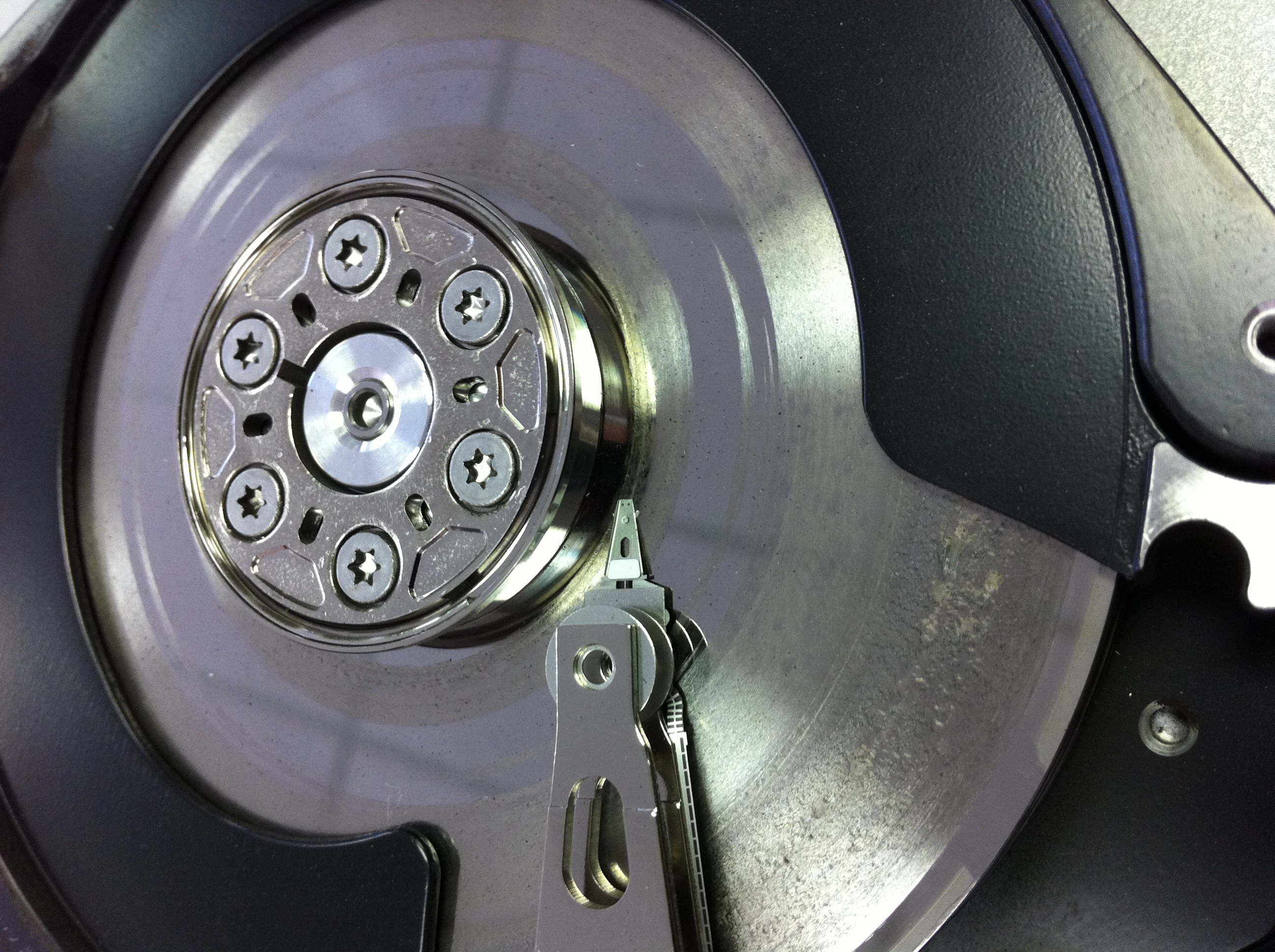
Many of the 2.5″ hard drives designed for laptop, notebook and netbook applications use glass platters. The glass platters can be manufactured with smoother and flatter surfaces which allow the heads to be flown closer to the disk surface. This in turn allows the manufactures to increase the density and store more data in the same space.
However, glass isn’t exactly known for its indestructibility and this picture illustrates the problems. This Western Digital laptop drive originally had two disks but the top disk has shattered into a hundred pieces. No useful data will be recoverable in this situation.

a terrible pic …

Data Recovery Toronto
the Data Recovery Blues

Sometimes the data is just not going to be recoverable! Here is an example of a badly crashed hard drive we received for data recovery from a disappointed Toronto client. Less then 5% of the hard disk drives we receive for data recovery purposes are in a similar condition. Typically this degree of damage begins with a lot of noticeable noise (clicking hard drive sounds) and escalates quickly into a total disaster!

Recovering the past …

North York, Ontario, Canada.

Everyone once in a while we get an interesting case that makes you scratch your head. We recently had a client that had re-formatted her hard drive and re-installed a bunch of programs before realizing that over 5 years of digital photographs were inadvertently forgotten. In a panic she arrived desperate for some advice or assistance in retrieving her photos. We quickly calmed her fears and assured her if there were photographs left intact on her hard drive, we could recover them.

Once in the lab we discovered that her actions had only overwritten a small portion of the drive’s file system and we were able to provide her with 85% of her pictures intact and in their original folders. We also recovered hundreds of orphaned photos which we gathered and put into a separate folder. She was ecstatic and went on her way happy to have her pictures.

A few days passed and we received a call from one very unhappy client. Apparently, we have included photographs which do not belong to her and they are of a very racy nature. She is irate and offended. Of course her husband denies any knowledge of these pictures, nobody else has access to her system, and the people in the pictures are not familiar to her or her husband.

I’m at a loss to explain how this could happen. My only thought is that the target drive we imaged her drive to, was not erased prior to us using it, and we have recovered images from what is left of some former client’s data image. But our target drives are always prepared in advance with a pre-determined pattern written on every sector, and we are extremely meticulous in these processes. We quickly pull out our virgin image of her drive, which we retain for 30 days, and we confirm that the areas of our drive not used by the present image are still filled with our pre-determined pattern. Ok so what the heck?

In order to get to the bottom of this issue we had the client once again send in her original hard drive. Our image was then compared with the original and not one byte was out of synch. It’s pretty clear that the mystery pictures were on her original drive before she ever brought it to us. A conversation ensues with the client as to the history of the computer and the hard drive inside it. She reveals that the original hard drive was filled to capacity several years ago and her son-in-law upgraded her to a larger drive. Uh-huh … I think we’re getting somewhere. Where did the son-in-law purchase the “new” drive? “Oh it wasn’t so new, he purchased it on eBay.” The pieces quickly merge together as we realize that the images have survived several formats and at least 2 years of constant computer use. Who took the pictures originally and who the cute girl is, we may never know, but we do know there is one husband who is very happy not to recognize her.

DIY or Do-It-Yourself Data Recovery?

WARNING: If your data is absolutely critical, DO NOTHING but send it to the professionals. More data is lost by well intentioned recovery attempts than is ever lost from the initial problem.

hard drive data recovery service

Toronto, Ontario, Canada. In some situations it may be possible to access your lost data using simple procedures OR even recover your lost data using relatively inexpensive software. Knowing how to differentiate which situations call for a professional and which don’t, is the key.

Before considering if DIY data recovery may be an option for you, be aware that your efforts may cause the permanent destruction of your data, so please proceed with caution!

The stress and panic of losing your data can often result in hasty and unwise decisions. Take the time to calm down before making any important decisions. Try and determine what data is absolutely critical and what data you can live without. Can the data be recreated and if so, at what cost? Is it backed up elsewhere or have I shared copies with any of my colleagues? Often, much of your data can be re-assembled from other sources and the remaining lost data can be worked around.

If you’re a home user or even a budget minded business, the cost of the recovery must be compared with the value of the data. Data recovery on hard drives typically starts at $500 and can easily surpass the $1000 mark, while data recovery from USB flash devices and camera cards is typically $300 or less. Putting a value on last summer’s vacations pics or ten years of email is not always that easy. The value of the data is always in the mind of the beholder.

If you decide to attempt a DIY data recovery, you will first need to determine if your data recovery situation is a candidate for DIY data recovery. Data loss can be the result of the 2 distinct problems:

  1. DEFECTIVE STORAGE DEVICE: Your data can’t be accessed because the storage device (typically a hard drive) is no longer functioning properly. Unless you’re a hard drive expert, there is little you can do.
  2. DAMAGED FILE SYSTEM: the storage device is working but due to corruption or damage to the computer’s file system structures, the data cannot be seen or accessed. The fie system keeps track of where the files are actually store on the hard drive or storage device.

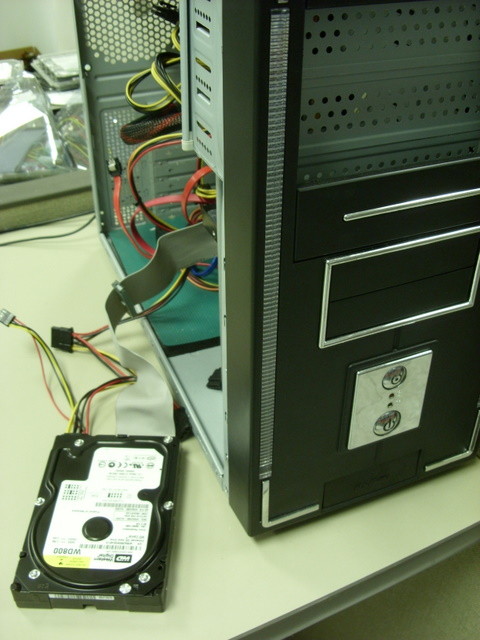
In the first category, the storage device or hard drive is NOT working properly. To self evaluate your hard drive, open up your computer and locate the hard drive. If possible remove the hard drive from the computer, but keep the connectors attached as illustrated in the picture on the right. laptop data recoveryNow place your ear as close to the hard drive as possible and power up the computer while listening. If your hard drive is making any strange or uncommon noises such as clicking, squealing, banging, clacking, ticking, scraping or other destructive metallic noises you likely have a defective hard drive. The louder the noises, the more likely your hard disk drive has begun to physically crash and there may only be a short window of time before the damage becomes insurmountable. If the data is mission critical, shut if off immediately, do nothing, and start shopping for a professional recovery service.

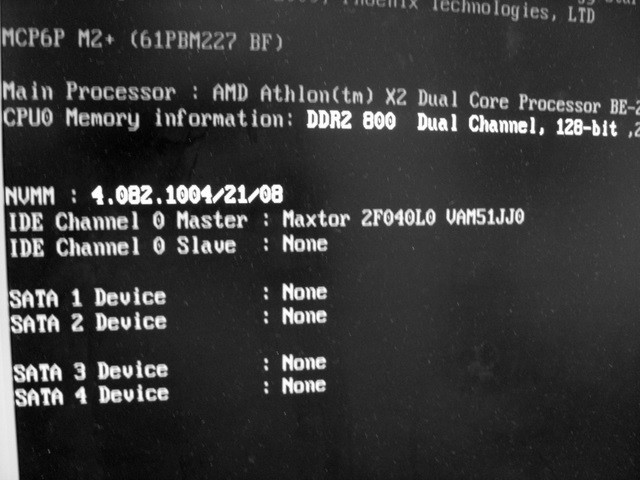
If you don’t hear any audible screams of pain, your hard drive may still be defective. hard disc data recoveryTo check further, monitor the screen as the computer is powering up for the post BIOS routines. In particular, there should be a message displayed when the computer is checking for the presence of hard drives. In the example on the left, there is one Maxtor 2F040L0 hard drive detected. If no hard drives are displayed, your hard drive is likely defective. However if no concerning noises are present, you can continue and attempt some of the additional procedures mentioned further on in this article.

In the second category of data loss, the hard drive is assumed to be working properly, and the data loss is likely the result of damage to the operating system files or to the “index of files”. However, this damage may still be the result of a hard drive perhaps failing intermittently, so be careful.

Many times a user cannot access their data simply because their computers will no longer boot up. Try attaching the inaccessible hard drive as a second drive on a good booting computer or install the inaccessible hard disk drive inside an external USB box and access it through a USB port. If the file system is still relatively intact you should be able to open up “My Computer” and gain access to the drive’s data files. For MAC users the inaccessible data drive should show up as an icon on your desktop.

If the drive’s data files still can’t be seen, there is one more tactic that can be employed. Running a commercially available data recovery program may recover the files you need, even if you’ve formatted the hard drive, deleted files or re-installed the operating system. Many of these programs can be purchased for less than $100 and offer a free trial period where you get to see the results before you decide to actually purchase the product. Be sure to attach an additional working storage device to the computer for recovering the data to. Data should never be recovered to the original storage device.

Hopefully your data loss is a simple issue and these procedures help you regain access to your data. However if your data loss situation is a more serious problem, please contact the experts at Memofix Data Recovery Services where data recovery is our passion and the tougher the case, the more determined we are to be successful. http://www.memofixdatarecovery.com/

and the Winner is ….

Memofix Data Recovery Services recently ran a data recovery survey on our corporate web site. In appreciation for completing the survey we entered all participants (except my Mom) in a draw for a free 2TB External USB drive.

Yesterday the draw was held and we are pleased to announce the winner is;

Alexandre Lemoine of ALTech Info located in Saint-Hyacinthe, Québec

Congratulations Alexandre!

We would also like to thank all participants for completing the survey. Your input was both valuable and greatly appreciated.

Laptop, Notebook, & Netbook Data Recovery

Toronto GTA, Ontario, Canada. Data recovery from laptops, notebooks and netbooks is not that much different then recovering data from desktop systems. The most noticeable difference lies in the size of the storage device or hard disk drive being used by each computer. Most modern desktop computer systems uses a larger 3.5” HDD or hard disc drive while a typical laptop or notebook style computer will use a smaller 2.5” HDD. Additionally many newer notebooks and netbooks are starting to use SSD or Solid State Drives. This discussion will focus solely on hard drives.

While most people assume it’s tougher to recover data from a smaller 2.5” laptop hard drive versus the 3.5” desktop drive, it is actually the opposite in most circumstances. When data is lost due to a physical or mechanical issue with a hard drive, our historical statistics clearly show that 2.5” laptop or notebook hard drive owners have an almost 10% better chance of seeing their data again versus 3.5” desktop drives owners. In my previous life at another recovery company, this same statistic also held true. Hmm … seems strange, especially when I see some data recovery service companies adding a surcharge for dealing with laptop hard drives.

So why are we more successful with 2.5” hard drive recoveries? First 2.5” hard drives sustain less damage when they do crash and second they are more accepting of standard data recovery procedures.

Laptops, notebooks, netbooks AND 2.5” hard drives are designed to take more physical abuse then your typical desktop computer or hard drive. By design and virtue of their tiny mass, 2.5” hard drives can absorb anywhere from 3-5 times as much shock as a typical desktop drive. Portable computers also use shock absorbing mounting brackets to further isolate the hard drive from any external bumps or drops. These damage saving features decrease the severity of damage due to crashes.

Laptop and other portable computer manufactures are also concerned with decreasing the energy consumption and heat dissipation of their products. Fortunately, both of these pursuits provide additional benefits for preserving your data. For example, most laptops save energy by spinning down the hard drive when the laptop is not used for a predetermined period of time. And because hard drives are much more susceptible to damage when they are spinning, this energy saving feature can really save data. 2.5” laptop hard drives take it even a step further and use ramps to lift the heads physically off the disk surface when the drive is spun down while many 3.5” hard drives continue to land the heads on the surface of the disks or platters. Once again an energy saving feature that helps prevent damage to the disk. And there is also some validity in the argument that saving energy creates less heat which in turn causes less drive failures.

Laptop, notebooks and netbook drives are also much more tolerant of data recovery techniques. Head xplants or the process of replacing a bad head assembly with a good head assembly is one of the more commonly used data recovery techniques, but because each hard drive’s head assembly is ever so slightly different and the hard drives electronics were tuned to work specifically with the original head assembly, xplants are often not successful. However this procedure is much more successful when attempted between two 2.5” hard drives versus between two 3.5” hard drives.

Because 2.5” hard drives are principally used in portable devices that by definition will operated while the user is mobile, they are designed to deal with harsher conditions and recover from a larger range of off track data situations then a typical 3.5” hard drive. Consequently they are more accepting of new heads with their slight differences. You can compare it to a racing car and a jeep. The racing care is tuned for high performance and is capable of going very fast and taking corners at incredible speeds as long as the road is smooth. But when the road turns too dirt and mud the racing car gets stuck. On the other hand, the jeep may not go as fast but when the road gets rough, it’ll keep on going.

Media damage, whether disk or platter damage, head crashes, or rings forming on the disk are always a problem. And once again, we find 2.5” hard drives are just more tolerant of damage. As a method of preventing damage in the first place, 2.5” hard drives fly the heads at a greater height above the disks then 3.5” hard drives. This allows a laptop or notebook drive to take more physical abuse or impact without having it’s heads coming into contact with the disk surfaces. This design also allows them to float above damage that would impede the positioning or even damage the heads of a typical 3.5” hard drive and thus giving us a much better chance of recovering data.

So even though your laptop hard disk drive may be smaller then it’s big brother the desktop drive, it’s still the leader in data loss prevention and the better drive to be using should you ever need the services of a professional data recovery company, like Memofix Data Recovery Services. http://www.memofixdatarecovery.com/

… David Foster

Remote Data Recovery

Toronto GTA, Ontario, Canada. Recovering data remotely is a service presently being offered by several of the larger data recovery companies. It sounds so convenient, no shipping, no computer disassembly, no risk, just call someone up and they remotely connect to my computer, and “poof” my data is restored. If only it were so simple. In reality it’s much more of a marketing ploy then a realistic recovery option. The complexities and dangers of offering remote service seem to counter the very pillars of data safety.

First you must consider that for a remote data recovery service to be successful the hard drive must be functioning properly; otherwise there is a serious risk of causing further damage. If the drive has physical problems and is beginning to fail, there may only a short window before the damage becomes insurmountable. As every data recovery company will advise, if the data is important, shut it off immediately and do nothing. So unless you’re knowledgeable enough to determine the condition of your hard drive or you don’t mind a 50/50 chance of doing further damage you may want to reconsider a remote data recovery service.

Furthermore, this service requires the user to have some technical computer skills as the original hard drive must be removed and installed in a second web attached computer along with possibly an additional hard drive to copy the recovered data to. Some assistance will also be required to setup and establish the remote link. And while some users may feel comfortable with these tasks, the real concern is with the increased risk of causing further damage whether due to physical handling, static shock, or the unintended running of automatic drive utilities like chkdsk.

It is our policy and that of most other professional data recovery services to create an exact image or mirror of the original drive. The original drive is then put away for safe keeping, while any alterations to the file system structures or running of utilities are completed on a copy of the copy. In a remote data recovery situation, you do not have the luxury of having a backup copy in case things go wrong.

We also see many cases of apparent file structure damage where the storage device or hard drive initially appears to be operating fine but as we attempt to image it we discover read errors or the drive starts failing in some other way. In instances like this there is a strong chance the file structure damage was actually caused by the physical issue. Attempting to recover data from a drive like this will just aggravate the situation and risk further damage to the storage device or filesystem.

In my past life, I worked for one of the larger data recovery companies that considered offering a remote recovery option. At the time we had multiple lab locations across the USA and we were already using remote connections to share the data recovery expertise spread throughout our different labs. Our more senior data recovery engineers essentially used remote access to evaluate and direct a more junior tech in how to proceed with a difficult data recovery. Prior to us offering the service to the general public, we investigated our competitors offering by conducting a secret shopper campaign where we attempted to engage their remote data recovery services. Surprisingly, we were repeatedly met with opposition when we requested a remote recovery. They tried to sell us data recovery software, followed by in-lab service before reluctantly agreeing to only attempt a remote recovery IF we approved a minimum of $1500 for the recovery if successful. And this was without ever looking at the media. It’s readily apparent that the entire concept was being used to get you to call them so they could then attempt to try and talk you into shipping the case to their lab.

Remote data recovery has most of same limitations and capabilities as that of a good data recovery software program. The drive must be functional and it must be connected to a working computer system. In many situations a data recovery program will perform as good as a remote recovery service. In fact, the remote recovery tech is more then likely going to be running utilities as part of the effort to salvage your data. So why pay for someone to hook up remotely and run utilities on your system. You can do that yourself and with less complications and time wasted establishing a safe connection.

There are a few occasions where remote data recovery does makes sense, where due to the isolation of the location there is no other option, but for those cases that can be delivered to a full service data recovery lab you would be very unwise not to take advantage of the hands on experience of a data recovery specialist. https://www.memofixdatarecovery.com/ … David Foster