
Data Recovery, recovering Hard Drive data, RAID data recovery

Data Recovery Insurance

Toronto, Ontario, Canada. Hard drive manufactures provide a warranty on their disk drives that will provide you with a new drive should yours happen to fail within the warranty period. However, none of these warranties can protect or replace your data should it become inaccessible or lost as a result of a failing hard drive or accidental damage. And in fact, the drive manufactures go out of their way to distance themselves as far away as possible from any liability for the data that is stored on their product. So why hasn’t someone offered insurance on the data that resides on your hard drive or other digital storage device. Simply put, it isn’t possible! Data is not always recoverable, no matter how much money one is willing to pay.

A few companies have attempted to sell “data recovery” type insurance but none would ever be so bold as to guarantee your data. Instead the few twisted souls that have ventured into the data recovery insurance game have chosen to repackage a similar type of insurance under the name of a data protection service.

About 5 years ago one of the laptop hard drive manufactures partnered with a data recovery company in offering this type of insurance. In such a plan, you are charged a small premium to cover the cost of “attempting” to recover your data should such a disaster befall you. There are no guarantees they will recover your data, only a promise to give it their best efforts. And if they’re not successful, there are no pay outs or compensation of any sort, other than possibly offering to insure your new replacement drive for free. Personally, I fail to see any incentive for the underlying data recovery company to give it much of an effort or expend any serious resources.

Many of us already have a home owner’s insurance policy that may provide coverage for data recovery services should you lose the PERSONAL data on your home computer. I was surprised to see my policy covers such losses up to $1500. Unfortunately there was a $500 deductible but at least I am covered for a serious recovery attempt at a relatively low recovery cost. You may want to check your policy or ask your insurance agent if you have coverage.

There is one external hard drive manufacture that I don’t have much experience with, but who does offer data recovery insurance on their products as a standard offering. The company is ioSafe http://www.iosafe.com/ and they specialize in manufacturing disaster proof external hard drives. Protecting your data is what their products are all about and guaranteeing them with a warranty to cover up to a $1000 of data recovery services should make you take them seriously.

I also remember working at ActionFront Data Recovery Labs in the early 2000s and we provided the recovery services to support a data recovery warranty for Belkin surge suppressors. Basically if you lost your data as a result of their product failing to protect your hard drive they would pay for the cost of recovering your data. There were no limits as I recall and the plan was based on our best efforts. We didn’t get paid unless we were successful so the client really did get a 1st rate recovery attempt.

While any item can be insured for cash compensation should that item be destroyed or lost, there are some things that just can’t be replaced with cash and perhaps your data is one of them. There are no guarantees that your data can be recovered so do what you can to prevent a data disaster in the first place. Protecting your data isn’t expensive, it’s priceless! … David Foster
Got Your Data Back, Now What? … Re-Integrating Your Data

Toronto, Ontario, Canada. If you’ve had the misfortune to experience a data loss situation, whether because you accidentally dropped your laptop, your brother-in- law insisted on reformatting your hard drive or perhaps a passing lightning storm drove a voltage spike through the heart of your system, then you know getting your data recovered is just the first step in getting your computer back in order.

In recovery cases where the original hard drive was found to be defective, it will need to be replaced with a new drive. In cases where the only problem was a LOGICAL issue, you may be able to re-use the original hard drive, BUT we do not recommend this as some logical problems may be the result of intermittent problems with your hard drive. Regardless of your situation, once a reliable storage device has been physically installed in your computer, you need to install & configure the operating system and install all the various programs or applications you may use. In most cases you will require the original licensed installation diskette(s), CD/DVD(s) or USB flash stick.

Once you have your system setup and bootable, the storage device with the recovered data (typically a USB external hard drive) can be attached to the new system. Identifying where to locate and copy the recovered data to is determined by the operating system and what your original username was.

For example, in Windows XP there is a folder in the root directory or top level folder called “Documents and Settings”. Within the “Documents and Settings” folder you will see a folder named for each user set up to use the system. There will be folders with names like “Administrator” and “All Users”. Among these folders you should also see a folder with the same name as your previous login name. So if you previously logged in as JoeUser you should see a folder called “JoeUser”. This is the default location for storing all your personal data. Some advanced users may have chosen a non-default location for some of their data files but such users should not require this article to reintegrate their data. Once inside your personal “JoeUser” folder, you will see some standard data folders with names such as “Desktop”, “MyDocuments”, MyPictures”, and “MyFavorites” . If you were to open the “Desktop” folder you should see all the items that were previously on your desktop. To copy this folder to your new system so your desktop looks just like it was before, simply drag and drop the “Documents and Settings/JoeUser/ Desktop” folder into the “Documents and Settings/JoeUser” folder on the new system. The new system will prompt you for permission to overwrite the “Desktop” folder and once approved your data will be copied. Repeat this procedure for each additional folder you may wish to copy. By default much of your data will be stored in the “MyDocuments” folder.

If you use Outlook for your email under Windows XP, you can find your .pst data files in the default \Documents and Settings\%username%\Local Settings\Application Data\Microsoft\Outlook\ folder. In Vista or Windows 7 the default is \Users\%username%\AppData\Local\Microsoft\Outlook\.

The default location for storing your data in Windows Vista or Windows 2007 is very similar except the “Documents & Settings” folder has been renamed to “Users”. So if your login name was JoeUser, your data would be located in the “Users/JoeUser” folder. It’s interesting that this also happens to be the location of your data files on a Apple or MAC system. Apple also uses a top level folder called Users which contains a folder named for each user and within each user folder you will find that user’s data. Drag and drop the data folders into the same locations on your MAC drive and you’re done.

… David Foster

Data Recovery pricing and why we’re NOT the cheapest

Toronto, Ontario, Canada. We are constantly reminded by our clients of just how expensive data recovery can be. No matter how much we attempt to prepare clients, many are still outright shocked at the cost. I can sympathize with many of our clients as I’ve experienced the same sensation at least a few times over the last year; like when I brought my car in for a simple brake job and the bill surged to almost a $1000; or when my furnace started making knocking noises and I was quoted over $1200 for a new blower motor. So what makes data recovery so expensive ….. or is it?

Just as your local auto service would not charge you the same price for an oil change as they would for a new exhaust system, Data Recovery pricing varies greatly. Some recoveries may take 20 minutes to resolve, while others can be on-going for a week or longer. Some problems can be handled by a junior data recovery technician, while others may require our resident genius to step in. Data loss may be the result of the accidental deletion of a few files, the dropping of a laptop or the failure of multiple hard drives from a 12 drive RAID array. Obviously the skill set and resources required to bring a crashed hard drive back to life or to reconstruct a damaged RAID array are much greater than the expertise required recovering a few deleted files.

Data Recovery is a service business with no guarantees. Sometime the data is just not recoverable no matter how much effort and parts we throw at it. And of course nobody likes to pay you for NOT recovering their data. So most reputable data recovery companies have adopted a somewhat unique service guarantee, where if we cannot recover the data you need, you will not be charged a dime. Consequently when data recovery jobs are quoted, the odds of us being able to recover the data successfully are built into the equation. In other words if we estimate the odds of a successful recovery are only 10%, then the recovery case will be quoted quite high. Looking at it slightly differently, if we attempt 10 such cases, we will be successful and get paid for just one of them. On the other hand, if our experience determines a recovery case is recoverable in 99% of the time, than the cost may be quite reasonable as there will be no risk factor built in.

What is you data worth? The most expensive data recovery I’ve been involved in was from a large world class hospital in one of the southern U.S. states. The hospital had been downloading all of its medical images, from ultrasounds to MRIs, to one server that was supposedly being backed up every night. When the server’s RAID array crashed one rainy night, they quickly learned their backup tapes were useless. The cost to re-book and recreate the over 200,000 images would have been in the millions of dollars, and many of them could never be replicated as the patients condition had changed. The job took us 3 months with a team of 4 techs and we ended up charging somewhere just over a $100K. And imagine this: we actually LOST money on it!

Providing a thorough and world class recovery service demands an investment in high end people and expensive equipment. Yes we could do data recovery cheaper like many on the web that scoop off the easiest cases and declare the rest unrecoverable (a real crime and disservice to everyone). Or we could charge ridiculous pricing like the big boys of the industry. But, doing just the easy cases so we are super profitable, or quoting everything super high so that when we do get an approval we make big money, is NOT our philosophy. We want to provide every client with the best chance of getting their data back and at a reasonable cost. Reasonable must mean we are able to be profitable enough to stay in the business and profitable enough to continue to invest in our people, our equipment and our processes. We have consciously set our pricing to be somewhere between these two extremes. A Guide to Data Recovery Pricing

So, if you find yourself in need of a data recovery service, please take the time to consider the value of your data. If it’s not worth much, go ahead and take a chance on a cheap fly by night recovery service or call you geeky brother-in-law Stan. But if you or your company can’t live without your data, don’t waste the first and best chance of a successful recovery with anyone but a professional recovery service like Memofix. … David Foster

External Hard Drives … SUV or Porsche?

Claremont, Ontario, Canada. At least every week we receive a few recoveries where the drive will not spin up. The problem is a physical issue where the spindle motor that spins the hard drive’s platters is seized. The cost of recovering from such a situation is quite expensive, but it may be possible to avoid such a dilemma.

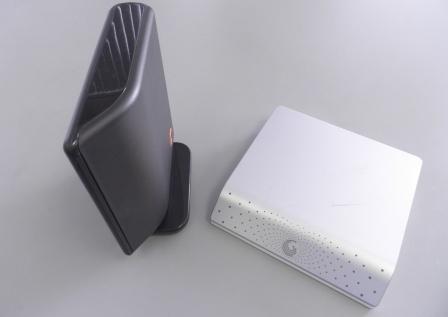
Manufactures design external enclosures that mount the drive either vertically or horizontally as shown in the picture below. Due to the high centre of gravity with the vertical units, they are extremely susceptible to being knocked over, which in turn may cause your hard drive’s spindle to seize. Avoid buying one of these vertically mounted external hard drive enclosure if at all possible.

External Cases

Vertically mounted (SUV) Horizontally mounted (Porsche)

While it’s true hard drives are designed to be mounted either vertically or horizontally, they are not designed to withstand much shock while operating. Approximately 10 years ago when hard drives were still designed with standard ball bearings in their spindle motors, they rarely seized. But in the quest for better performance, drives began using fluid dynamic bearings. With FD bearings, the metal balls were replaced with a layer of liquid. While there is no doubt that these bearings were superior in performance, they do have the disadvantage that under shock situations the fluid dynamic bearings can catastrophically seize. And that is what we are seeing so much of today. http://www.memofixdatarecovery.com/data-recovery-hard-drive.php … David Foster

FREE Data Recovery

Markham, Ontario, Canada. This is a story I love to tell. It reveals much of the human psyche and I find it fascinating

Back in the 90’s when Data Recovery type services were first starting to mature I was working for one of the pioneers of the industry, Nick Majors. Nick was a man of unquestionable integrity and honesty. So it was no surprise that nothing perturbed him more at the time than the massive influx of companies that suddenly “claimed” to be experts in data recovery. From cases that were sent to us for a 2nd opinion and through our own secret shopper program, where we sent data recovery cases to these so called experts, it became obvious that there were a lot of unscrupulous and opportunistic villains infecting the data recovery business. They made their money by getting in as many jobs as they could, charging an evaluation fee for each one, and then recovering the 10-15% of the cases that were the easiest (skimming the cream off the top as we referred to it back then) . They would do the cases where no parts and little intelligence were required … basically the cases that could easily be handled by any commercially available recovery software. Those they couldn’t recover were declared unrecoverable and the client was told they were out of luck.

So it was decided that we had a responsibility to save the world’s data from all these crooks and make some money off it at the same time. With huge fanfare and press releases, we announced our FREE-FIX program. Basically, we would recover people’s data for free IF it was a simple problem that we could resolve in 15 minutes or less. This would include logical problems with the file system, deleted files, formatted drives and pcb problems for common drives we had in stock. The program was intended for consumer users and was available on single hard drives with Windows or MAC data only. If we were successful, the client only paid for the return shipping and the media to put the data on. If the case was not eligible for FREE-FIX, we would provide the client with a no obligation quote for further recovery attempts.

We thought if we took the high road and did the easy stuff for free, we would kill this growing segment of con artists as they would not be able to survive without the easy jobs. And of course we also hoped that many of the ineligible cases would be approved for escalation into more desirable expensive jobs. We really felt that we would gain such a good reputation from this program that it would pay us back a thousand times.

Boy, were we wrong !!!! Yes most of the owners of the cases that qualified for FREE-FIX loved us. But the other 85% of the people were absolutely outraged at us. We were suddenly bombarded with irate clients wanting to rip a strip off of us. Those that we tried to “up-sell” because theirs’ was not a simple/free recovery, largely declined as they felt we were using bait and switch tactics. Even some of the 100 or so people who qualified for FREE-FIX every month thought we must be making money off the return media and the shipping. Shortly after the 1st month, the FREE-FIX experiment was cancelled and quickly disappeared into the growing mist of the World Wide Web, never to be heard of again. … David Foster

Tips for keeping your data safe

If you’ve spent any time on the various data recovery websites you’ve no doubt come across lots of advice on what to do once you have a data loss situation. Our website also has a page on it https://www.memofixdatarecovery.com/protect-your-data. But I’ve always felt the best advice would be to avoid such an unpleasant experience in the 1st place. So after some interesting discussions with our data recovery technicians, we have created a list of useful tips and suggestions that may keep you from losing your data in the first place.

1. Start by choosing the safest storage device you can. Here are some specific recommendations that may help …

  • Don’t buy the latest and greatest hard drive. Stick with a true and tested hard drive model that has been around a while. Not only will the bad models have been discontinued, but any bugs or known issues on seasoned models, will have been addressed. Search the web to discover problems other users may be having with a specific drive model. For example, don’t buy the first helium filled hard drives until time has tested them 1st.
  • Don’t use an old hard drive. If your drive is older than 5 years consider replacing it. And no matter how old your drive is, if it starts acting up in any way, whether making a strange noise once in a while or whether read errors keep popping up, make a copy of your data and get rid of it, before it fails.
  • Buy the lightest hard drive you can! Huh? Preferably one with a single disk. Sounds strange you say? Less mass requires less power = less heat & less stress combined with less parts = less crashes. When a hard drive requires 4 disks to keep up with the maximum capacity being offered by the competition, you know they’re likely stretching the design limitations.
  • Consider using a laptop drive in your desktop. Laptop drives by design are meant to take more physical abuse and are designed to be light in weight, low in power needs and quiet in operation.
  • If you’re using an SSD or Solid State Drive, ensure you regularly backup. SSD drives use extremely complicated and always proprietary methods of distributing the data across multiple memory chips. The point is, if your SSD becomes damaged, recovering your data may be very very very expensive … if it is even possible. I also wonder how an SSD will stand up to a power surge. If a hard drive gets a power surge the electronics get fried but the physically stored data remains intact. In an SSD, fried electronics could very well be your critical data disappearing into the cosmos.
  • Use USB Flash Sticks only for transferring data from one computer to another. Do not use them as temporary or permanent storage devices. They are very susceptible to both physical damage and ESD damage. Every few months a student walks in the door with the sole copy of their thesis on an inaccessible USB flash drive.

2. Then maintain and protect your storage device or hard drive with these suggestions

  • Connect your computer to a UPS or surge suppressor. This simple device can prevent electrical surge damage to your drive as well as preventing damage to any open files or the file system itself should your power source be interrupted.
  • Ensure your system has adequate ventilation. One of the most common causes of drive failure is overheating, so make sure your computer’s fans work or even consider adding an additional one.
  • Use an antivirus program and keep updated with the latest virus definitions.
  • Be gentle! A hard drive is a delicate device. Be sure it has a chance to stop spinning before attempting to move your desktop or laptop computer. And be extremely careful not to knock over any external hard drives you may have attached. Every week we see damaged external drives where the external case was merely tipped over while it was running.


3. And finally protect your data just in case bad things happen!

  • Backup the important stuff! Yeah, yeah … we all know this and yet few of us do it, me included. If it’s important to you, prove it and back it up.
  • Backup to the Cloud. While it may still be slow and cost a few bucks, a cloud backup service of at least your most critical stuff is an excellent idea. And most of us need not worry about the prying eyes of the United States NSA.
  • Don’t Backup Archival Data to USB Flash Sticks! The data is stored electronically and unless the device is re-charged periodically by plugging it into a powered computer, the data will start to leak away over time. If you put your data on a USB stick and throw it in a drawer for a year or two, odds are your data will be gone or seriously corrupted. Some authorities on the subject claim your data could be in jeopardy in as soon as 3 months if not re-charged.
  • Defrag often! If the data is contiguous (all stored sequentially together) there are ways to rip off data files even if the drive’s file system or “index of file locations” is totally missing. Be sure to use you computers defragmentation utility on a regular basis.
  • Don’t encrypt your data, unless absolutely necessary. Even if you never forget the password, a failing hard drive combined with encryption means the odds of getting your data back are slim. If you must use encryption, use it only on individual files that must be guarded at no cost.

While it’s virtually impossible to be 100% diligent in safeguarding our data at all times, hopefully a few of these tips will lower the chances of you losing your data. But if all else fails and you find yourself in a data loss predicament, please give us a call.

(this blog post while slightly modified, was originally published on January 25th, 2010)

DataTalk with David Foster

Toronto, Ontario, Canada.

The beginning of a blog …

As this will be my 1st ever blog and my 1st entry, let me start by introducing myself and then providing a brief overview of what this blog will be about.

My name is David Foster and I’m in charge of the Memofix Data Recovery Lab. I’ve been in the data recovery business for over 20 years. In the late 1980s I started a company that repaired hard drives. But within 7 years as hard drives were becoming disposable items, we sold the business and I thought my hard learned skills may never be put to use again. But of course the real value was now in the data which was only accessible if the drive could be resurrected and I soon started as a data recovery technician at a small data recovery company in Toronto. These were the early days of data recovery companies and we “wrote the book” on data recovery in many ways. With an initial team of 10 employees this company grew very quickly and was soon considered the most technically capable data recovery company in the world. Along the way I became the VP of Lab Operations and we opened 7 fully functional data recovery labs including labs in Canada, the U.S. and the Netherlands. As all good things do, it came to an end when the company was bought by a large hard drive manufacturer.

About a year after that I found my way to a warm new home here at Memofix and have gotten myself nicely settled in. Memofix is a fantastic storage centric company managed by real people with real integrity and I have been tasked to revamp the data recovery division into a real force. Memofix has been doing data recovery for quite some time now, but has largely provided it as a service to their existing client base as a result of client requests. But now we are launching a new phase of data recovery services aimed at all of Canada. Our goal is to provide superior data recovery services at reasonable prices with outstanding customer service for all types of media and operating systems. I am extremely excited to be able to take my vision of what a superb quality service offering should be and mold Memofix Data Recovery Services into just such an elite service.

Over the next months and years you will see some big changes at Memofix and many you won’t. I’m sure I will use this blog to boast about many of them. But besides the opportunity to promote Memofix, I really hope to use this blog to educate folks in all areas of data recovery. I hope to explain some of the techniques we use, discuss operating systems and hard drives, give advise on do it yourself techniques, maybe gossip a little about industry players, just about anything to do with computers and data and storage and of course hard drives. Perhaps you have a topic or question you would like answered. My email is [email protected] and I welcome your feedback.