Data Recovery, recovering Hard Drive data, RAID data recovery

YES we can recover your data, even if others can’t!

As a member of a worldwide consortium called the TSC or Technical Services Consortium, we are part of a family of companies that offer many of the same services, but in different geographical areas. Because we are not competing with each other, we have developed some amazing business relationships with folks that would normally be our competitors. This has allowed us to gain knowledge in areas where we were weak and to share knowledge where we are strong. As the only member of the consortium offering data recovery services, we often get called in to help with data loss situations.

Recently one of our TSC partners in the Netherlands, Sprague Europe, was approached by a well-known University in Germany. The University had had a catastrophic failure with a small RAID 5 server and the hard work of hundreds of students was in jeopardy. RAID server data recovery

Initially the University had contacted a well-respected but smaller data recovery company in the Netherlands to help. They were able to image one of the 3 drives used in the RAID 5 array, but unfortunately, all attempts at resurrecting either of the remaining two drives was met with failure.

With RAID 5 and it’s built in redundancy, we only needed to image one of the two non-responsive drives to be able to rebuild the RAID. Both drives had developed light rings on their disks and the heads were physically destroyed by travelling over the damaged areas and had become stuck in the head loader ramps. With each recovery attempt, these rings would increase in depth and width, and soon no recovery would be possible. The smaller Dutch data recovery company had exhausted their supply of parts drives and realizing the chances for success were decreasing with each attempt, they advised the University to send it to Kroll Ontrack, the largest data recovery company in the world. Ontrack had a branch in Germany and off the case went.

But again, all attempts to recover the data were met with failure and the University was almost ready to concede defeat. But as luck would have it, the head of the University’s Computer Centre was an old colleague with one of our friends at Sprague and in a last ditch effort he called Sprague for advice. Our friend at Sprague suggested Memofix “may” be able to help.

Unlike most data recovery service providers, Memofix does not charge an extra fee for working on hard drives that have been previously worked on by other data recovery companies. In fact we cherish those data recovery cases because it gives us a chance to show just how good we are. Over the years we have recovered approximately 70% of the recoveries that have been previously attempted by our competitors.

western digital data recoveryWhen I first saw the request and the summary of what had been attempted, I was skeptical if we could do any better than the two professional data recovery companies that had already tried, especially when one of them was a “world leader” in data recovery and cost did not appear to be a constraint. I spoke with the original data recovery company that tried the 1st attempts. They told me that both defective drives had heads that were bent, distorted, and stuck in the head ramp loaders. They also told me that they had gotten both defective hard drives to function for a very short period of time after replacing the head assembly. Things were looking a little more promising.

When it comes to recovering data, there is one MAJOR factor that influences the chance of recovering data and that is the condition of the disks. If the disks are in good shape, a recovery is usually going to be possible. If the disks are badly scored and ringed, then it will be next to impossible to get a set of heads to function inside the drive without damaging them almost instantaneously. For a disk to get that badly damaged usually means the drive has been running/spinning in a crashed state for a long time. The fact that these drives had their heads stuck in the loading ramps is good news, as they could no longer damage the disks. The second fact that made us hopeful was that the drives were manufactured by Western Digital and Memofix has one of the best Western Digital data recovery techs that we have ever met and we do know a lot of data recovery techs.

So we decided that we may have a chance of successfully recovering at least some of the data and consequently the case was sent to us for a final data recovery attempt.

Our initial evaluation confirmed that we would need to get one of two defective drives imaged. After much scrutiny it was determined that one of the defective drives had shifted disks. When heads are replaced, there is a procedure for adjusting the disks which can sometimes help in getting access to a non-responsive hard drive. I suspect one of the data recovery service providers had attempted this procedure or something similar. This procedure can sometimes make things worse, so we decided to concentrate on the more pristine of the two drives.

Our Western Digital data recovery specialist got right to work. His first task was to get the drive functional enough to read off the drives system area, a normally inaccessible storage area on the drive used for its own housekeeping and the storing of drive specific settings. The system area tells the drive how many heads are present and what settings to use with each head. Without this road-map, recovery may not be possible.

bent heads comparison
Bent Heads vs Good Heads

We quickly determined that two of the disk surfaces had physical damage and we would worry about those surfaces last. Modifying the system area allowed us to configure the drive to ignore the 2 damaged heads/surfaces. We then physically removed the 2 heads (corresponding to the damaged surfaces) from a good parts head stack. This would prevent further damage to those disk surfaces as well as preventing read interference from the heads going over the damaged areas. We then used this head assembly to get the drive to initialize and we started to image off the good surfaces. After approximately 20 hours of imaging, the heads assembly became too contaminated with crash debris to function and we had to modify a new set of heads to continue. After two days we had managed to image 6 of the 8 disk surfaces. We were now ready to go after the two damaged disk surfaces.

At this stage, our greatest danger was the inherent risk of developing new crashes & destroying our chances of imaging off the last two disk surfaces. Consequently, the drive was imaged only while it could be monitored by a dedicated human watching and listening for any potential new crashes. Imaging of these last two surfaces took almost a week and in the process we consumed five sets of heads and still had some areas where nothing could be read because of the damage to the hard drives’ disks.

With the best drive images we could obtain, we began to analyze what we had. Once we determined the correct RAID 5 configuration settings we were able to use the RAID’s parity to virtually rebuild the missing disk and to de-stripe the 3 drive RAID 5 volume onto a single drive. Then it was a matter of repairing some minor file system structure damage, mounting up the volume, and copying the data to a new target hard drive.

In the end, we were able to recover over 99% of all the students’ data. But there wouldn’t have been any data recovery had it not been for one individual at the University refusing to take NO for an answer.

Consequently, I think the real takeaway point, has to be the fact that not all data recovery companies have the same abilities and just because the world’s largest data recovery company says it can’t be done, doesn’t mean Memofix, the world’s most determined data recovery company, can’t prove them wrong.

We are Memofix, and YES we can recover your data, even if others can’t!

Top 3 Reasons to Avoid Data Protection Plans!

Recently, another hard drive manufacture announced they would begin offering a data protection plan in the United States and in Canada. The program is simple enough: if you lose your data from an enrolled hard drive within the 2 or 3 year term, the hard drive manufacture will use reasonable efforts to attempt to recover your data. Costs for the plan in Canada range from $40 to $90 depending on the type of hard drive and the number of years of coverage. This is not a new concept, similar data protection plans have existed for over 10 years.

data recovery insurance

So what’s wrong with these plans? … I am NOT a fan of data protection plans for 3 important reasons:

1. False sense of Security: Let’s start by looking at the basic concept of data protection plans and what they offer. While called a data protection plan, there really is no plan to protect your data! The plan is once your data is damaged or lost the plan provider will see IF they can recover it. The fact that it may not be recoverable is buried in the terms and conditions. Many people will miss this important point buried in the fine print and walk away with a false sense of security that their data is safe. As a result, many people may feel they can bypass backing up their data and this is the real danger. People WILL lose their data!

2. Oops we can’t help you, here’s your money back: These protection plans take your money to protect your data. Then when the time comes to perform and it’s discovered the data is not recoverable “using reasonable means”, they simply refund you initial premium. With most insurance policies if they cannot fix your car, they pay you its value. What’s the value of your data? Imagine you’re in a car accident with your brand new car and your insurance company decides to return your 2 months of premiums versus fixing your car. To add further insult to injury, some data protection plans reserve the right to refund your plan fee in the form of a Gift Card. Oh Yippy!

3. Are you getting the best effort?: Attempting data recovery is often very expensive. For example, to attempt to recover the data from a 3TB external hard drive that’s been dropped, will typically require 1-3 new parts drives and a week or more of computer time to image the hard drive. I believe a technician encountering this situation may be prone to declare the case unrecoverable and simply refund the money versus spending hundreds of dollars on parts and investing a lot of time for a chance to recover the data. What real incentive is there for the data recovery company to spend money and try to recover your data? Now, if there was a large payout of perhaps 5,000 dollars if they could NOT recover the data, then I would believe there would be an incentive to recover the data. For this reason in particular, I believe that an independent data recovery service will try much harder and be much more successful in recovering your data because they have a huge incentive as they won’t get paid unless they are successful.

So, if you find yourself being pressured to enroll in a ”data protection plan” be sure to consider all the facts and don’t be lulled into a false sense of security by a clever marketing program. If you’ve encountered a data loss situation and your company can’t live without the data, do your due diligence and entrust your data recovery to a professional data recovery service.


Click here for a Free Data Recovery Quote whether you’re in Toronto, Hamilton, Mississauga, Ottawa, Brampton, Markham, London, Kitchener, Windsor, Burlington, Sudbury, Kingston, Oshawa, Barrie or Thunder Bay.

CryptoLocker holding your Data hostage?

If you haven’t heard of the CryptoLocker virus then you really should read on. This rather nasty virus is usually acquired by opening an email attachment which then embeds it’s secret code deep inside your computer. It then starts to silently encrypt ALL your data files including but not limitied to pictures, word documents, spreadsheets, pdf, emails etc. The virus encrypts your files using a virtually unbreakable RSA encryption algorithm and then demands a ransom of $100 to $500 USD in exchange for decrypting your files. Furthermore, if you don’t pay by a strict time limit, they permanently throw away the decryption key.

After the initial data encryption on your system hard drive, the virus searches out and encrypts data files on ANY online storage device, whether that is a powered on external hard drive, a USB stick, a NAS or network attached storage device, or heaven forbidden every shared folder on a network.

The first indication you are infected, is when you are greeted with a popup ransom note similar to the one displayed below. To do the most damage, the ransom note doesn’t appear until the encryption has completed, which can be anywhere from a few hours to a few days depending on how much data the virus has access to.

cryptolocker


This particular virus has been around for a few years and appears to becoming even more rampant, to the point that copycat viruses are now popping up. We have received numerous enquiries for assistance in recovering the data, but I’m sorry to say we can’t help other than to offer advice.

The good news is that the virus can be kept at bay by any user who is very vigilant about not opening any email attachments unless they are known to be 100% safe and from a trusted source. The best advice we can give is to suggest everyone keep a backup of your data on an offline or powered off external hard drive. That way nothing can touch it.

The bad news is that once you are infected, there is NO way to decrypt the data without the decryption key. Even with present computing speeds, brute force methods would take over 1000 years to crack it.

Unfortunately, and against any moral compass, we would recommend that you pay the ransom and hope the kidnappers will be honorable enough to decrypt your data. We have heard and read stories on the web of people paying the ransom and getting their data decrypted successfully. But unfortunately, we have also heard stories of people paying the ransom and getting nothing.

If you have had any experience with this virus, please comment and share your knowledge with all our readers.

Choosing a Data Recovery Service Before You Need Them

Today’s blog features a guest post from Larry Shulman, our Business Development Manager and a veteran of the Canadian computer industry.

IT managers have a tough job today. Most are dealing with demand for expanding data storage capacity, keeping a complex computing infrastructure running with less dollars and planning for disaster recovery and business continuity. Memofix, drawing on our experience as an extension of our customer’s IT department, has some suggestions on what to look for when choosing service partners for specific challenges.

Too often our clients come to us in the midst of an emergency. They may have a hardware failure and require an immediate turnaround on a repair or replacement unit. Perhaps a hard drive or RAID system has crashed and the data is critical to their operation. At that point in the crisis customers may not have the luxury of worrying about the security of the data contained on those devices or about how to solve a complex technical issue. Memofix is known for their responsiveness in these situations but we can’t help think that a small amount of research would also give our customers added confidence that they are not put at undue risk.

When it comes to data recovery we think our customers, both IT managers and technology resellers, need to look deeper at the service partner they are considering. A prospective data recovery partner will have access to sensitive data that only they can access. Therefore don’t just rely on technical ability to recovery data in a timely manner. You need to partner with someone who takes privacy and data security as seriously as you do. Therefore we think you should do the following:

  • If you’re looking for data services of any kind, do a back ground check. If you are sending storage devices or media to a supplier, for repair or data recovery services, can you trust them to ensure proper security measures are taken? Memofix recommends that you ask for references and check them out thoroughly. We regularly sign NDAs (non-disclosure agreements) for our customers and our technicians that work on any data device are subject to an extensive background check before they are hired.
  • Tour the supplier’s facilities and talk to their management and employees. You want to make sure that your potential partner has an efficient operation and that their staff is motivated to solve problems on behalf of the customer. Memofix has an open door policy for potential new clients or existing customers and we’re more than happy to let you visit.
  • Ask for a demonstration of the services you are looking for. For data recovery it’s easy to demonstrate how to solve simple problems but the supplier should be able to walk you through the process of rebuilding a drive or extracting data from a failed RAID. Memofix can address any specific types of devices that you need to support and we’ll even provide some advice on how to avoid having to call us.
  • Make sure that a prospective partner has invested in areas that support your requirements. Memofix has made a significant investment in our data recovery lab, in our technicians and in stocking over 20,000 hard drives for spare parts.

Memofix has every confidence that we will meet or exceed the scrutiny that we recommend. We provide depot work for some of the largest storage OEMs in the industry which means we’ve passed stringent audits and assessments. Make sure that you put any prospective data recovery partner through a similar process before handing over any storage device or media. Or simply contact Memofix and come by for a visit.

RAID Disaster Area!

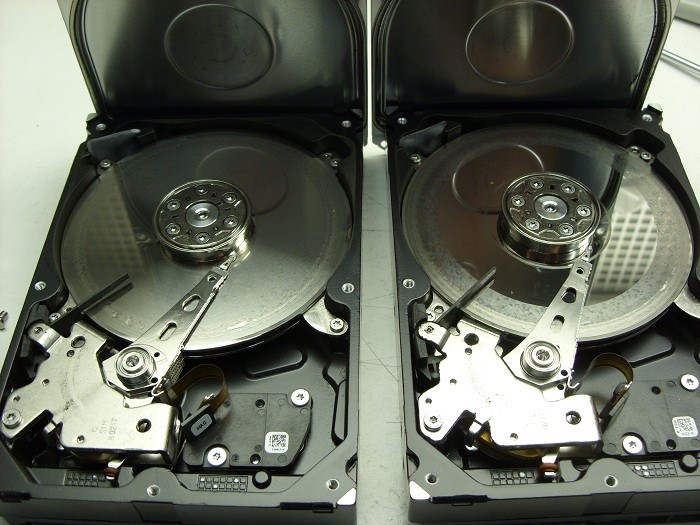
It’s been a while since I’ve posted any astonishing pictures of actual data recovery cases we receive. This morning we received a pair of matching Seagate 7200.11 500GB SATA hard drives that were in such bad shape I just had to share …

2 crashed seagates

They were part of a 2 drive RAID-1 set which means they were exact copies of each other. The client assumed having two copies of their data on two drives would ensure they would be safe. Unfortunately they were wrong.

Their assumption of safety is flawed on a several accounts by my reckoning.

First, both drives are physically in the same box . So if one falls off the table, they both fall of the table. And judging by the physical damage of these two hard drives, this might very well be what happened. Notice the scoring and rings forming all across the disks or platters of both drives. This is a real physical crash where the magnetic coating that was used to retain the data has been scraped off and left scattered through out the drive’s internals as a fine black powder.

Regardless, of how the physical damage happened, it is also apparent that the drives were running for sometime in this state. Typically minor crash debris is collected by a filter located in the top left corner of each drive. The filter is originally white in color but as you can see in the picture, both filters are now black. Crashes like this are also very audible and for a sample of what this sounds like, listen to the recording of one of these drive below.

Secondly, RAID box vendors often recommend you use two identical hard drives as was the situation here. Again, this does not sound like such a good practice to me. If one drive has a manufacturing defect, then there is a good chance the 2nd drive will have the same manufacturing defect, especially if the drives are bought at the same time from the same vendor. And even if the hard drives have no manufacturing defects, their life spans are bound to be very similar. Once one drive fails, the odds of the next one failing shortly after are quite high as well.

If your data is valuable, nothing beats a good back up on a separate distinct device that is stored in a different physical location. But should you find yourself without a backup and a failing RAID box, do your data a favor and shut yourRAID array down immediately and contact Memofix Data Recovery Services for immediate assistance.


another view


Levels of Data Recovery for Hard Drives

Toronto, Ontario, Canada.

Data Recovery Service Providers often categorize hard drive data recoveries into different levels and Memofix Data Recovery Services is no exception. While we don’t provide flat level pricing to individual consumers, we often provide our MACC or Memofix Authorized Care Centre partners with flat rate pricing based on three categories or levels of data recovery. Our definitions of these levels are described below and can be helpful in preparing yourself for the costs and degree of difficulty involved with each increasingly complicated recovery scenario.

LEVEL 1

Level 1 is the lowest level and requires the least expertise and resources. Level 1 means the hard drive is still 100% fully functional. It is recognized by the computer and if the user was to reformat their hard drive they would be able to continue to use it, albeit without their original data.

Level 1 type problems are NOT the fault of a failing hard drive. Level 1 type problems ARE the result of damage, corruption or deletion of all or part of a hard drive’s file system. These actions could have been done deliberately, accidentally, or even unknowingly. The file system is “actual data” written on the hard drive and for our purposes, it can be thought of as a big index that points to the locations on the hard drive where a particular file or folder is stored.

If that index is damaged or corrupted, the operating system may not be able to locate a particular file or folder. Or if the index is for a file or folder used by the operating system, then the drive may not be able to boot or be accessed using conventional methods.

Examples of Level 1 type problems would include;

  • Deleting a file or folder
  • Formatting your hard drive
  • Restoring the operating system
  • Boot Virus Infection

Many level 1 data loss situations can be remedied by a tech-savvy end-user using readily available data recovery software. However there are precautions and the peace of mind that only a professional data recovery service company can give you, so if your data is absolutely CRITICAL to retrieve, do NOT attempt this. However, if you can afford to take the risk or just can’t afford the cost of professional help please read an earlier blog I wrote on the subject of do-it-yourself data recovery … http://www.memofixdatarecovery.com/blog/index.php/diy-data-recovery-do-it-yourself/


LEVEL 2

Level 2 is the middle level and requires more expertise and resources then level 1. Level 2 means the hard drive is not functioning properly but the problem(s) will not require work to be done in a clean room environment. Level 2 data loss situations are normally something an end-user cannot solve themselves. Nowadays even switching a PCB is not a simple process, as the drives HDA (head disk assembly) is fine tuned to work with the same PCB it was manufactured with. In fact, the drive’s PCB contains stored values which determine critical settings used by the heads to position and read data optimally. PCBs from the same model hard drive and with the exact firmware can NOT be simply swapped out unless these stored values are first transferred to the new replacement PCB.

Examples of Level 2 type problems would include;

  • Defective PCB or Printed Circuit Board electronics
  • Overwrite or corruption to the hard drive’s “system area” (special files used exclusively by the hard drive for its own operation and maintenance.
  • Corruption to the drive’s firmware.
  • Excessive read errors or hard media defects that are not the result of weak or bad heads.
  • Issues with full disk encryption or file encryption


LEVEL 3

Level 3 problems indicate a major failure with the hard disk drive. Level 3 means the hard drive WILL require extensive cleanroom work to enable any recovery. Typical level 3 recoveries involve head crashes where the drive’s heads have come into contact with the disk surfaces. This usually causes damage to the both the disks and the heads. To recover any data the drive must first be made functional again. First we purge the sealed head disk area of any free particles and then we replace the heads from a new and exact version of the original hard drive. Then we attempt to copy off the used areas of the bad hard drive. During this process the heads will often go bad again due to the damage on the disks. So we must repeat this procedure until we have imaged or copied off all of the used areas on the bad hard drive. This process can take 2 days to 2 months in extreme cases. In the worst cases, the damage is so severe that newly installed heads are instantly destroyed and no recovery will be possible. Another common level 3 scenario occurs when a hard drive is dropped and the spindle motor that spins the disks is seized. This requires the transfer of the disks onto a new motor and typically requires multiple head xplants as well.

Examples of Level 3 type problems would include;

  • Damaged heads and disks
  • Seized or non-spinning spindle motors
  • Stiction, where the heads have become stuck to the disks
  • Fire or water damage
  • Dropped, knocked over, bumped, or physically abused hard drives


So to be brief and to summarize,

  1. If a client or user has deleted a file/folder or reformatted AND their hard drive was and is still working perfectly, then it is a LEVEL1 data recovery scenario.
  2. If the drive was physically abused in any way, or if it makes any unusual noises it is likely a LEVEL 3 data recovery scenario.
  3. For anything else, a LEVEL 2 data recovery scenario is most likely.

In a future blog we will discuss USB flash, camera cards and SSD data recovery levels.

Warning: USB Flash Devices FAIL!

There exists a belief that USB flash drives, also referred to as USB flash sticks, memory sticks, thumb drives, or USB jump drives, are robust, reliable and a very secure alternative for storing your data! But every month we routinely service dozens of data recovery cases involving USB flash devices from the Toronto area, so we can tell you from experience that this belief is just plain WRONG!

recovering data from USB flash sticks
Do you need Data Recovery for a USB Flash drive?

Perhaps it is the knowledge that these USB flash devices use solid state flash memory chips for storing the data and consequently there are no moving parts to become defective. Or maybe people just don’t treat them with the same respect and care they would with a hard disk drive.

I know I often use them for bringing home files I plan to work on over the weekend. And yes I throw them in my pocket, carry them for days, forget about them, take them motorcycling or fishing in the rain for a weekend , and even have the wife wash and dry them, as I forget to remove them from my pocket on wash day, (YES, my wife refuses to check pockets). Sometime they work after and sometime they don’t.

But and its a big BUT, I never store anything on them that I haven’t already backed-up on some computer. And that is the correct way to use these USB flash devices; as temporary storage locations used to move existing data from one location to another. They are NOT intended to be long term storage devices and they should NEVER hold the ONLY copy of anything!

Besides deleting files or formatting your flash device, the USB flash devices we receive for data recovery suffer from either physical or ESD (electro static discharge) damage. Typical scenarios may include;

  • USB device has been inserted into a running computer and someone comes along and inadvertently bumps into the USB flash device and causes it to physically break off
  • OR in the same scenario as above, it bends enough to cause some of the connections to touch each other and short out electrically
  • Users often try to force an incorrectly oriented flash stick into a USB connection and cause physical or electronic damage
  • USB flash devices are often stepped on or even run over with a vehicle.
  • Flash devices are often accidentally dropped or immersed in liquids ie. coffee cups, toilets and washing machines.
  • Carry a USB flash drive in your pocket can often cause static electricity to build up and it can discharge causing electronic damage.

Canadians in need of our services can click here for our Toronto USB data recovery services.

Or if the topic interests you further, please wait for my next post where we will discuss the challenges in recovering data from USB flash devices and why the process is so complicated and not always even possible. To ensure you don’t miss any of any of my new posts be sure to subscribe to the Memofix data recovery blog.

Data Recovery for Dr. Dell in Haiti

Data Recovery is often a thankless business. We can spend hundreds of dollars on parts and many late days attempting to recover someone’s critical data files. And in the end, if we are unsuccessful, we don’t get paid and rarely do we get a thanks for our efforts, no matter how hero like our recovery efforts may have been. So when we receive a great big thank you and some pictures showing the fruits of our labour in use, we really like to soak it up. 🙂

“Hi Bob,

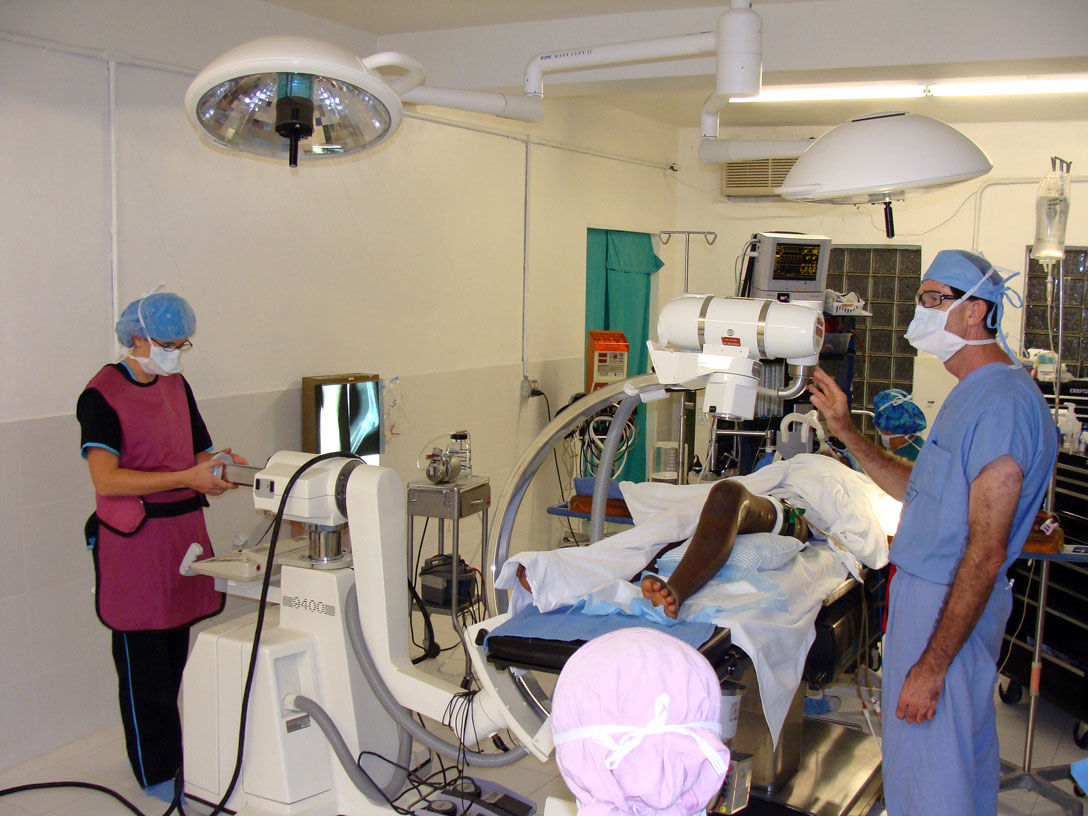
you probably remember me from a few months ago. I had the hard drive from an X-ray machine in Haiti that had failed due to a power surge. I though you may be interested to know that thanks to the drive your company recovered the machine is now working again. I’ve attached some pictures for you from the mission in Haiti including pictures of the C-arm being used during a knee operation. The surgeon in the picture is Dr. Dell who covered the cost of the recovery. This surgery to implant a plate in a patient’s damaged knee would not have been possible without a working x-ray. I thought your team would appreciate seeing the results of a job well done.

Thanks and Blessings, Geoff “

The Real Doctor of Recovery, Dr. Dell doing his thing in Haiti

Back in August, Geoff, an associate of Dr. Dells asked if we could recover data from an old Quantum hard drive being used in an older X-ray machine in Haiti. It was a 52 MB hard drive, yes 52MB or .052GB or .0000052TB, small by today’s standards that’s for sure. As the disk drive was very old and few data recovery companies other then Toronto’s Memofix Data Recovery Services had the experience or parts to deal with it, we were asked to attempt the hard drive recovery in Toronto.

As it turns out the hard drive had been damaged by a power surge and it’s printed circuit board or PCB was fried. Additionally and more detrimental to our data recovery efforts, the surge damaged a small pre-amp chip that is located on the head assembly inside the sealed disk drive compartment. The chip is used to amplify the signals from the individual heads to the PCB and without its proper operation, no recovery would be possible.

On a current modern hard drive, we would simply replace the entire head assembly but this older Quantum hard drive used a unique hybrid positioning system for controlling the heads and it could not be simply replaced with a new one if the data was to be recovered. This hybrid positioning system used a combination of an optical encoder for rough head positioning and an embedded servo system for fine positioning. As a result the relationship between the two positioning methods was critical and could not be altered or replaced with anything but the original mechanical parts.

With Memofix’s grey haired experience in repairing legacy hard disk drives we were able to replace the pre-amp chip on the original head assembly and restore the hard drive to an operating state. We then created an exact image of the entire original hard drive onto a new Quantum 52AT hard drive. Interestingly enough, we had a new Quantum hard drive sitting in our stock, still sealed in a bag we received directly from the now defunct manufacture in the early 90’s.

Sometimes it’s good to be a pack rat that’s been around forever! Especially when our efforts in Toronto help a good doctor spread heath and healing through a country that really needs everyone’s help. May the forces of good be with the people of Haiti!