Data Recovery, recovering Hard Drive data, RAID data recovery

Recovering Unrecognized SD and microSD cards

SD cards and microSD cards are flash-based storage devices used extensively in cameras and phones. You can see the size difference between a microSD card and a full size SD card in the two pictures below.

SD card data recovery micro SD card data recovery


Both SD and microSD cards are functionally the same as USB flash drives. Both share similar components including a memory chip(s) and a controller chip to manage the memory device(s). Below is an example of a typical SD card showing both sides of the device with the plastic casing removed. On the left hand side picture you can see two larger memory chips and a smaller black controller chip.

SD card memory chips
Non-monolithic SD Card

SD card circuit side


SD cards can be manufactured as a device comprised of the individual components (memory and controller) like the example above OR they can be manufactured as a monolithic device like the picture below. ALL microSD cards are monolithic devices.

A monolithic device has the controller, memory chips and any other discrete components, combined and built into a single chip or device. It is one piece so you cannot break a monolithic device down into discrete components. To the eye, a monolithic device appears as just a piece of black plastic like the examples below.

microSD card data recovery
Monolithic MicroSD Card

microSD card monolithic


When monolithic or non-monolithic devices become dead, inaccessible or unrecognized, they require different methods to recover the data.

With non-monolithic devices we can remove the individual memory chips and read the raw data using a standalone chip reader. However, the raw data is “very raw” and still requires extensive analysis to determine the layout of the data and customized software to put the pieces back together into a useable format. Even a flash device with one memory chip requires this rebuilding of the raw data. Some of this complexity is a result of a technique used by flash called “wear leveling” where the device tries to use all the memory cells equally so that no particular memory cell becomes worn out sooner than its neighbours. As a result, many of the storage cells will appear to have copies of the same data, but a closer inspection reveals the contents are older versions of the data waiting to be re-used with new data. Consequently, we must use the raw contents of the device to determine how it all fits together. It is somewhat like a giant jigsaw puzzle.

With a monolithic device, we cannot remove the memory chip(s) as they are all part of the same package. In these situations, we need to remove the plastic coating from the device so that we can visually see and map out the circuitry (see the photo to the right).
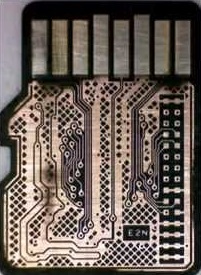
monolithic circuit board
coating removed

Then we need to determine how we can connect to this existing circuitry in order to gain access to the memory contents. Some connections for previously discovered microSD cards are shared and available to professional data recovery companies using a web-based database.

However, if the database does not contain details on the “to be recovered” device, the entire mapping out process can be quite tedious and can take anywhere from a 5 days to 5 weeks. Once the circuitry layout has been determined, we can use that information for future data recoveries from the exact same device. The bad news is that very few SD or microSD cards will share the exact same layout.

reading a monolith IC
Monolithic Adapter PCB


Having determined where we need to connect to the device, we now must tediously solder wires from the adapter board to the device. Then we are able to use a chip reader to connect to the adapter and read off the memory contents. Finally, we need to figure out the data layout as we do with the non-monolithic devices and ultimately recover the data. To the left is a picture showing our connections to access the memory devices on a monolithic SD card.


Our typical fees for recovering data from unrecognized SD cards that are non-monolithic range from $500-$1200.

Unfortunately due to the massive amount of work required, our fees for recovering data from an unrecognized monolithic SD card or microSD card are even higher. Expect fees in the range of $1200-$3000. depending on whether we have existing layout information for your particular device.

As always, our evaluations are free and our work is guaranteed to make you happy or you don’t have to pay a nickel. To send us a new case now, please click here.


FREE Pickup Service for the Toronto GTA


Do you live in the Toronto GTA and don’t have the time to package, ship or deliver your hard drive or other storage device to Memofix? We can help!

Memofix now has a free pickup service for data recovery cases originating in the Toronto GTA. Initially, this service will cover, Brampton, Mississauga, Oakville, Richmond Hill, Markham, Vaughan, Scarborough, North York, Etobicoke and the rest of Toronto.

Memofix_Delivery

Memofix will pick-up your storage device from your home or work and deliver it to our recovery lab by 2pm the next day. Choose either the morning pickup window of 9am -1pm OR the afternoon pickup window of 12pm-4pm Monday through Friday and our driver will arrive within that window of time. Our drivers also carry proper packaging for 1 hard drive. Other devices will need to be prepackaged for the driver.

Requesting this new pickup service is very easy. When creating a new data recovery case you can simply choose to have your hard drive or other storage device picked up. You will need to confirm the pickup address, contact phone number and a 4 hour window when you will be available to meet our driver. You can even add special instructions, ie. meet me in the lobby of my office building.

Are you outside the Toronto GTA? … Memofix hopes in the coming months to roll out our unique pickup service to other major and not so major city centres across Canada, so stay tuned for updates.


Join us at the Canadian Imaging Conference and Trade Show


Memofix Data Recovery Services will be an exhibitor at the upcoming 2015 Canadian Imaging Conference and Trade Show in Niagara Falls, Ontario on April 26th and 27th. Please feel free to be our guest at this event by printing and presenting the Trade Show Pass shown below.


This trade show is put on by the PPOC or Professional Photographers of Canada and is part of a 4 day conference aimed at the professional photographer and imaging professional. The conference offers various educational seminars hosted by 19 well respected industry experts and is aimed at improving your artistic and technical imaging skills.

Memofix Data Recovery Services has extensive experience recovering data for professional photographers and videographers. We routinely recover data from all types of camera memory cards, as well as external hard drives, NAS devices, LTO tape and RAID storage devices. If you’ve lost your valuable photos or video, we can help.


YES we can recover your data, even if others can’t!

As a member of a worldwide consortium called the TSC or Technical Services Consortium, we are part of a family of companies that offer many of the same services, but in different geographical areas. Because we are not competing with each other, we have developed some amazing business relationships with folks that would normally be our competitors. This has allowed us to gain knowledge in areas where we were weak and to share knowledge where we are strong. As the only member of the consortium offering data recovery services, we often get called in to help with data loss situations.

Recently one of our TSC partners in the Netherlands, Sprague Europe, was approached by a well-known University in Germany. The University had had a catastrophic failure with a small RAID 5 server and the hard work of hundreds of students was in jeopardy. RAID server data recovery

Initially the University had contacted a well-respected but smaller data recovery company in the Netherlands to help. They were able to image one of the 3 drives used in the RAID 5 array, but unfortunately, all attempts at resurrecting either of the remaining two drives was met with failure.

With RAID 5 and it’s built in redundancy, we only needed to image one of the two non-responsive drives to be able to rebuild the RAID. Both drives had developed light rings on their disks and the heads were physically destroyed by travelling over the damaged areas and had become stuck in the head loader ramps. With each recovery attempt, these rings would increase in depth and width, and soon no recovery would be possible. The smaller Dutch data recovery company had exhausted their supply of parts drives and realizing the chances for success were decreasing with each attempt, they advised the University to send it to Kroll Ontrack, the largest data recovery company in the world. Ontrack had a branch in Germany and off the case went.

But again, all attempts to recover the data were met with failure and the University was almost ready to concede defeat. But as luck would have it, the head of the University’s Computer Centre was an old colleague with one of our friends at Sprague and in a last ditch effort he called Sprague for advice. Our friend at Sprague suggested Memofix “may” be able to help.

Unlike most data recovery service providers, Memofix does not charge an extra fee for working on hard drives that have been previously worked on by other data recovery companies. In fact we cherish those data recovery cases because it gives us a chance to show just how good we are. Over the years we have recovered approximately 70% of the recoveries that have been previously attempted by our competitors.

western digital data recoveryWhen I first saw the request and the summary of what had been attempted, I was skeptical if we could do any better than the two professional data recovery companies that had already tried, especially when one of them was a “world leader” in data recovery and cost did not appear to be a constraint. I spoke with the original data recovery company that tried the 1st attempts. They told me that both defective drives had heads that were bent, distorted, and stuck in the head ramp loaders. They also told me that they had gotten both defective hard drives to function for a very short period of time after replacing the head assembly. Things were looking a little more promising.

When it comes to recovering data, there is one MAJOR factor that influences the chance of recovering data and that is the condition of the disks. If the disks are in good shape, a recovery is usually going to be possible. If the disks are badly scored and ringed, then it will be next to impossible to get a set of heads to function inside the drive without damaging them almost instantaneously. For a disk to get that badly damaged usually means the drive has been running/spinning in a crashed state for a long time. The fact that these drives had their heads stuck in the loading ramps is good news, as they could no longer damage the disks. The second fact that made us hopeful was that the drives were manufactured by Western Digital and Memofix has one of the best Western Digital data recovery techs that we have ever met and we do know a lot of data recovery techs.

So we decided that we may have a chance of successfully recovering at least some of the data and consequently the case was sent to us for a final data recovery attempt.

Our initial evaluation confirmed that we would need to get one of two defective drives imaged. After much scrutiny it was determined that one of the defective drives had shifted disks. When heads are replaced, there is a procedure for adjusting the disks which can sometimes help in getting access to a non-responsive hard drive. I suspect one of the data recovery service providers had attempted this procedure or something similar. This procedure can sometimes make things worse, so we decided to concentrate on the more pristine of the two drives.

Our Western Digital data recovery specialist got right to work. His first task was to get the drive functional enough to read off the drives system area, a normally inaccessible storage area on the drive used for its own housekeeping and the storing of drive specific settings. The system area tells the drive how many heads are present and what settings to use with each head. Without this road-map, recovery may not be possible.

bent heads comparison
Bent Heads vs Good Heads

We quickly determined that two of the disk surfaces had physical damage and we would worry about those surfaces last. Modifying the system area allowed us to configure the drive to ignore the 2 damaged heads/surfaces. We then physically removed the 2 heads (corresponding to the damaged surfaces) from a good parts head stack. This would prevent further damage to those disk surfaces as well as preventing read interference from the heads going over the damaged areas. We then used this head assembly to get the drive to initialize and we started to image off the good surfaces. After approximately 20 hours of imaging, the heads assembly became too contaminated with crash debris to function and we had to modify a new set of heads to continue. After two days we had managed to image 6 of the 8 disk surfaces. We were now ready to go after the two damaged disk surfaces.

At this stage, our greatest danger was the inherent risk of developing new crashes & destroying our chances of imaging off the last two disk surfaces. Consequently, the drive was imaged only while it could be monitored by a dedicated human watching and listening for any potential new crashes. Imaging of these last two surfaces took almost a week and in the process we consumed five sets of heads and still had some areas where nothing could be read because of the damage to the hard drives’ disks.

With the best drive images we could obtain, we began to analyze what we had. Once we determined the correct RAID 5 configuration settings we were able to use the RAID’s parity to virtually rebuild the missing disk and to de-stripe the 3 drive RAID 5 volume onto a single drive. Then it was a matter of repairing some minor file system structure damage, mounting up the volume, and copying the data to a new target hard drive.

In the end, we were able to recover over 99% of all the students’ data. But there wouldn’t have been any data recovery had it not been for one individual at the University refusing to take NO for an answer.

Consequently, I think the real takeaway point, has to be the fact that not all data recovery companies have the same abilities and just because the world’s largest data recovery company says it can’t be done, doesn’t mean Memofix, the world’s most determined data recovery company, can’t prove them wrong.

We are Memofix, and YES we can recover your data, even if others can’t!

Top 3 Reasons to Avoid Data Protection Plans!

Recently, another hard drive manufacture announced they would begin offering a data protection plan in the United States and in Canada. The program is simple enough: if you lose your data from an enrolled hard drive within the 2 or 3 year term, the hard drive manufacture will use reasonable efforts to attempt to recover your data. Costs for the plan in Canada range from $40 to $90 depending on the type of hard drive and the number of years of coverage. This is not a new concept, similar data protection plans have existed for over 10 years.

data recovery insurance

So what’s wrong with these plans? … I am NOT a fan of data protection plans for 3 important reasons:

1. False sense of Security: Let’s start by looking at the basic concept of data protection plans and what they offer. While called a data protection plan, there really is no plan to protect your data! The plan is once your data is damaged or lost the plan provider will see IF they can recover it. The fact that it may not be recoverable is buried in the terms and conditions. Many people will miss this important point buried in the fine print and walk away with a false sense of security that their data is safe. As a result, many people may feel they can bypass backing up their data and this is the real danger. People WILL lose their data!

2. Oops we can’t help you, here’s your money back: These protection plans take your money to protect your data. Then when the time comes to perform and it’s discovered the data is not recoverable “using reasonable means”, they simply refund you initial premium. With most insurance policies if they cannot fix your car, they pay you its value. What’s the value of your data? Imagine you’re in a car accident with your brand new car and your insurance company decides to return your 2 months of premiums versus fixing your car. To add further insult to injury, some data protection plans reserve the right to refund your plan fee in the form of a Gift Card. Oh Yippy!

3. Are you getting the best effort?: Attempting data recovery is often very expensive. For example, to attempt to recover the data from a 3TB external hard drive that’s been dropped, will typically require 1-3 new parts drives and a week or more of computer time to image the hard drive. I believe a technician encountering this situation may be prone to declare the case unrecoverable and simply refund the money versus spending hundreds of dollars on parts and investing a lot of time for a chance to recover the data. What real incentive is there for the data recovery company to spend money and try to recover your data? Now, if there was a large payout of perhaps 5,000 dollars if they could NOT recover the data, then I would believe there would be an incentive to recover the data. For this reason in particular, I believe that an independent data recovery service will try much harder and be much more successful in recovering your data because they have a huge incentive as they won’t get paid unless they are successful.

So, if you find yourself being pressured to enroll in a ”data protection plan” be sure to consider all the facts and don’t be lulled into a false sense of security by a clever marketing program. If you’ve encountered a data loss situation and your company can’t live without the data, do your due diligence and entrust your data recovery to a professional data recovery service.


Click here for a Free Data Recovery Quote whether you’re in Toronto, Hamilton, Mississauga, Ottawa, Brampton, Markham, London, Kitchener, Windsor, Burlington, Sudbury, Kingston, Oshawa, Barrie or Thunder Bay.

Hard Drive ECC Errors!

Recovering data, whether it’s important engineering data for a Hydro Electric company or the family pictures for a young family, is very rewarding on a personal level. Of course there is the enjoyment of helping someone in need. But the real reward for a good data recovery technician comes from the satisfaction of solving problems others can’t.

However, not all data recovery cases are solvable and that’s hard for my techs and our clients to hear. One of the most frustrating data recovery scenarios involves uncorrectable read errors. We see a lot of these cases.

In this typical scenario we receive a small 2.5” laptop hard drive for data recovery. We evaluate the hard drive and deem it functional enough to start creating a sector by sector image. But as we image off the drive it encounters more and more Error Check & Correction or ECC errors; to the point that there is at least one unreadable sector for every 5000 sectors we read. When a disk drive encounters a read error it will attempt to read the same sector at least 10 times. This slows the imaging process to a crawl and as a result it’s not uncommon for the imaging to take months to complete. Besides the time delay, the image is also riddled with unreadable sectors located randomly across the entire data area and in close proximity to each other, making it difficult to find large contiguous blocks of error free data. This means many larger files may be damaged beyond being use-able and often the majority of the good data will be restricted to smaller sized files. Depending on the size of the files the client needs, this may be acceptable or not.

What is most frustrating is the fact that there is little that can be done. These errors are the result of data not being written properly to the drive in the first place. Bad in equals bad out!

It helps to understand where these errors are triggered. When a hard drive reads a sector of data, it also reads a 50 byte ECC code that resides just after the real data. When the data was 1st written to the sector it ran a sophisticated algorithm on the 512 bytes of sector data and this resulted in a unique ECC code which can only be replicated by reading the exact same data. When a sector is read later, the drive attempts to validate the data by running the same algorithm on the data and comparing it to the previously stored ECC code. If the code doesn’t match, the disk drive produces an error code and prevents the transfer of the data. The hard drive will normally attempt to re-read the data up to 10 times as it tries to match the ECC code and this process slows the drive down considerably.

With our hard drive expertise we are able to disable the retries and other housekeeping chores that slow the drive down. But even with these shortcuts, it is not uncommon for hard drives with this problem to take weeks or even 2-3 months to completely read off every readable sector, especially if the drive is 1TB or larger.

We do have the capability to use special read commands to bypass the ECC error checking but the data is usually garbage or at the very least, it can never be trusted 100%. We will do this for a few key sectors of data if the situation warrants it.

So what cause these ECC errors to proliferate? ECC errors can be the result of many different causes.

If a weak head is having problems writing data, ECC errors can often be created. The head appears to be stable when it writes the data and even passes the ECC check initially. But when it attempts to read the same sector later the ECC check fails and the request is aborted.

lf a hard drive is running under extreme heat conditions, for example if a laptop gets extremely hot while you are working from home by the swimming pool, the hard drive which is a mechanical device made of many sorts of metals will expand. Writing data while the drive is in this state may cause problems later when trying to read the drive in a cooled down state as the positioning will affected ever so slightly. This shouldn’t normally cause problems but extremes of operability are always unpredictable.

BUT the number one reason for the proliferation of ECC errors in our opinion is a bad memory chip whether on the hard drive or more likely inside the desktop or laptop.

If your storage device is riddled in read errors, we can help and are usually successful in recovering the majority of a user’s data. Costs for these types of cases are typically in the $400-700 range depending on the severity of the errors and the capacity of your hard drive. Please give us a call today to discuss your data loss situation.

Kindness Changes Everything!


Memofix was recently asked to help out a fellow Canadian who had lost the latest pictures of his deceased wife after his computer became submerged in the recent Calgary and High River, Alberta floods. Memofix’s expertise with water damaged hard drives was invaluable in recovering the data and putting a smile on a saddened face. Here’s a letter of appreciation we recently received for our gratuitous assistance.

Despair to HOPE!

This is a story of how a few acts of kindness can build hope in a person’s life

My name is Rick Ellis and I am one of the thousands of displaced citizens of High River, AB after the floods of 2013 but I consider myself lucky to have met a few “angels” during the anguish of these times.

I lost my wife Chris AKA Princess on the 14th of June, 2013. Less than a week later, on June 20, we were hit by the worst flood in our history. I had gotten our computer, Ipod and cellphone out before the flood but left them at my place of work not dreaming that they would be in any danger there. More than a week later they let my employers back into the building to retrieve valuables and \my employers, Tony and Penny Marshall of Highwood Crossing Foods, who are angels in their own right, retrieved my bags for me, one that held my clothes , one that held our valuables,computer etc.and one of important documents. Upon arriving at the TIDE loads of hope caravan I opened my trunk to retrieve my bag of clothes that had been sitting in the flood waters for over a week. A volunteer came out to help me unload my clothes and when he grabbed my bag with the electronics in it I broke down and told him of my wifes passing and that I was going to try and recover any info I could off of them. This complete stranger then offered to make a few phone calls to see if he could help me. This truly caring person was David Brodie, vice president, Western Canada of Citizen Optimum. He was from Vancouver and yet he was out in the middle of this disaster helping people unload their few remaining clothes to be washed for free by TIDE.Within two days I received a call from Mr Brodie to take all my electronics into Future Shop in Shawnessy, Calgary, and they would see what they could recover. Please remember that these devices held all of our recent and last pictures, music and memories. He asked me to speak to Rob Kean, general manager for the Shawville Blvd store, When I went in Rob greeted me like an old friend and his IT wiz Andy said that they would do what they could to retrieve whatever info they could. Remember these devices had been sitting in flood waters for more than two weeks. From here my thanks go out to countless people that I have never met but their assistance has made a difference in both my and my children’s lives, three great sons, two and hopefully three great dauthers in law,and two plus three more on the way grandchildren. Larry Shulman@memofix.com, [email protected], and all the great people at FUTURE SHOP. On Jul 30 I got a call from Rob Kean saying that they had retrieved some of my lost data. I must say that I was a compleat puddle (my boys description of how I break down) when I went into the store and not only had they retrieved all the info from my old computer but also downloaded all the info onto a brand new laptop, complete with an emergency backup drive, a brand new ipod 5, I’m still trying to figure out how to run these, headphones, sony speaker system and A large part of my memories to share with my grandchildren. To all these people who have helped pull me out of my despair, THANK YOU. I think all of you must have seen the last piece of art my wife bought. “Kindness changes everything” I am going to try and attach it to this email but if it doesn’t work please email me and I will see if I can rectify this.

I know that there are still some prople trying to retrieve our last phots off of my wifes Iphone but even if you don’t, you are still part of Chrissy’s angels.

Thanks to all is not enough

The puddle man

Rick Ellis

Tape Backup Gets Squeezed by The Cloud and SSDs

For the past couple of years we have been telling our customers and social media followers that Tape Is Not Dead. But the past 12 months has put increasing pressure on a backup technology that business has relied on for decades. Memofix is one of the few repair facilities in North America that repairs hard drives and we continue to support customers of HP, IBM and Quantum tape drives, among others. However we see the signs that tape is quickly being pushed out of IT operations by Cloud and Solid State Drives (SSDs).

In our conversations with storage OEMs, customers and industry contacts there’s no surprise that Cloud backup is becoming the backup and data recovery option that many companies are moving to. Local storage is not going away and the move to disk-to-disk backup has been underway for years. But the Cloud is quickly replacing tape as the guarantee for business continuity. It provides offsite security while eliminating the majority of administration associated with tape backup processes, and there’s no need for expensive equipment purchases or upgrades. It was a logical move for Memofix to offer Cloud Backup solutions in order to continue serving the thousands of customers who have relied on us for storage technology and services for 25+ years.

How are SSDs affecting the use of tape for data backups? SSD Manufacturers and systems integrators are selling flash technology with the emphasis on savings. The primary saving comes from a reduction in power consumption and reduced impact on IT cooling systems. But we are also hearing more pitches that tout the speed of SSDs and the productivity gains that companies can achieve, particularly when dealing with large data sets and industries where response is critical. As SSDs grow in capacity and come down in price, they are starting to push traditional HDD storage into a Disk-to-Disk backup role. This means the tape drive infrastructure is rendered obsolete or its role is greatly reduced.

In a backup market that has plenty of new sexy technologies, tape continues to be the solid low-cost performer, albeit less exciting. It’s a little bit like shopping for a new car. IT managers and business owners can either afford to drive out of the showroom with the leading solutions in Cloud, SSD and disk-to-disk, or they have to settle for the economy model that everyone thinks is already obsolete. Whatever you’re driving, we can help you tune up your backup strategy.