Data Recovery, recovering Hard Drive data, RAID data recovery

iTech2013 … How was the show?

Today’s blog features a guest post from Larry Shulman, our Business Development Manager.

Last week Memofix Hitech Services Inc. exhibited at the iTech show in Toronto.

Exhibitor products and services ranged from Infrastructure & Data Centre Operations, Storage Innovations & Big Data, Servers & OS, Communications & Connectivity, Security & Risk Management, Disaster Recovery & Business Continuity, Cloud Services & Solutions, Virtualization, Mobile Apps & Hardware and managed IT Services.

Being an “independent” show (not sponsored by a particular manufacturer or distributor) it seemed to attract a nice balance of small to medium business (SMB), and smaller solution / service providers (VAR’s, consultants, resellers). As an exhibitor that provides solutions to both SMB’s and resellers what I found interesting was that those in attendance have the same challenges, obstacles and goals as their larger counterparts (corporations, government etc.) and that both are looking for solutions to support what is becoming a very complex landscape of demands and requirements.

The solutions that Memofix presented: data recovery services, tape and hard disk repair, data destruction services, storage ITAD solutions and cloud back were well received by both SMB and solution providers in attendance. SMB’s seemed to be relieved knowing there is a company that offers these types of recovery solutions when and if needed and solution providers were excited that through Memofix they can add additional “value added services” to their customers.

As a grizzled veteran of the IT industry (over 25 years) as I walked the show floor I am still amazed and in awe at the technology solutions being developed by IT companies including Memofix to support the requirements of both large and small. I have to appreciate our industry for the good work they continue do in support of clients, and trying to stay one step ahead of what the customer needs.

Keep up the good work……


Memofix at iTech 2013 Toronto

We love talking about IT with our customers, particularly if it involves storage technology. We are a company of geeks who are always willing to share our technical expertise on hard disks, tape drives and data recovery with clients and business partners. And now we’re being allowed out in public.

Memofix will be at iTech 2013, at the Toronto International Centre, on Thursday, May 16th. For the past decade iTech has become known as Canada’s IT Infrastructure Conference and allows technology professionals to speak one-on-one with industry vendors, all in one place. The seminar sessions deliver information on the latest trends, cutting edge products and services and help them research solutions for their IT strategy.

We are excited to be at the show because it gives us an opportunity to meet with many of our past clients and discuss the challenges they have in the area of storage. More importantly we love meeting new customers who get to find out what we are all about. We think a face-to-face conversation allows us to convey our love for all things storage and build a trust factor based on our expertise and the fact that we love to help solve problems.

At the conference we will be focusing on 3 important services that generate the most interest from our customers.

Data Recovery: A malfunctioning storage device can be a minor nuisance or severely disrupt your business operations. Unfortunately the failure of hard drives, RAID arrays, and other data storage technologies is a fact of life. Find out how Memofix can serve as your emergency support partner and how we retrieve or recover data from all types of data storage media. Businesses of all sizes across Canada put their trust in Memofix Data Recovery Services to recover data from hard disks, tape cartridges flash media of all categories and NAS, SAN, and multi-disk servers.

Tape and Hard Disk Repair: All the industry experts will tell you, “Tape is dead”. For companies that continue to use tape as their backup or archive strategy it is getting harder to find a support vendor and there are few service organizations in North America that specialize in tape drive repair. Memofix, with 25 years of experience, is among that select group and we provide direct support for some of the largest manufacturers of tape storage technologies. Our tape and hard disk repair services allow companies to extend their IT budgets by keeping existing devices running and avoiding an early replacement. We also offer extended warranties for tape storage devices that are very cost competitive with OEM alternatives.

Cloud Backup: The future of backup is not cloudy (sorry, bad pun). As companies cope with ever increasing amounts of information they realize that it’s critical to have a dependable backup solution that can scale with their business needs. Come by our iTech booth and find out how our Cloud Backup solution can prioritize files for backup and securely transmit an encrypted copy to an offsite Canadian-based data centers. The Memofix Cloud Backup service can save you money, simplify your IT operations and give you an increased sense of security about your data.

Since 1986 Memofix has been a Canadian market leader specializing in the repair of storage devices, data recovery solutions and partnering with manufacturers as their warranty depot. Our company takes pride in the professionalism of and experience of our technicians and our process of continual improvement. Come by our booth at the iTech conference and find out why we are quality obsessed and customer focused.

The Challenge of Being Unique

Today’s blog features a guest post from Andrew Gotshal, one of the original founders of Memofix. – David Foster

Occasionally, when meeting with manufacturer partners or corporate executives, I’m asked what makes Memofix different in the marketplace. What sets us apart from other technical services organizations? What unique advantage or value do we provide to customers?

It’s easy for us to list all the important stuff that OEMs and customers want to hear. With over 25 years of experience we have a proven track record. The majority of our business comes from returning clients and word of mouth referrals, demonstrating our commitment to customer satisfaction and quality. We regularly pass performance tests and service level agreement metrics with our manufacturers; which means we deliver on our depot warranty commitments. Our technical expertise allows us to tackle tough problems and provide complete solutions. But most competitors who are focused on customer responsiveness and quality can provide those same attributes. So why are we different?

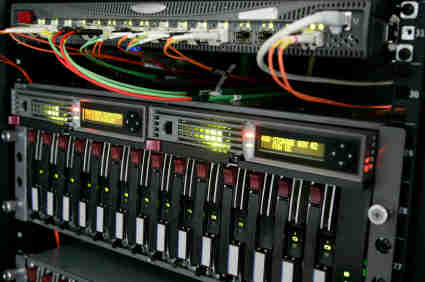
Server data recovery

Our company is a family of individuals from different backgrounds and unified by one important characteristic – we’re Geeks. Capital “G” Geeks who want to understand the technology that we are working on, to figure out why a problem is occurring, how do we fix it and can we make recommendations to ensure it doesn’t happen again. Customers who throw us unique challenges tell us that they like our thought process. Instead of jumping to a conclusion we start running through the various scenarios that could result in the reported problem. Then we start our testing process to eliminate one or the other and focus on the root cause. Think of us as the child who takes apart the family computer so we can figure out how it works. Except when we put it back together again, we’ve made a few improvements and it runs a lot better.

Memofix loves storage technology, it runs in our blood. That’s not to say we are singularly focused – we are after all one of the largest national providers of depot services for a leading notebook OEM. But in the same way that you have a fondness for that first person you dated seriously, we look back on our start as the repair centre for the first Seagate drives that entered the Canadian market. This has led to our investment in specialized equipment to analyze and recertify hard drives. Because we have some of the brightest technicians in Canada we are one of a select group in North America that can repair hard disks and complex tape backup technology. Our membership in the Technical Services Consortium (www.tsc-ww.com) gives us global access to service expertise, parts and process improvement. After almost 30 years in this industry we continue to look for ways to improve our capabilities and provide more value to our business partners and customers.

We have tackled some unique challenges for our customers and the ones that we are proudest of generally were not the most profitable but they appealed to our Geek side. Here are some examples:

  • A clinic in Haiti relied on their 20 year old X-Ray machine to provide badly needed medical care. When the hard disk started to malfunction they searched extensively for a solution because replacement was not an option. We were able to supply the parts needed from our spares (largest spare parts inventory in Canada), recover the data and earn a big thank-you from the medical staff.
  • Customers regularly come to us with specialized production equipment that is decades old, with a similarly aged hard disk as an important component. In almost every case we have the parts and the technical expertise to keep this equipment running, including a 3.2MB hard disk that we provided to a data recovery customer just last week.
  • Where a replacement drive is not available for an older system, we have been successful in using newer drives and reducing the capacity so that it will be accepted by the legacy operating system or application (known as destroking). In some cases our technicians will also need to reconfigure the firmware on the drive, an important skill for us and rarely found outside OEM organizations.
  • During the recent hard disk shortage, caused by flooding in the Philippines, several OEMs approached us to leverage our expertise in firmware re-configuration, in an effort to use alternative drives for computers that had been designed for specific models and brands of hard drives.
  • We have been able to provide feedback to our OEM partners on their testing process, helping them to understand that perfectly good drives were failing due to their audit software. The result for our manufacturer partner was a higher yield and lower replacement costs.
  • Several retail chains rely on us to wipe personal data from storage devices returned by their customers. Wiping Xbox hard drives and flash drives presents a unique challenge because the operating system is embedded with the consumer data. Our technicians were able to create an algorithm which would detect where the OS is located on the HDD or flash drive. This meant wiping all data up to the OS, recognize where the OS is and leave it intact, and start removing consumer data immediately after.

Another important element of our uniqueness is attitude. We are never more important than the customer’s we serve. We customize programs to accommodate the customer’s process branding, financial models, and security. Manufacturers come to Memofix in order to reduce their costs and we approach each new project with that objective in mind, including pricing our services based on the OEM realizing those financial savings. We are willing to share the risk and create a partnership versus simply being a supplier.

The challenge of being unique comes from constant re-evaluation of what’s important for your partners and clients, and how we adapt to meet those changing needs. To be relevant to the marketplace you have to stay focused on the customer and not your competitors. You have to resist the urge to concentrate on revenue and expense reduction, and instead invest in skills, people, technology and process in order to be successful through long-term relationships. We try to meet that challenge every day and so far our customers are telling us that we’re doing OK.

Andrew Gotshal

Founder, Memofix


Helium Hard Drives?

Better not leave your hard drive just lying around, or it may just float away. Or at least that may be the case after 2013, when at least one hard drive manufacture, Hitachi Global Storage (now owned by Western Digital) has plans to start filling hard drives with helium.

http://www.hgst.com/press-room/2012/hgst-announces-radically-new-helium-filled-hard-disk-drive-platform

We all know helium as that “lighter than air” gas that has been used to fill and float party balloons for years. But due to it’s lighter then air composition, operating in a helium environment also allows mechanical devices like motors, to spin with less effort, produce less air turbulence, and to operate with less heat and noise. Hard drive manufactures have known of these advantages for years but the problem was keeping the helium from escaping the sealed internal chamber of a hard disk drive. Now that a solution has been found, it will be possible to install more disks on the same motor by spacing them even closer together. Presently, 5 disks can be used in a normal air filled hard drive. Using a sealed helium environment will allow 7 disks for a maximum capacity of 5.6 TB in a single hard drive! WOW!

Helium is harvested as a bi-product of natural gas production and Texas has some of the highest concentrations in the world but the demand continues to outstrip supply. Helium is mainly used in the medical industry to cool MRI machines, and in cryogenics, arc welding and wafer fabrication. It is still unclear how the hard drive industries requirements could effect this shortage but it will no doubt help drive up the cost of hard drives should it become common place.

As for data recovery, it could be a tough barrier to overcome. Assuming that the process used to seal in the helium is a one time affair it may not be possible to reload the hard drive with helium. Consequently we may not be able to replace damaged heads or open the sealed disk chamber in any way … or perhaps we will need to operate in a helium filled clean room .. I can hear the recovery techs speaking in high pitched chipmunk-like voices now … 🙂 .. is that you Alvin?

RAID Disaster Area!

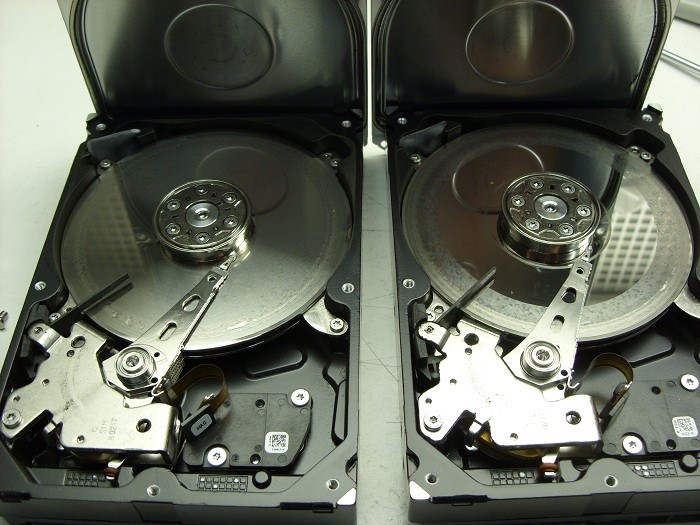
It’s been a while since I’ve posted any astonishing pictures of actual data recovery cases we receive. This morning we received a pair of matching Seagate 7200.11 500GB SATA hard drives that were in such bad shape I just had to share …

2 crashed seagates

They were part of a 2 drive RAID-1 set which means they were exact copies of each other. The client assumed having two copies of their data on two drives would ensure they would be safe. Unfortunately they were wrong.

Their assumption of safety is flawed on a several accounts by my reckoning.

First, both drives are physically in the same box . So if one falls off the table, they both fall of the table. And judging by the physical damage of these two hard drives, this might very well be what happened. Notice the scoring and rings forming all across the disks or platters of both drives. This is a real physical crash where the magnetic coating that was used to retain the data has been scraped off and left scattered through out the drive’s internals as a fine black powder.

Regardless, of how the physical damage happened, it is also apparent that the drives were running for sometime in this state. Typically minor crash debris is collected by a filter located in the top left corner of each drive. The filter is originally white in color but as you can see in the picture, both filters are now black. Crashes like this are also very audible and for a sample of what this sounds like, listen to the recording of one of these drive below.

Secondly, RAID box vendors often recommend you use two identical hard drives as was the situation here. Again, this does not sound like such a good practice to me. If one drive has a manufacturing defect, then there is a good chance the 2nd drive will have the same manufacturing defect, especially if the drives are bought at the same time from the same vendor. And even if the hard drives have no manufacturing defects, their life spans are bound to be very similar. Once one drive fails, the odds of the next one failing shortly after are quite high as well.

If your data is valuable, nothing beats a good back up on a separate distinct device that is stored in a different physical location. But should you find yourself without a backup and a failing RAID box, do your data a favor and shut yourRAID array down immediately and contact Memofix Data Recovery Services for immediate assistance.


another view


Levels of Data Recovery for Hard Drives

Toronto, Ontario, Canada.

Data Recovery Service Providers often categorize hard drive data recoveries into different levels and Memofix Data Recovery Services is no exception. While we don’t provide flat level pricing to individual consumers, we often provide our MACC or Memofix Authorized Care Centre partners with flat rate pricing based on three categories or levels of data recovery. Our definitions of these levels are described below and can be helpful in preparing yourself for the costs and degree of difficulty involved with each increasingly complicated recovery scenario.

LEVEL 1

Level 1 is the lowest level and requires the least expertise and resources. Level 1 means the hard drive is still 100% fully functional. It is recognized by the computer and if the user was to reformat their hard drive they would be able to continue to use it, albeit without their original data.

Level 1 type problems are NOT the fault of a failing hard drive. Level 1 type problems ARE the result of damage, corruption or deletion of all or part of a hard drive’s file system. These actions could have been done deliberately, accidentally, or even unknowingly. The file system is “actual data” written on the hard drive and for our purposes, it can be thought of as a big index that points to the locations on the hard drive where a particular file or folder is stored.

If that index is damaged or corrupted, the operating system may not be able to locate a particular file or folder. Or if the index is for a file or folder used by the operating system, then the drive may not be able to boot or be accessed using conventional methods.

Examples of Level 1 type problems would include;

  • Deleting a file or folder
  • Formatting your hard drive
  • Restoring the operating system
  • Boot Virus Infection

Many level 1 data loss situations can be remedied by a tech-savvy end-user using readily available data recovery software. However there are precautions and the peace of mind that only a professional data recovery service company can give you, so if your data is absolutely CRITICAL to retrieve, do NOT attempt this. However, if you can afford to take the risk or just can’t afford the cost of professional help please read an earlier blog I wrote on the subject of do-it-yourself data recovery … http://www.memofixdatarecovery.com/blog/index.php/diy-data-recovery-do-it-yourself/


LEVEL 2

Level 2 is the middle level and requires more expertise and resources then level 1. Level 2 means the hard drive is not functioning properly but the problem(s) will not require work to be done in a clean room environment. Level 2 data loss situations are normally something an end-user cannot solve themselves. Nowadays even switching a PCB is not a simple process, as the drives HDA (head disk assembly) is fine tuned to work with the same PCB it was manufactured with. In fact, the drive’s PCB contains stored values which determine critical settings used by the heads to position and read data optimally. PCBs from the same model hard drive and with the exact firmware can NOT be simply swapped out unless these stored values are first transferred to the new replacement PCB.

Examples of Level 2 type problems would include;

  • Defective PCB or Printed Circuit Board electronics
  • Overwrite or corruption to the hard drive’s “system area” (special files used exclusively by the hard drive for its own operation and maintenance.
  • Corruption to the drive’s firmware.
  • Excessive read errors or hard media defects that are not the result of weak or bad heads.
  • Issues with full disk encryption or file encryption


LEVEL 3

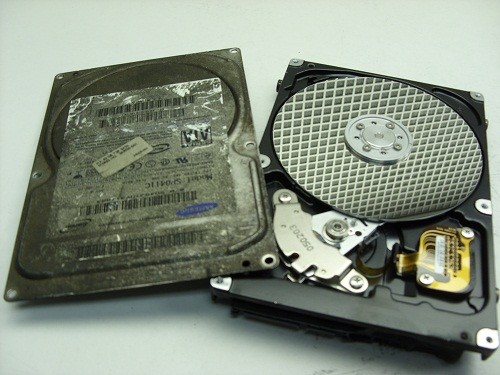
Level 3 problems indicate a major failure with the hard disk drive. Level 3 means the hard drive WILL require extensive cleanroom work to enable any recovery. Typical level 3 recoveries involve head crashes where the drive’s heads have come into contact with the disk surfaces. This usually causes damage to the both the disks and the heads. To recover any data the drive must first be made functional again. First we purge the sealed head disk area of any free particles and then we replace the heads from a new and exact version of the original hard drive. Then we attempt to copy off the used areas of the bad hard drive. During this process the heads will often go bad again due to the damage on the disks. So we must repeat this procedure until we have imaged or copied off all of the used areas on the bad hard drive. This process can take 2 days to 2 months in extreme cases. In the worst cases, the damage is so severe that newly installed heads are instantly destroyed and no recovery will be possible. Another common level 3 scenario occurs when a hard drive is dropped and the spindle motor that spins the disks is seized. This requires the transfer of the disks onto a new motor and typically requires multiple head xplants as well.

Examples of Level 3 type problems would include;

  • Damaged heads and disks
  • Seized or non-spinning spindle motors
  • Stiction, where the heads have become stuck to the disks
  • Fire or water damage
  • Dropped, knocked over, bumped, or physically abused hard drives


So to be brief and to summarize,

  1. If a client or user has deleted a file/folder or reformatted AND their hard drive was and is still working perfectly, then it is a LEVEL1 data recovery scenario.
  2. If the drive was physically abused in any way, or if it makes any unusual noises it is likely a LEVEL 3 data recovery scenario.
  3. For anything else, a LEVEL 2 data recovery scenario is most likely.

In a future blog we will discuss USB flash, camera cards and SSD data recovery levels.

Data Recovery & House Fires

If you’ve ever been the victim of a house fire, you understand what a mess it can create. But interestingly enough, a lot of the mess can be attributed to the actions used to extinguish the fire, versus the fire itself. In particular, the spraying of water and other firefighting liquids can create a wet soggy environment which is definitely not friendly for electronic devices such as your computer or the hard disk drive that resides inside.

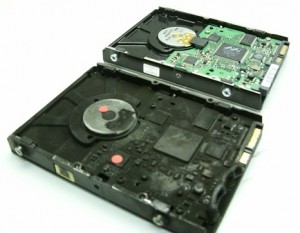
Recovering data from hard drives which have been exposed to heat, fire, and water is not as exponentially difficult as some data recovery companies may lead you to believe. Even a hard drive as badly burnt as the one below was a fairly easy recovery for our skilled data recovery technicians located in Toronto. Notice the difference in color due to the soot and smoke, as well as the melted PCB and plastic connectors.

Will my data be recoverable after a fire?


But what really determines if the data will be recoverable or not? We can replace melted PCBs. We can replace damaged head assemblies. We can rebuild missing NVRAM data. But it is the condition of the disks or platters that are most important when determining the chances of successfully recovering the data on any damaged hard drive. In most of the fire cases we see, the hard drive’s pressure equalization valve and lid seal are successful in protecting the disks from exposure to the fire or fire retardant liquids. In those where the seal was penetrated we may find some water residue which can usually be cleaned successfully.

And when we open this fire burned drive, we see a pristine gleaming disk with no apparent water, soot, or other residues being present. And as is typical with most house fires the heat was not severe enough to warp or bend the disk(s) in anyway. So once we replaced or rebuild the damaged components we were able to get the hard drive functioning long enough to create a sector by sector image of the hard disk drive. We then successfully recovered all the client’s files from this image.


Inside a fire burned or well done hard drive.

Not all recoveries are as simple as this burn victim, but our extensive expertise allows us to successfully recover data from over 90% of the burned hard drives we receive for data recovery. If your hard drive is the victim of fire and you need your data recovered, we would recommend that you seal the disk drive in a zip lock baggie as soon after the fire as possible. This will prevent any water residues from evaporating and leaving mineral deposits on the disk surfaces which may hamper our recovery attempts. And remember, even if things look grim, we can often put a smile back on your face. www.memofixdatarecovery.com


Top 5 Worst Mistakes A HDD User Can Make!

Or Mistakes I See Every Day That Can Be Easily Avoided
A Diatribe by Rob Armstrong, Memofix Data Recovery Engineer

Every day in Data Recovery labs across the globe, hard drives (HDDs) are received from people who were convinced they knew what to do when their HDDs failed. Unfortunately, most have been horribly misinformed by friends, family, sweaty nightmare, rumor and/or innuendo, or even worse poor Search Engine results written by non-professionals who think they know HDDs inside and out. The truth is, I have been in the Data Recovery industry for close to seven years, and I learn more about hard drives and each manufacturer and model EVERY DAY. It is not a simple or straightforward undertaking, and is unfortunately one of those things in life that is best left up to the professionals…for no other reason than most, if not all, Data Recovery Labs have a free evaluation service. If you attempt to “fix” your HDD at home, you could conceivably damage the drive beyond the point where it can be recovered – even by an accredited lab.
So here is the advice of a Data Recovery Tech who just wants the public to be better informed as to what they should do when the unthinkable happens (and yes, I am aware that if people heed my advice, we will be receiving fewer cases for recovery):

1. If the HDD is Dropped or Physically Traumatized in Any Way

Whether the device is running or not, once dropped, you should not apply power again. If you are truly concerned with not losing your data – send it in to a data recovery lab right away. Some would advise to apply power just once to see if you can get access – even for a short window of time – to copy off everything on there before it fails for good. Here’s the problem with that thinking: if you dropped the drive and the heads inside the drive physically bent due to the impact, then when you apply power, the heads now come into physical contact with the platters (whereas before the trauma they floated above the surface by several microns) and your data is scraped off at 7200 rotations per minute – becoming unrecoverable.

2. If You Have Sporadic Access to Your HDD

While working, you see the “hourglass” icon come up…too many times…or it takes waaaay too long to save, or sometimes your HDD boots to Windows OK, sometimes it doesn’t. Your HDD defaults to the “blue screen of death” sometimes – but not every time – you boot. These could be indicators that your drive is failing either physically or logically as bad sectors proliferate (reported as “Read Errors”) or your hardware may be slowly failing. In any case, the next time you have access to your HDD, COPY IT! All of your critical files and folders, profiles, e-mail documents, anything you deem important. You may never get another chance, and I’ve heard of many instances where consumers just kept rebooting until they had access – then did not back up once they have it. And no - putting your HDD into a refrigerator is not going to help.

3. If a Drive Fails in Your RAID Array

Hard drives can fail at any time without any type of warning (I know – you didn’t want to hear that), and therefore quite often, one drive in a RAID array will fail well before the others. Obviously, the way in which the data is written to a RAID makes it extremely simple to rebuild should one drive fail (with parity, each drive’s contents are re-buildable using the other drives). However, when multiple drives fail simultaneously – send the array into a Data Recovery lab. Once again, you will get a FREE evaluation, which will determine EXACTLY what is wrong with the RAID and what it will take to recover the data. Too many times have we seen RAID arrays where the consumer has replaced too many drives, kept the power on damaged drives too long, or “accidentally” reformatted the whole RAID after rebuilding didn’t work right away. Again, how important is your data?

4. If You Use One External for Both Mac and PC

Stop it. You just stop that right now. In this day and age, external HDDs are cheap enough to buy one for each of your O/S’s, and moving your HDD from one system to the other and back can cause your HDD to fail. In the end, it comes down to filesystem difference and the incompatibility of the two O/S’s. The way data is stored and written in a Mac environment is VERY different from the way a PC writes, and most systems have a difficult time resolving both O/S’s. You can’t mount a Mac drive in Windows (unless using a third-party program), and vice-versa, so you shouldn’t be using the same HDD with both systems. I’m sure some of you will yell and scream after hearing this advice, and have used one external HDD for both Mac and PC without any problems – but if the possibility exists that you will lose everything, isn’t it worth two externals?

5. If You Use Your USB Device for Storage

Again, stop it. Years ago, I assisted a Data Recovery company with customer service while also working in their lab, and many an argument was had with consumers over the definition of a “backup”. A backup is a secondary copy of your data. That means it exists not only in two locations or folders, but on two completely separate drives. This is the only way to become completely secure in the knowledge your data is safe from loss. As such, USB devices (aka thumb drives, USB sticks) should be used only for transferring data from one HDD to another immediately. Too many USB devices have been received that were smashed because it ended up forgotten and on the bottom of the purse, or lost and chewed up by the family dog (no, really). Do not store any data on your USB device that is critical for any extended period of time – unless you have a true backup on another HDD.

So there you have it. The early days of Data Recovery were a lot like the introduction of Science into public discourse hundreds of years ago. There were scientific methods we were using along with basic computer know-how to recover data – proven methods – but there was also a “fringe” element to recovery, mixing science and…guesswork. We would adjust the lid on a drive, believing that by doing so, the airflow inside the drive or magnetic field would affect the voice coil to get better results. I even remember sitting at my workstation all day and holding a drive, because I believed that if I let go of the drive it would stop working – some superstitious nonsense about my personal electromagnetic field affecting the HDD. Basically if the method worked for one person, we would all try it – regardless of how little sense it made. That was then.
Now, we as Data Recovery Technicians know exactly how to recover data from any HDD, using proven scientific method – no more guesswork. And that is why you should ignore rumor and poor forum scuttlebutt when it comes to the recovery of your critical data, and just send the drive in for a free evaluation. When the unthinkable happens. Which it shouldn’t, now that I’ve given you 5 ways to avoid it!