
Data Recovery, recovering Hard Drive data, RAID data recovery

After-Hours Emergency Service (647) 448-5302

Data Recovery & House Fires

If you’ve ever been the victim of a house fire, you understand what a mess it can create. But interestingly enough, a lot of the mess can be attributed to the actions used to extinguish the fire, versus the fire itself. In particular, the spraying of water and other firefighting liquids can create a wet soggy environment which is definitely not friendly for electronic devices such as your computer or the hard disk drive that resides inside.

Recovering data from hard drives which have been exposed to heat, fire, and water is not as exponentially difficult as some data recovery companies may lead you to believe. Even a hard drive as badly burnt as the one below was a fairly easy recovery for our skilled data recovery technicians located in Toronto. Notice the difference in color due to the soot and smoke, as well as the melted PCB and plastic connectors.
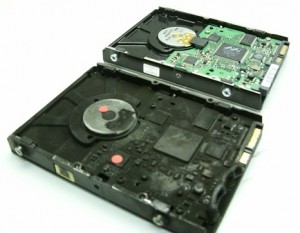
Will my data be recoverable after a fire?


But what really determines if the data will be recoverable or not? We can replace melted PCBs. We can replace damaged head assemblies. We can rebuild missing NVRAM data. But it is the condition of the disks or platters that are most important when determining the chances of successfully recovering the data on any damaged hard drive. In most of the fire cases we see, the hard drive’s pressure equalization valve and lid seal are successful in protecting the disks from exposure to the fire or fire retardant liquids. In those where the seal was penetrated we may find some water residue which can usually be cleaned successfully.

And when we open this fire burned drive, we see a pristine gleaming disk with no apparent water, soot, or other residues being present. And as is typical with most house fires the heat was not severe enough to warp or bend the disk(s) in anyway. So once we replaced or rebuild the damaged components we were able to get the hard drive functioning long enough to create a sector by sector image of the hard disk drive. We then successfully recovered all the client’s files from this image.
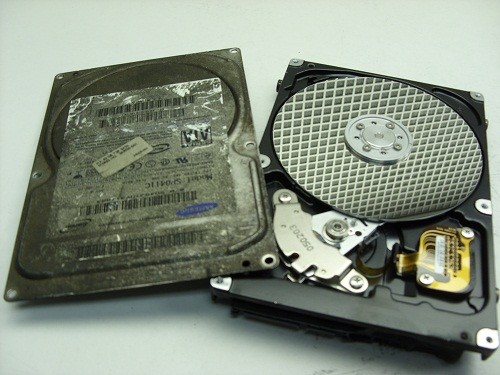
 

Inside a fire burned or well done hard drive.

Not all recoveries are as simple as this burn victim, but our extensive expertise allows us to successfully recover data from over 90% of the burned hard drives we receive for data recovery. If your hard drive is the victim of fire and you need your data recovered, we would recommend that you seal the disk drive in a zip lock baggie as soon after the fire as possible. This will prevent any water residues from evaporating and leaving mineral deposits on the disk surfaces which may hamper our recovery attempts. And remember, even if things look grim, we can often put a smile back on your face. www.memofixdatarecovery.com
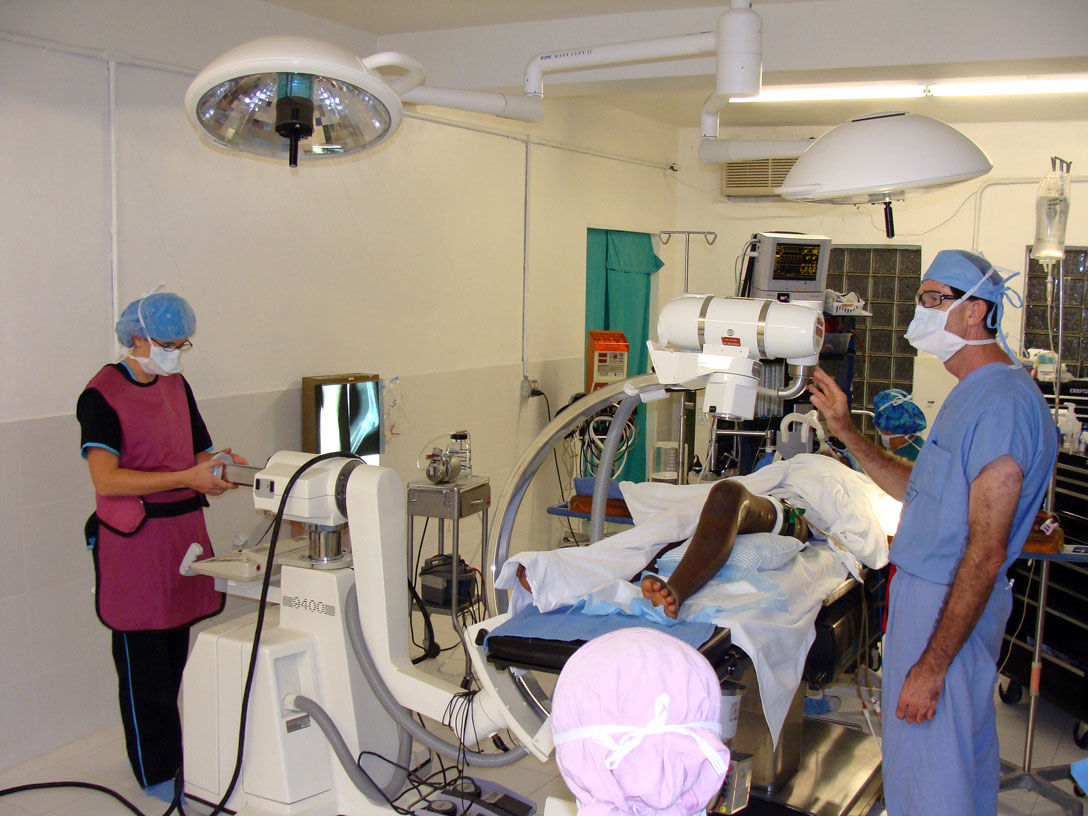


Data Recovery for Dr. Dell in Haiti

Data Recovery is often a thankless business. We can spend hundreds of dollars on parts and many late days attempting to recover someone’s critical data files. And in the end, if we are unsuccessful, we don’t get paid and rarely do we get a thanks for our efforts, no matter how hero like our recovery efforts may have been. So when we receive a great big thank you and some pictures showing the fruits of our labour in use, we really like to soak it up. 🙂

“Hi Bob,

you probably remember me from a few months ago. I had the hard drive from an X-ray machine in Haiti that had failed due to a power surge. I though you may be interested to know that thanks to the drive your company recovered the machine is now working again. I’ve attached some pictures for you from the mission in Haiti including pictures of the C-arm being used during a knee operation. The surgeon in the picture is Dr. Dell who covered the cost of the recovery. This surgery to implant a plate in a patient’s damaged knee would not have been possible without a working x-ray. I thought your team would appreciate seeing the results of a job well done.

Thanks and Blessings, Geoff “

The Real Doctor of Recovery, Dr. Dell doing his thing in Haiti

Back in August, Geoff, an associate of Dr. Dells asked if we could recover data from an old Quantum hard drive being used in an older X-ray machine in Haiti. It was a 52 MB hard drive, yes 52MB or .052GB or .0000052TB, small by today’s standards that’s for sure. As the disk drive was very old and few data recovery companies other then Toronto’s Memofix Data Recovery Services had the experience or parts to deal with it, we were asked to attempt the hard drive recovery in Toronto.

As it turns out the hard drive had been damaged by a power surge and it’s printed circuit board or PCB was fried. Additionally and more detrimental to our data recovery efforts, the surge damaged a small pre-amp chip that is located on the head assembly inside the sealed disk drive compartment. The chip is used to amplify the signals from the individual heads to the PCB and without its proper operation, no recovery would be possible.

On a current modern hard drive, we would simply replace the entire head assembly but this older Quantum hard drive used a unique hybrid positioning system for controlling the heads and it could not be simply replaced with a new one if the data was to be recovered. This hybrid positioning system used a combination of an optical encoder for rough head positioning and an embedded servo system for fine positioning. As a result the relationship between the two positioning methods was critical and could not be altered or replaced with anything but the original mechanical parts.

With Memofix’s grey haired experience in repairing legacy hard disk drives we were able to replace the pre-amp chip on the original head assembly and restore the hard drive to an operating state. We then created an exact image of the entire original hard drive onto a new Quantum 52AT hard drive. Interestingly enough, we had a new Quantum hard drive sitting in our stock, still sealed in a bag we received directly from the now defunct manufacture in the early 90’s.

Sometimes it’s good to be a pack rat that’s been around forever! Especially when our efforts in Toronto help a good doctor spread heath and healing through a country that really needs everyone’s help. May the forces of good be with the people of Haiti!


Recovering Data After a Format

For many years it’s been common knowledge among the more technically savvy computer enthusiasts, that even if you format your hard drive, the data can be recovered. Any simple data recovery software program and even most computer stores with a service department should be able to quickly restore your hard disk drive data after a format. And while this rule has been true for many years, there’s now a new sheriff in town, and he plays by different rules. With the advent of Vista and Windows 7, formatting your disc drive may now permanently destroy your computer data. Read on for the details …

In Windows, there are two types of formats that can be implemented; a quick format and a regular format. In the picture below, a quick format is selected, while un-checking the box would perform a regular format.

Data Recovery Services
Windows Format Screen

On older versions of Windows, up to and including Windows XP, a quick format overwrites the beginning of the MFT or Master File Table. The MFT is an index of all the files stored on a volume. Formatting re-initializes the MFT to appear to contain no data files by truncating the length of the known MFT. However, the orphaned index entries from before the quick format are still intact and can be used to recover all the previously existing files. With older versions of Windows, a regular format does exactly the same but it also tests for bad sectors across the entire drive. This test is non-destructive and does not overwrite any other data areas, so again all data files should be recoverable.

On newer versions of Windows, from Vista on and including Windows 7 and 8, a quick format does the same as with older versions and the data should be recoverable. BUT the regular format has changed substantially. It now overwrites “every” sector on the hard drive and as a result no data will be recoverable once this command is executed.

So why would Microsoft change the regular format to now erase every trace of data? Personally I believe it is in response to the increased awareness over data security and in particular the news coverage of personal data being discovered on tossed computers (see this interesting story on one couples adventure with leftover data files). Now, with just a simple regular format, Microsoft allows an end user to effectively do a complete and secure erase of all your hard drive’s personal content.

With new power comes new responsiblity, so be sure you know what you’re doing before formatting any hard disk drive, because even your friends at Memofix Data Recovery Services may not be able to help you.

Data Recovery Machine, Myth or Reality?

Vaughan, Ontario, Canada.

Some people believe that data recovery service companies have automated “data recovery machines”. Basically, a data recovery technician physically removes an individual disk or platter from the inaccessible hard drive, inserts the disk into the machine and automatically reads off the data. While several recovery companies have attempted to create such a data recovery machine, in reality there exists NO such device!

Even if such a machine existed it could’nt solve “all” the data loss situations. In many cases the physical damage to the hard drive’s discs prevents any chance of reading the discs and successfully recovering data. The drive’s disks are coated with an extremely thin layer of magnetic material and when a crash develops on the disks it physically removes this coating and turns it into a black magnetic dust. That dust is the actual data and nothing will ever be able to put it all back together …period.

But the real problem with developing a data recovery machine would be the customization required to support the overwhelming number of different hard drive families in existence. Each family shares similar hardware, architecture, and encoding schemes. When you send data to a hard drive to be written, it is typically encoded 5 different times before it is actually written on the physical disks. These encoding schemes are usually quite different between families of hard drives and are constantly being updated in pursuit of higher data densities. In my estimation there are thousands of different schemes that would need to be reverse engineered in order to decipher data from just today’s current drive models, let alone the equal amount of non-current hard drives still in use.

Back in the late 1990’s there was a Scandinavian data recovery company called Ibas that developed a data recovery machine called the Patan for Pattern Analyzer. http://www.ibas.com/technology/hard-disk-repair.htm Of course the company claimed, ambiguously that it could recover data from independent hard drive platters or disks, but in reality it

Data Recovery Machine
PATAN Data Recovery Machine

could recover data from just one family of Seagate hard drives, and even then it was a non-current family of MFM hard drives. (ST4000 series) MFM drives use an interface with 2 ribbon cable connectors and haven’t been manufactured since the early 90s.

More recently (early 2000’s) in my prior life at a leading data recovery company, we developed a machine to read data off the disks of a Western Digital SCSI hard drive and a few other similar PATA models. http://www.channelscience.com/files/Drive-Independent_Data_Recovery.pdf But again, the device took talented engineers many years to develop, could recover data from just a few specific models and required constant tweaking and attention. As of today, it’s my understanding that this dust gathering machine has been largely used as a slick marketing tool.

Due to the extreme and constant technical advancements in hard drive technology and the presence of several distinct and competitive hard drive manufacturers I doubt we will see any additional attempts at creating a drive independent data recovery device. And with many of the newer data recovery techniques we have developed, the need for such a machine is becoming a distant memory. So, once again don’t forget Memofix Data Recovery Services www.memofixdatarecovery.com for those occasions when you just can’t live without your data.