Data Recovery, recovering Hard Drive data, RAID data recovery

Who Makes the Most Reliable Hard Drives?

most reliable hard driveAfter losing data, our customers tend be very dissatisfied with their present hard drive and they want to know what we think is the most reliable hard drive. As we diagnose every type of hard drive failure that exists and on a regular basis, we get to know the problem drives on a much deeper level then your average computer user. This month we give you our opinion on 3.5″ desktop internal hard drives. So what would we buy?


The Most Reliable Desktop Hard Drive

There was a time when there were over a hundred hard drive manufactures. These days, the herd has been thinned considerably and there remains only 3 desktop hard drive manufactures. Seagate, Toshiba and Western Digital. All three manufactures have made some very good hard drives during their history. And all three have also made some pretty terrible drives at times as well.

Back in 2012 Western Digital bought Hitachi’s hard drive business. This would have left only WD and Seagate selling desktop drives, as Toshiba at the time was strictly a laptop drive manufacture. The global anti-competition rules would not allow the resulting two company monopoly. Consequently, WD was forced to sell the Hitachi desktop hard drive division to Toshiba in order to have a 3rd competitor. WD retained the Hitachi name. Toshiba used the forced sale to jump into the desktop HDD market and began selling Hitachi desktop drives re-labelled as Toshiba drives. Toshiba has now weened itself off Hitachi’s technologies and makes it’s own unique desktop drives. WD continues to sell both Hitachi branded drives as well as WD branded drives. The two drive brands are quite different in design and it appears the Hitachi drives are continuing to use the original Hitachi designs.


#1 HITACHI - In our opinion WD’s Hitachi brand hard drives are the most reliable desktop hard drive at this time. Hitachi was the 1st manufacture to introduce helium filled drives and the reliability of these drives continues their tradition of making quality long lasting storage devices.


#2 WESTERN DIGITAL - In our opinion, the Western Digital brand makes the 2nd most reliable desktop hard drives. So in fact, WD makes the top two hard drive brands. Additionally, when it come to “recoverabilty”, we feel WD makes the most recoverable hard drives at this time. This is due to the drive’s high level of acceptance of “donor” head assemblies, and the layout of the drive’s own internal operating system.



#Toshiba Logo3 TOSHIBA - In our opinion third place would go to the new Toshiba desktop drives. We have seen a lot of these but what we have seen appear rock solid. Toshiba’s ranking may climb as we see more of them. Our opinion may also be influenced by our positive experiences with their laptop drives.


 

seagate-new-living-logo#4 SEAGATE - And in our opinion, stumbling along in last place is Seagate. Seagate has had some exceptionally bad hard drives in the last few years. 1.5TB Seagates of any model are very prone to failing. Additionally there have been high failure rates reported for the 3TB Seagate ST3000DM001 and the 4TB Seagate ST4000DX000. On the positive side, the latest Seagate 6TB and larger drives appear to be very reliable!


Please don’t place to much trust in our opinions. We tend to mostly see the bad apples, while the good drives continue to hum along, almost unnoticed by folks like us.

In our next blog post we’ll offer our opinion on laptop hard drives and who we think makes the most reliable hard drive for this purpose. In the meantime, don’t forget to backup you data to a second hard drive as nothing beats having a backup. A backup a day keeps the DR away. ( Data Recovery)


For a free no obligation quote, click the Orange button -> Free Quote Now


Need more convincing, read our glowing 5-STAR Google reviews ->



Deleted SSD Files … Gone Forever?

It wasn’t long after the introduction of the PC that computer enthusiasts figured out that if you deleted a file on your hard drive, it could generally still be recovered. This was possible because deleting a file only deleted its index entry while the file itself remained intact and undamaged. Armed with this knowledge, many IT professionals rescued deleted files and won the accolades of their panicked customers in the process. But the rules have changed with the modern SSD or Solid State Drive and in most cases, if a file is deleted from an SSD, the file is deleted forever!

data recovery Ontario
To understand why, it helps to understand a little more about SSDs.

Unlike a hard drive which can simply write over existing data, an SSD must 1st erase existing data before it can write new data. The process of erasing a data block is very slow in comparison to writing or reading a data block, and as a result 1st generation SSDs became considerably slower over time. To address this concern, newer SSDs started preemptively erasing recently freed blocks during their idle time. This process is referred to as garbage collection and is found in all current SSDs.

However, initially SSDs did not understand or communicate with operating systems like Windows, consequently when Windows deleted a file and marked the space as free for re-use, the SSD knew nothing about it. As far as the SSD was concerned, this space was written to and was thus in-use. To overcome this build-up of unknown and thus unavailable space, SSD manufacturers introduced a feature called TRIM. TRIM allows the operating system to communicate and inform the SSD of free data blocks as they become available. The SSD will then add these blocks to its list of blocks to be preemptively erased. Unfortunately in the real world, these blocks are erased and prepared for re-use almost immediately. Consequently, a deleted file is now totally unrecoverable within moments of being deleted.

Even if you do a quick format on an SSD, the data will be gone almost instantaneously and forever! Previously with hard drives, it was still possible to recover the original data files even if you formatted your hard drive. See our Recovering Data After a Format blog post for more information on that topic.

There are exceptions where deleted SSD data can still be recovered. This is usually because the SSD, operating system or storage configuration does not support TRIM. Below are some examples where TRIM is not supported and hence, deleted files may still be recoverable:

  • Using an older 1st generation SSD or Solid State Drive
  • Running Windows versions before Vista and MAC OSX versions prior to 10.6.8
  • Using an SSDs inside an external USB or Firewire enclosures, and most NAS boxes.
  • File system has become corrupted and the volume is no longer recognized or accessible.
  • SSD formatted with FAT16 or FAT32
  • PCI Express SSDs generally do not support TRIM
  • Encrypted volumes do not usually support TRIM
  • SSD RAID arrays do not typically support TRIM.

Solid Sate Drives are becoming much more common as the prices comes down and their benefits become apparent, but as always, there are tradeoffs, and understanding the implications is always important. If we can help resolve your data loss situation or if you just want a second opinion, please don’t hesitate to contact us at 1-800-MEMOFIX or [email protected].


Memofix at iTech 2013 Toronto

We love talking about IT with our customers, particularly if it involves storage technology. We are a company of geeks who are always willing to share our technical expertise on hard disks, tape drives and data recovery with clients and business partners. And now we’re being allowed out in public.

Memofix will be at iTech 2013, at the Toronto International Centre, on Thursday, May 16th. For the past decade iTech has become known as Canada’s IT Infrastructure Conference and allows technology professionals to speak one-on-one with industry vendors, all in one place. The seminar sessions deliver information on the latest trends, cutting edge products and services and help them research solutions for their IT strategy.

We are excited to be at the show because it gives us an opportunity to meet with many of our past clients and discuss the challenges they have in the area of storage. More importantly we love meeting new customers who get to find out what we are all about. We think a face-to-face conversation allows us to convey our love for all things storage and build a trust factor based on our expertise and the fact that we love to help solve problems.

At the conference we will be focusing on 3 important services that generate the most interest from our customers.

Data Recovery: A malfunctioning storage device can be a minor nuisance or severely disrupt your business operations. Unfortunately the failure of hard drives, RAID arrays, and other data storage technologies is a fact of life. Find out how Memofix can serve as your emergency support partner and how we retrieve or recover data from all types of data storage media. Businesses of all sizes across Canada put their trust in Memofix Data Recovery Services to recover data from hard disks, tape cartridges flash media of all categories and NAS, SAN, and multi-disk servers.

Tape and Hard Disk Repair: All the industry experts will tell you, “Tape is dead”. For companies that continue to use tape as their backup or archive strategy it is getting harder to find a support vendor and there are few service organizations in North America that specialize in tape drive repair. Memofix, with 25 years of experience, is among that select group and we provide direct support for some of the largest manufacturers of tape storage technologies. Our tape and hard disk repair services allow companies to extend their IT budgets by keeping existing devices running and avoiding an early replacement. We also offer extended warranties for tape storage devices that are very cost competitive with OEM alternatives.

Cloud Backup: The future of backup is not cloudy (sorry, bad pun). As companies cope with ever increasing amounts of information they realize that it’s critical to have a dependable backup solution that can scale with their business needs. Come by our iTech booth and find out how our Cloud Backup solution can prioritize files for backup and securely transmit an encrypted copy to an offsite Canadian-based data centers. The Memofix Cloud Backup service can save you money, simplify your IT operations and give you an increased sense of security about your data.

Since 1986 Memofix has been a Canadian market leader specializing in the repair of storage devices, data recovery solutions and partnering with manufacturers as their warranty depot. Our company takes pride in the professionalism of and experience of our technicians and our process of continual improvement. Come by our booth at the iTech conference and find out why we are quality obsessed and customer focused.

Need a Data Recovery Expert?

Please allow me to introduce you to MemofixMan, the creation of our own Rob Armstrong. Not only is Rob a talented artist, he also has an incredible flare for recovering data. Rob can be found most days recovering data in the Memofix data recovery lab. We hope you enjoy his drawings and we hope to publish more of his creations soon.

toronto data recovery experts

Data Recovery & House Fires

If you’ve ever been the victim of a house fire, you understand what a mess it can create. But interestingly enough, a lot of the mess can be attributed to the actions used to extinguish the fire, versus the fire itself. In particular, the spraying of water and other firefighting liquids can create a wet soggy environment which is definitely not friendly for electronic devices such as your computer or the hard disk drive that resides inside.

Recovering data from hard drives which have been exposed to heat, fire, and water is not as exponentially difficult as some data recovery companies may lead you to believe. Even a hard drive as badly burnt as the one below was a fairly easy recovery for our skilled data recovery technicians located in Toronto. Notice the difference in color due to the soot and smoke, as well as the melted PCB and plastic connectors.

Will my data be recoverable after a fire?


But what really determines if the data will be recoverable or not? We can replace melted PCBs. We can replace damaged head assemblies. We can rebuild missing NVRAM data. But it is the condition of the disks or platters that are most important when determining the chances of successfully recovering the data on any damaged hard drive. In most of the fire cases we see, the hard drive’s pressure equalization valve and lid seal are successful in protecting the disks from exposure to the fire or fire retardant liquids. In those where the seal was penetrated we may find some water residue which can usually be cleaned successfully.

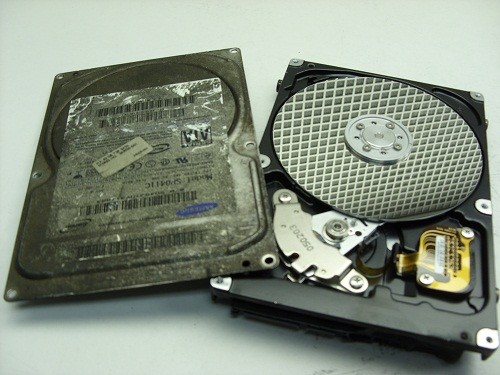
And when we open this fire burned drive, we see a pristine gleaming disk with no apparent water, soot, or other residues being present. And as is typical with most house fires the heat was not severe enough to warp or bend the disk(s) in anyway. So once we replaced or rebuild the damaged components we were able to get the hard drive functioning long enough to create a sector by sector image of the hard disk drive. We then successfully recovered all the client’s files from this image.


Inside a fire burned or well done hard drive.

Not all recoveries are as simple as this burn victim, but our extensive expertise allows us to successfully recover data from over 90% of the burned hard drives we receive for data recovery. If your hard drive is the victim of fire and you need your data recovered, we would recommend that you seal the disk drive in a zip lock baggie as soon after the fire as possible. This will prevent any water residues from evaporating and leaving mineral deposits on the disk surfaces which may hamper our recovery attempts. And remember, even if things look grim, we can often put a smile back on your face. www.memofixdatarecovery.com


Top 5 Worst Mistakes A HDD User Can Make!

Or Mistakes I See Every Day That Can Be Easily Avoided
A Diatribe by Rob Armstrong, Memofix Data Recovery Engineer

Every day in Data Recovery labs across the globe, hard drives (HDDs) are received from people who were convinced they knew what to do when their HDDs failed. Unfortunately, most have been horribly misinformed by friends, family, sweaty nightmare, rumor and/or innuendo, or even worse poor Search Engine results written by non-professionals who think they know HDDs inside and out. The truth is, I have been in the Data Recovery industry for close to seven years, and I learn more about hard drives and each manufacturer and model EVERY DAY. It is not a simple or straightforward undertaking, and is unfortunately one of those things in life that is best left up to the professionals…for no other reason than most, if not all, Data Recovery Labs have a free evaluation service. If you attempt to “fix” your HDD at home, you could conceivably damage the drive beyond the point where it can be recovered – even by an accredited lab.
So here is the advice of a Data Recovery Tech who just wants the public to be better informed as to what they should do when the unthinkable happens (and yes, I am aware that if people heed my advice, we will be receiving fewer cases for recovery):

1. If the HDD is Dropped or Physically Traumatized in Any Way

Whether the device is running or not, once dropped, you should not apply power again. If you are truly concerned with not losing your data – send it in to a data recovery lab right away. Some would advise to apply power just once to see if you can get access – even for a short window of time – to copy off everything on there before it fails for good. Here’s the problem with that thinking: if you dropped the drive and the heads inside the drive physically bent due to the impact, then when you apply power, the heads now come into physical contact with the platters (whereas before the trauma they floated above the surface by several microns) and your data is scraped off at 7200 rotations per minute – becoming unrecoverable.

2. If You Have Sporadic Access to Your HDD

While working, you see the “hourglass” icon come up…too many times…or it takes waaaay too long to save, or sometimes your HDD boots to Windows OK, sometimes it doesn’t. Your HDD defaults to the “blue screen of death” sometimes – but not every time – you boot. These could be indicators that your drive is failing either physically or logically as bad sectors proliferate (reported as “Read Errors”) or your hardware may be slowly failing. In any case, the next time you have access to your HDD, COPY IT! All of your critical files and folders, profiles, e-mail documents, anything you deem important. You may never get another chance, and I’ve heard of many instances where consumers just kept rebooting until they had access – then did not back up once they have it. And no - putting your HDD into a refrigerator is not going to help.

3. If a Drive Fails in Your RAID Array

Hard drives can fail at any time without any type of warning (I know – you didn’t want to hear that), and therefore quite often, one drive in a RAID array will fail well before the others. Obviously, the way in which the data is written to a RAID makes it extremely simple to rebuild should one drive fail (with parity, each drive’s contents are re-buildable using the other drives). However, when multiple drives fail simultaneously – send the array into a Data Recovery lab. Once again, you will get a FREE evaluation, which will determine EXACTLY what is wrong with the RAID and what it will take to recover the data. Too many times have we seen RAID arrays where the consumer has replaced too many drives, kept the power on damaged drives too long, or “accidentally” reformatted the whole RAID after rebuilding didn’t work right away. Again, how important is your data?

4. If You Use One External for Both Mac and PC

Stop it. You just stop that right now. In this day and age, external HDDs are cheap enough to buy one for each of your O/S’s, and moving your HDD from one system to the other and back can cause your HDD to fail. In the end, it comes down to filesystem difference and the incompatibility of the two O/S’s. The way data is stored and written in a Mac environment is VERY different from the way a PC writes, and most systems have a difficult time resolving both O/S’s. You can’t mount a Mac drive in Windows (unless using a third-party program), and vice-versa, so you shouldn’t be using the same HDD with both systems. I’m sure some of you will yell and scream after hearing this advice, and have used one external HDD for both Mac and PC without any problems – but if the possibility exists that you will lose everything, isn’t it worth two externals?

5. If You Use Your USB Device for Storage

Again, stop it. Years ago, I assisted a Data Recovery company with customer service while also working in their lab, and many an argument was had with consumers over the definition of a “backup”. A backup is a secondary copy of your data. That means it exists not only in two locations or folders, but on two completely separate drives. This is the only way to become completely secure in the knowledge your data is safe from loss. As such, USB devices (aka thumb drives, USB sticks) should be used only for transferring data from one HDD to another immediately. Too many USB devices have been received that were smashed because it ended up forgotten and on the bottom of the purse, or lost and chewed up by the family dog (no, really). Do not store any data on your USB device that is critical for any extended period of time – unless you have a true backup on another HDD.

So there you have it. The early days of Data Recovery were a lot like the introduction of Science into public discourse hundreds of years ago. There were scientific methods we were using along with basic computer know-how to recover data – proven methods – but there was also a “fringe” element to recovery, mixing science and…guesswork. We would adjust the lid on a drive, believing that by doing so, the airflow inside the drive or magnetic field would affect the voice coil to get better results. I even remember sitting at my workstation all day and holding a drive, because I believed that if I let go of the drive it would stop working – some superstitious nonsense about my personal electromagnetic field affecting the HDD. Basically if the method worked for one person, we would all try it – regardless of how little sense it made. That was then.
Now, we as Data Recovery Technicians know exactly how to recover data from any HDD, using proven scientific method – no more guesswork. And that is why you should ignore rumor and poor forum scuttlebutt when it comes to the recovery of your critical data, and just send the drive in for a free evaluation. When the unthinkable happens. Which it shouldn’t, now that I’ve given you 5 ways to avoid it!

Data Recovery for Dr. Dell in Haiti

Data Recovery is often a thankless business. We can spend hundreds of dollars on parts and many late days attempting to recover someone’s critical data files. And in the end, if we are unsuccessful, we don’t get paid and rarely do we get a thanks for our efforts, no matter how hero like our recovery efforts may have been. So when we receive a great big thank you and some pictures showing the fruits of our labour in use, we really like to soak it up. 🙂

“Hi Bob,

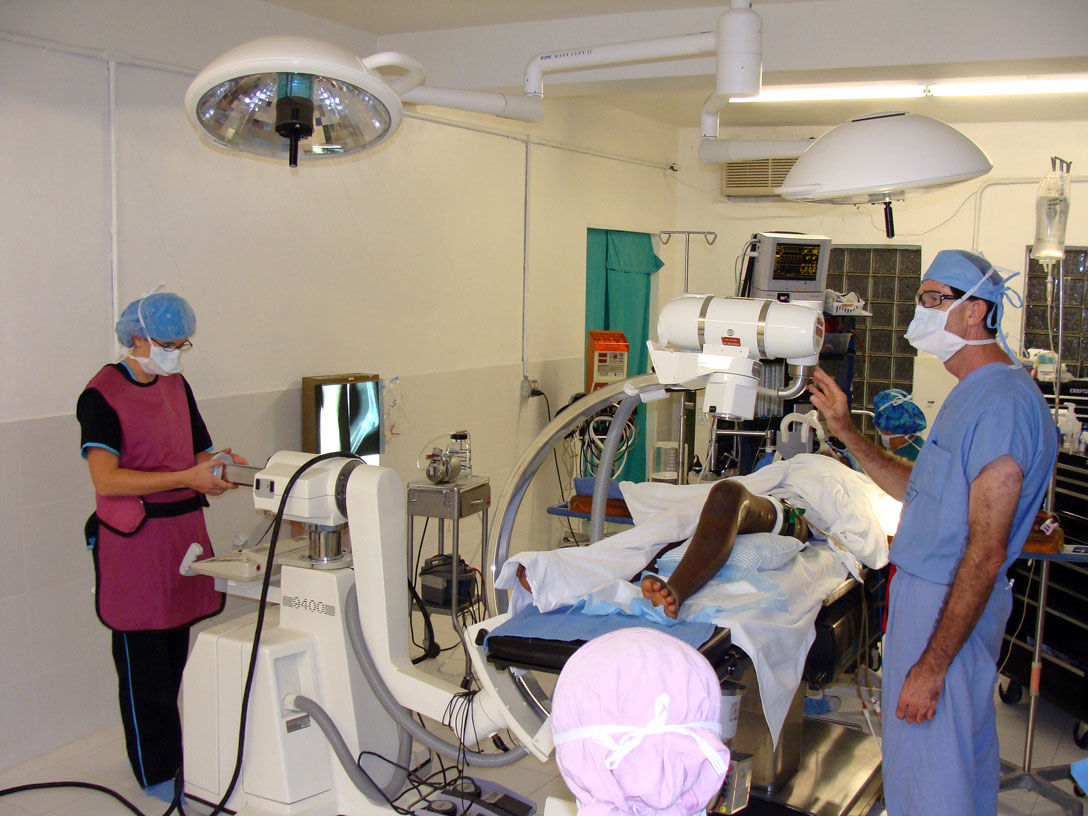
you probably remember me from a few months ago. I had the hard drive from an X-ray machine in Haiti that had failed due to a power surge. I though you may be interested to know that thanks to the drive your company recovered the machine is now working again. I’ve attached some pictures for you from the mission in Haiti including pictures of the C-arm being used during a knee operation. The surgeon in the picture is Dr. Dell who covered the cost of the recovery. This surgery to implant a plate in a patient’s damaged knee would not have been possible without a working x-ray. I thought your team would appreciate seeing the results of a job well done.

Thanks and Blessings, Geoff “

The Real Doctor of Recovery, Dr. Dell doing his thing in Haiti

Back in August, Geoff, an associate of Dr. Dells asked if we could recover data from an old Quantum hard drive being used in an older X-ray machine in Haiti. It was a 52 MB hard drive, yes 52MB or .052GB or .0000052TB, small by today’s standards that’s for sure. As the disk drive was very old and few data recovery companies other then Toronto’s Memofix Data Recovery Services had the experience or parts to deal with it, we were asked to attempt the hard drive recovery in Toronto.

As it turns out the hard drive had been damaged by a power surge and it’s printed circuit board or PCB was fried. Additionally and more detrimental to our data recovery efforts, the surge damaged a small pre-amp chip that is located on the head assembly inside the sealed disk drive compartment. The chip is used to amplify the signals from the individual heads to the PCB and without its proper operation, no recovery would be possible.

On a current modern hard drive, we would simply replace the entire head assembly but this older Quantum hard drive used a unique hybrid positioning system for controlling the heads and it could not be simply replaced with a new one if the data was to be recovered. This hybrid positioning system used a combination of an optical encoder for rough head positioning and an embedded servo system for fine positioning. As a result the relationship between the two positioning methods was critical and could not be altered or replaced with anything but the original mechanical parts.

With Memofix’s grey haired experience in repairing legacy hard disk drives we were able to replace the pre-amp chip on the original head assembly and restore the hard drive to an operating state. We then created an exact image of the entire original hard drive onto a new Quantum 52AT hard drive. Interestingly enough, we had a new Quantum hard drive sitting in our stock, still sealed in a bag we received directly from the now defunct manufacture in the early 90’s.

Sometimes it’s good to be a pack rat that’s been around forever! Especially when our efforts in Toronto help a good doctor spread heath and healing through a country that really needs everyone’s help. May the forces of good be with the people of Haiti!


Recovering Data After a Format

For many years it’s been common knowledge among the more technically savvy computer enthusiasts, that even if you format your hard drive, the data can be recovered. Any simple data recovery software program and even most computer stores with a service department should be able to quickly restore your hard disk drive data after a format. And while this rule has been true for many years, there’s now a new sheriff in town, and he plays by different rules. With the advent of Vista and Windows 7, formatting your disc drive may now permanently destroy your computer data. Read on for the details …

In Windows, there are two types of formats that can be implemented; a quick format and a regular format. In the picture below, a quick format is selected, while un-checking the box would perform a regular format.

Data Recovery Services
Windows Format Screen

On older versions of Windows, up to and including Windows XP, a quick format overwrites the beginning of the MFT or Master File Table. The MFT is an index of all the files stored on a volume. Formatting re-initializes the MFT to appear to contain no data files by truncating the length of the known MFT. However, the orphaned index entries from before the quick format are still intact and can be used to recover all the previously existing files. With older versions of Windows, a regular format does exactly the same but it also tests for bad sectors across the entire drive. This test is non-destructive and does not overwrite any other data areas, so again all data files should be recoverable.

On newer versions of Windows, from Vista on and including Windows 7 and 8, a quick format does the same as with older versions and the data should be recoverable. BUT the regular format has changed substantially. It now overwrites “every” sector on the hard drive and as a result no data will be recoverable once this command is executed.

So why would Microsoft change the regular format to now erase every trace of data? Personally I believe it is in response to the increased awareness over data security and in particular the news coverage of personal data being discovered on tossed computers (see this interesting story on one couples adventure with leftover data files). Now, with just a simple regular format, Microsoft allows an end user to effectively do a complete and secure erase of all your hard drive’s personal content.

With new power comes new responsiblity, so be sure you know what you’re doing before formatting any hard disk drive, because even your friends at Memofix Data Recovery Services may not be able to help you.