Data Recovery, recovering Hard Drive data, RAID data recovery

YES we can recover your data, even if others can’t!

As a member of a worldwide consortium called the TSC or Technical Services Consortium, we are part of a family of companies that offer many of the same services, but in different geographical areas. Because we are not competing with each other, we have developed some amazing business relationships with folks that would normally be our competitors. This has allowed us to gain knowledge in areas where we were weak and to share knowledge where we are strong. As the only member of the consortium offering data recovery services, we often get called in to help with data loss situations.

Recently one of our TSC partners in the Netherlands, Sprague Europe, was approached by a well-known University in Germany. The University had had a catastrophic failure with a small RAID 5 server and the hard work of hundreds of students was in jeopardy. RAID server data recovery

Initially the University had contacted a well-respected but smaller data recovery company in the Netherlands to help. They were able to image one of the 3 drives used in the RAID 5 array, but unfortunately, all attempts at resurrecting either of the remaining two drives was met with failure.

With RAID 5 and it’s built in redundancy, we only needed to image one of the two non-responsive drives to be able to rebuild the RAID. Both drives had developed light rings on their disks and the heads were physically destroyed by travelling over the damaged areas and had become stuck in the head loader ramps. With each recovery attempt, these rings would increase in depth and width, and soon no recovery would be possible. The smaller Dutch data recovery company had exhausted their supply of parts drives and realizing the chances for success were decreasing with each attempt, they advised the University to send it to Kroll Ontrack, the largest data recovery company in the world. Ontrack had a branch in Germany and off the case went.

But again, all attempts to recover the data were met with failure and the University was almost ready to concede defeat. But as luck would have it, the head of the University’s Computer Centre was an old colleague with one of our friends at Sprague and in a last ditch effort he called Sprague for advice. Our friend at Sprague suggested Memofix “may” be able to help.

Unlike most data recovery service providers, Memofix does not charge an extra fee for working on hard drives that have been previously worked on by other data recovery companies. In fact we cherish those data recovery cases because it gives us a chance to show just how good we are. Over the years we have recovered approximately 70% of the recoveries that have been previously attempted by our competitors.

western digital data recoveryWhen I first saw the request and the summary of what had been attempted, I was skeptical if we could do any better than the two professional data recovery companies that had already tried, especially when one of them was a “world leader” in data recovery and cost did not appear to be a constraint. I spoke with the original data recovery company that tried the 1st attempts. They told me that both defective drives had heads that were bent, distorted, and stuck in the head ramp loaders. They also told me that they had gotten both defective hard drives to function for a very short period of time after replacing the head assembly. Things were looking a little more promising.

When it comes to recovering data, there is one MAJOR factor that influences the chance of recovering data and that is the condition of the disks. If the disks are in good shape, a recovery is usually going to be possible. If the disks are badly scored and ringed, then it will be next to impossible to get a set of heads to function inside the drive without damaging them almost instantaneously. For a disk to get that badly damaged usually means the drive has been running/spinning in a crashed state for a long time. The fact that these drives had their heads stuck in the loading ramps is good news, as they could no longer damage the disks. The second fact that made us hopeful was that the drives were manufactured by Western Digital and Memofix has one of the best Western Digital data recovery techs that we have ever met and we do know a lot of data recovery techs.

So we decided that we may have a chance of successfully recovering at least some of the data and consequently the case was sent to us for a final data recovery attempt.

Our initial evaluation confirmed that we would need to get one of two defective drives imaged. After much scrutiny it was determined that one of the defective drives had shifted disks. When heads are replaced, there is a procedure for adjusting the disks which can sometimes help in getting access to a non-responsive hard drive. I suspect one of the data recovery service providers had attempted this procedure or something similar. This procedure can sometimes make things worse, so we decided to concentrate on the more pristine of the two drives.

Our Western Digital data recovery specialist got right to work. His first task was to get the drive functional enough to read off the drives system area, a normally inaccessible storage area on the drive used for its own housekeeping and the storing of drive specific settings. The system area tells the drive how many heads are present and what settings to use with each head. Without this road-map, recovery may not be possible.

bent heads comparison
Bent Heads vs Good Heads

We quickly determined that two of the disk surfaces had physical damage and we would worry about those surfaces last. Modifying the system area allowed us to configure the drive to ignore the 2 damaged heads/surfaces. We then physically removed the 2 heads (corresponding to the damaged surfaces) from a good parts head stack. This would prevent further damage to those disk surfaces as well as preventing read interference from the heads going over the damaged areas. We then used this head assembly to get the drive to initialize and we started to image off the good surfaces. After approximately 20 hours of imaging, the heads assembly became too contaminated with crash debris to function and we had to modify a new set of heads to continue. After two days we had managed to image 6 of the 8 disk surfaces. We were now ready to go after the two damaged disk surfaces.

At this stage, our greatest danger was the inherent risk of developing new crashes & destroying our chances of imaging off the last two disk surfaces. Consequently, the drive was imaged only while it could be monitored by a dedicated human watching and listening for any potential new crashes. Imaging of these last two surfaces took almost a week and in the process we consumed five sets of heads and still had some areas where nothing could be read because of the damage to the hard drives’ disks.

With the best drive images we could obtain, we began to analyze what we had. Once we determined the correct RAID 5 configuration settings we were able to use the RAID’s parity to virtually rebuild the missing disk and to de-stripe the 3 drive RAID 5 volume onto a single drive. Then it was a matter of repairing some minor file system structure damage, mounting up the volume, and copying the data to a new target hard drive.

In the end, we were able to recover over 99% of all the students’ data. But there wouldn’t have been any data recovery had it not been for one individual at the University refusing to take NO for an answer.

Consequently, I think the real takeaway point, has to be the fact that not all data recovery companies have the same abilities and just because the world’s largest data recovery company says it can’t be done, doesn’t mean Memofix, the world’s most determined data recovery company, can’t prove them wrong.

We are Memofix, and YES we can recover your data, even if others can’t!

iTech2013 … How was the show?

Today’s blog features a guest post from Larry Shulman, our Business Development Manager.

Last week Memofix Hitech Services Inc. exhibited at the iTech show in Toronto.

Exhibitor products and services ranged from Infrastructure & Data Centre Operations, Storage Innovations & Big Data, Servers & OS, Communications & Connectivity, Security & Risk Management, Disaster Recovery & Business Continuity, Cloud Services & Solutions, Virtualization, Mobile Apps & Hardware and managed IT Services.

Being an “independent” show (not sponsored by a particular manufacturer or distributor) it seemed to attract a nice balance of small to medium business (SMB), and smaller solution / service providers (VAR’s, consultants, resellers). As an exhibitor that provides solutions to both SMB’s and resellers what I found interesting was that those in attendance have the same challenges, obstacles and goals as their larger counterparts (corporations, government etc.) and that both are looking for solutions to support what is becoming a very complex landscape of demands and requirements.

The solutions that Memofix presented: data recovery services, tape and hard disk repair, data destruction services, storage ITAD solutions and cloud back were well received by both SMB and solution providers in attendance. SMB’s seemed to be relieved knowing there is a company that offers these types of recovery solutions when and if needed and solution providers were excited that through Memofix they can add additional “value added services” to their customers.

As a grizzled veteran of the IT industry (over 25 years) as I walked the show floor I am still amazed and in awe at the technology solutions being developed by IT companies including Memofix to support the requirements of both large and small. I have to appreciate our industry for the good work they continue do in support of clients, and trying to stay one step ahead of what the customer needs.

Keep up the good work……


Levels of Data Recovery for Hard Drives

Toronto, Ontario, Canada.

Data Recovery Service Providers often categorize hard drive data recoveries into different levels and Memofix Data Recovery Services is no exception. While we don’t provide flat level pricing to individual consumers, we often provide our MACC or Memofix Authorized Care Centre partners with flat rate pricing based on three categories or levels of data recovery. Our definitions of these levels are described below and can be helpful in preparing yourself for the costs and degree of difficulty involved with each increasingly complicated recovery scenario.

LEVEL 1

Level 1 is the lowest level and requires the least expertise and resources. Level 1 means the hard drive is still 100% fully functional. It is recognized by the computer and if the user was to reformat their hard drive they would be able to continue to use it, albeit without their original data.

Level 1 type problems are NOT the fault of a failing hard drive. Level 1 type problems ARE the result of damage, corruption or deletion of all or part of a hard drive’s file system. These actions could have been done deliberately, accidentally, or even unknowingly. The file system is “actual data” written on the hard drive and for our purposes, it can be thought of as a big index that points to the locations on the hard drive where a particular file or folder is stored.

If that index is damaged or corrupted, the operating system may not be able to locate a particular file or folder. Or if the index is for a file or folder used by the operating system, then the drive may not be able to boot or be accessed using conventional methods.

Examples of Level 1 type problems would include;

  • Deleting a file or folder
  • Formatting your hard drive
  • Restoring the operating system
  • Boot Virus Infection

Many level 1 data loss situations can be remedied by a tech-savvy end-user using readily available data recovery software. However there are precautions and the peace of mind that only a professional data recovery service company can give you, so if your data is absolutely CRITICAL to retrieve, do NOT attempt this. However, if you can afford to take the risk or just can’t afford the cost of professional help please read an earlier blog I wrote on the subject of do-it-yourself data recovery … http://www.memofixdatarecovery.com/blog/index.php/diy-data-recovery-do-it-yourself/


LEVEL 2

Level 2 is the middle level and requires more expertise and resources then level 1. Level 2 means the hard drive is not functioning properly but the problem(s) will not require work to be done in a clean room environment. Level 2 data loss situations are normally something an end-user cannot solve themselves. Nowadays even switching a PCB is not a simple process, as the drives HDA (head disk assembly) is fine tuned to work with the same PCB it was manufactured with. In fact, the drive’s PCB contains stored values which determine critical settings used by the heads to position and read data optimally. PCBs from the same model hard drive and with the exact firmware can NOT be simply swapped out unless these stored values are first transferred to the new replacement PCB.

Examples of Level 2 type problems would include;

  • Defective PCB or Printed Circuit Board electronics
  • Overwrite or corruption to the hard drive’s “system area” (special files used exclusively by the hard drive for its own operation and maintenance.
  • Corruption to the drive’s firmware.
  • Excessive read errors or hard media defects that are not the result of weak or bad heads.
  • Issues with full disk encryption or file encryption


LEVEL 3

Level 3 problems indicate a major failure with the hard disk drive. Level 3 means the hard drive WILL require extensive cleanroom work to enable any recovery. Typical level 3 recoveries involve head crashes where the drive’s heads have come into contact with the disk surfaces. This usually causes damage to the both the disks and the heads. To recover any data the drive must first be made functional again. First we purge the sealed head disk area of any free particles and then we replace the heads from a new and exact version of the original hard drive. Then we attempt to copy off the used areas of the bad hard drive. During this process the heads will often go bad again due to the damage on the disks. So we must repeat this procedure until we have imaged or copied off all of the used areas on the bad hard drive. This process can take 2 days to 2 months in extreme cases. In the worst cases, the damage is so severe that newly installed heads are instantly destroyed and no recovery will be possible. Another common level 3 scenario occurs when a hard drive is dropped and the spindle motor that spins the disks is seized. This requires the transfer of the disks onto a new motor and typically requires multiple head xplants as well.

Examples of Level 3 type problems would include;

  • Damaged heads and disks
  • Seized or non-spinning spindle motors
  • Stiction, where the heads have become stuck to the disks
  • Fire or water damage
  • Dropped, knocked over, bumped, or physically abused hard drives


So to be brief and to summarize,

  1. If a client or user has deleted a file/folder or reformatted AND their hard drive was and is still working perfectly, then it is a LEVEL1 data recovery scenario.
  2. If the drive was physically abused in any way, or if it makes any unusual noises it is likely a LEVEL 3 data recovery scenario.
  3. For anything else, a LEVEL 2 data recovery scenario is most likely.

In a future blog we will discuss USB flash, camera cards and SSD data recovery levels.

Data Recovery & Encryption, foe or friend ?

Toronto, Ontario, Canada.

To most of us, the word “encryption” conjures up images of spies and secret disks containing information that must be guarded at all costs. Few of us realize that we all rely on and use encryption almost every day in our normal lives. Whether making a cell call, sending an email, buying something with your debit card, or accessing the web wirelessly, we are using and being protected by this not so simple process.

What is encryption? Encryption is the process used to transform and disguise data so that it is unreadable or undecipherable to anyone without a pre-determined secret code or password. Basically, the data to be encrypted is sent through an elaborate algorithm using the secret code or password to scramble the data into indistinguishable rubbish.

Please note, that password protection is NOT encryption. Password protection “may” prevent access to the data, but it does not alter the actual data. Password protection can be easily bypassed.

Encryption has also become common place for protecting data on computer based storage device like hard drives and USB flash sticks. Encryption can be used to protect an entire volume, a folder or even a single file. There are several distinct implementations available:

  • SOFTWARE, Users can buy or use free encryption programs that make it possible to encrypt files, folders or even their entire hard drive or flash device using software routines to intercept and modify the data on the fly. The entire encrypting and decrypting process is handled by your computer’s CPU or processor. Popular examples include SafeGuard, SecureDoc, PGP, TrueCrypt and Safeboot. Starting with XP Professional, Microsoft includes a built in folder and file encryption feature called Encrypting File System or EFS for short. Software encryption methods are popular as they are inexpensive and can be implemented on any existing storage device. However, they are generally much slower, typically 20% slower than hardware based methods.
  • HARDWARE, There are external hard drive devices that use a standard hard drive connected through a “hardware based” encryption interface board. In many cases this encryption process is performed without the user even being aware. Many Western Digital external boxes use this method allowing 100% data protection if the drive is ever removed from the enclosure and its encrypting interface board. Hardware techniques are considerably faster than software methods.
  • SELF ENCRYPTING, Users can now buy hard drives and SSDs that utilize on-board hardware to encrypt and decrypt the data on the fly. These devices encrypt the entire contents of a storage device and are referred to as SEDs or self-encrypting devices or drives. These drives carry a premium price tag but are the ultimate in safety and speed. Some hard drive manufactures such as Seagate may also refer to this self-encrypting as FDE or Fixed Disk Encryption.

Why use encryption? Most of us have heard a story or two about personal financial data falling into the wrong hands due to a corporate laptop being stolen or lost. Or the often recreated news story about reporters picking computers out of the trash and finding “valuable” info left abandoned. Yes it does happen, as someone who regularly buys previously used hard drives can attest. But just how many of us actually have super sensitive data on our computers in the first place? If you are one of the few that must keep your data from prying eyes, then by all means encrypt away. But if you don’t need to … DON’T!

Besides the potential loss in performance, there are several other reasons not to use encryption.

  • LOSS OF PASSWORD OR KEYFILE: If you can’t remember the password or can’t find the keyfile you made 3 years ago, you will NOT get your data back, period. While there are numerous recovery techniques for decrypting or accessing encrypted volumes, they all require some form of a username/password combo or a special key file created by the encryption software.
  • OPERATING SYSTEM FAILURE: If an encrypted drive’s operating system becomes corrupted, perhaps due to a simple virus and the drive is no longer bootable or accessible, there is no easy way to repair the file system and regain access. To resolve the issue you must first decrypt the entire volume. Again you will need a user/password or keyfile (and specialized programs) to perform such an operation. Once the volume is decrypted, the file system damage can then be repaired using the file system’s own repair utilities, i.e. chkdsk.exe
  • READ ERRORS: Over time storage device can easily develop read errors and if these read errors affect the operating system files or an area used to store pertinent encryption parameters, it can become impossible to access your data. As above, complicated procedures will be required to decrypt the volume and access the data. A single read error can stop everything.

Is encryption breakable? Theoretically, with enough computing power and enough time, any encryption scheme can be broken. But if the process takes a thousand years, the value of the data may be very limited. And fortunately the increase in computing power to break the key is easily outstripped by the exponential increase in difficulty by adding an additional bit to the encryption key. Presently, most credit card companies recommend transactions using 128 bit encryption keys. 128 bits keys are considered by the experts to be safe until about 2030 although some recommend 256 bit keys due to the advent of the “quantum computer” where theoretically the difficulty may be halved.

There are 2 basic ways of breaking encryption. The hacker either breaks the password by guessing the password or the hacker uses crypto analysis to guess the message based on the natural frequency and composition of the characters in a given language. To guess a password is often very easy as people tend to use real words and they are often chosen from an individual’s personal life or interests. Even brute force using a pre-created word list is often successful. To be sure your password can’t be compromised in your lifetime it has been recommended that your password should be at least 20 random characters. Of course few of us can remember such a long sequence.

In the real world, getting around the encryption is often much easier than either of these methods. Keyboard recorders are simple to install devices that can be used to record all the keystrokes of a user including their passwords. Or perhaps a hidden camera could provide the same results. Another technique can be utilized if a user leaves their computer unattended, as the contents of RAM memory are not encrypted and there are ways to dump the RAM contents and retrieve a password. Additionally, a group of researchers/hackers recently discovered that the contents of RAM memory do not disappear as soon as the power is removed. In fact if the RAM chips can be kept cool, the data may be retained for 10 minutes or longer. Theoretically reading the RAM contents could be possible even if the power is turned off. But this isn’t really so much about breaking the password as it is about stealing the password.

Can Memofix recover your encrypted data? Usually YES, but we need your keyfile or username/password combo … PERIOD. If we could recover your encrypted data without these credentials then what would be the point of using encryption in the first place.

We regularly recover data encrypted with PPG, Safeboot, SafeGuard, SecureDoc, EFS and most other software encryption programs. We are also very successful recovering hardware encrypted hard drives where the encryption is performed by an interface board separate from the storage device. i.e. the popular Western Digital My Book.

However, SEDs or Self Encrypting Devices present a real problem. It is estimated that by 2017 over 80% of all hard drives and all SSD or Solid State Drives will be SED or self-encrypting devices. There are NO decryption methods available for these SEDs and if consumers and businesses are to adopt these new SEDs, this concern must be addressed by the manufacturers.

Encryption is here to stay whether you need it or not. If you do choose to encrypt your data, we suggest you always create a key file and store it in a secure location. Additionally, record all usernames and passwords in a secure location and until the SED manufactures create a solution for authorized decrypting, we suggest you steer clear of their products or be sure to regularly backup.

As always, when things don’t quite go as planned remember your friends at Memofix https://www.memofixdatarecovery.com/ are always willing to help!

a terrible pic …

Data Recovery Toronto
the Data Recovery Blues

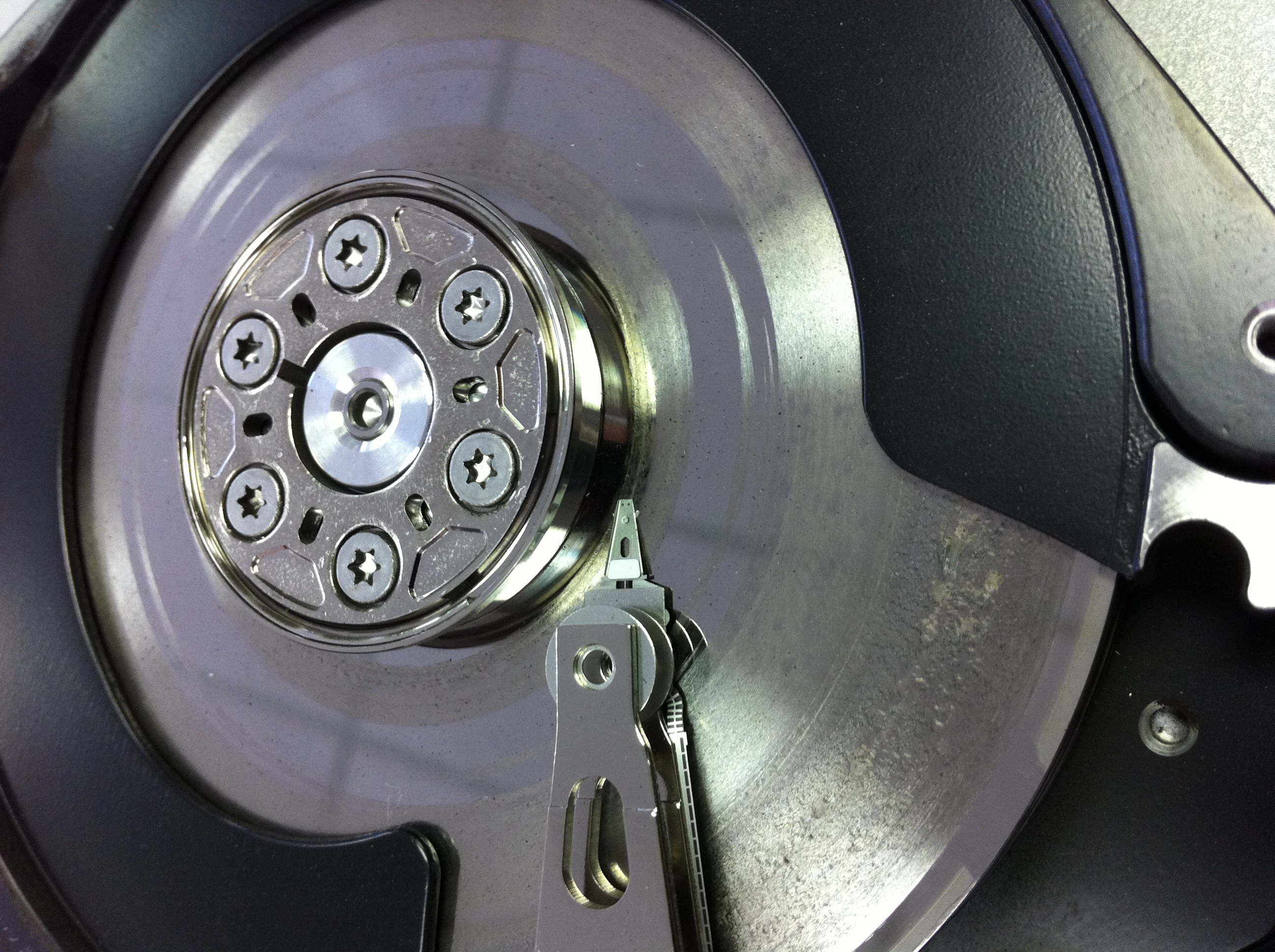
Sometimes the data is just not going to be recoverable! Here is an example of a badly crashed hard drive we received for data recovery from a disappointed Toronto client. Less then 5% of the hard disk drives we receive for data recovery purposes are in a similar condition. Typically this degree of damage begins with a lot of noticeable noise (clicking hard drive sounds) and escalates quickly into a total disaster!

Remote Data Recovery

Toronto GTA, Ontario, Canada. Recovering data remotely is a service presently being offered by several of the larger data recovery companies. It sounds so convenient, no shipping, no computer disassembly, no risk, just call someone up and they remotely connect to my computer, and “poof” my data is restored. If only it were so simple. In reality it’s much more of a marketing ploy then a realistic recovery option. The complexities and dangers of offering remote service seem to counter the very pillars of data safety.

First you must consider that for a remote data recovery service to be successful the hard drive must be functioning properly; otherwise there is a serious risk of causing further damage. If the drive has physical problems and is beginning to fail, there may only a short window before the damage becomes insurmountable. As every data recovery company will advise, if the data is important, shut it off immediately and do nothing. So unless you’re knowledgeable enough to determine the condition of your hard drive or you don’t mind a 50/50 chance of doing further damage you may want to reconsider a remote data recovery service.

Furthermore, this service requires the user to have some technical computer skills as the original hard drive must be removed and installed in a second web attached computer along with possibly an additional hard drive to copy the recovered data to. Some assistance will also be required to setup and establish the remote link. And while some users may feel comfortable with these tasks, the real concern is with the increased risk of causing further damage whether due to physical handling, static shock, or the unintended running of automatic drive utilities like chkdsk.

It is our policy and that of most other professional data recovery services to create an exact image or mirror of the original drive. The original drive is then put away for safe keeping, while any alterations to the file system structures or running of utilities are completed on a copy of the copy. In a remote data recovery situation, you do not have the luxury of having a backup copy in case things go wrong.

We also see many cases of apparent file structure damage where the storage device or hard drive initially appears to be operating fine but as we attempt to image it we discover read errors or the drive starts failing in some other way. In instances like this there is a strong chance the file structure damage was actually caused by the physical issue. Attempting to recover data from a drive like this will just aggravate the situation and risk further damage to the storage device or filesystem.

In my past life, I worked for one of the larger data recovery companies that considered offering a remote recovery option. At the time we had multiple lab locations across the USA and we were already using remote connections to share the data recovery expertise spread throughout our different labs. Our more senior data recovery engineers essentially used remote access to evaluate and direct a more junior tech in how to proceed with a difficult data recovery. Prior to us offering the service to the general public, we investigated our competitors offering by conducting a secret shopper campaign where we attempted to engage their remote data recovery services. Surprisingly, we were repeatedly met with opposition when we requested a remote recovery. They tried to sell us data recovery software, followed by in-lab service before reluctantly agreeing to only attempt a remote recovery IF we approved a minimum of $1500 for the recovery if successful. And this was without ever looking at the media. It’s readily apparent that the entire concept was being used to get you to call them so they could then attempt to try and talk you into shipping the case to their lab.

Remote data recovery has most of same limitations and capabilities as that of a good data recovery software program. The drive must be functional and it must be connected to a working computer system. In many situations a data recovery program will perform as good as a remote recovery service. In fact, the remote recovery tech is more then likely going to be running utilities as part of the effort to salvage your data. So why pay for someone to hook up remotely and run utilities on your system. You can do that yourself and with less complications and time wasted establishing a safe connection.

There are a few occasions where remote data recovery does makes sense, where due to the isolation of the location there is no other option, but for those cases that can be delivered to a full service data recovery lab you would be very unwise not to take advantage of the hands on experience of a data recovery specialist. https://www.memofixdatarecovery.com/ … David Foster

Got Your Data Back, Now What? … Re-Integrating Your Data

Toronto, Ontario, Canada. If you’ve had the misfortune to experience a data loss situation, whether because you accidentally dropped your laptop, your brother-in- law insisted on reformatting your hard drive or perhaps a passing lightning storm drove a voltage spike through the heart of your system, then you know getting your data recovered is just the first step in getting your computer back in order.

In recovery cases where the original hard drive was found to be defective, it will need to be replaced with a new drive. In cases where the only problem was a LOGICAL issue, you may be able to re-use the original hard drive, BUT we do not recommend this as some logical problems may be the result of intermittent problems with your hard drive. Regardless of your situation, once a reliable storage device has been physically installed in your computer, you need to install & configure the operating system and install all the various programs or applications you may use. In most cases you will require the original licensed installation diskette(s), CD/DVD(s) or USB flash stick.

Once you have your system setup and bootable, the storage device with the recovered data (typically a USB external hard drive) can be attached to the new system. Identifying where to locate and copy the recovered data to is determined by the operating system and what your original username was.

For example, in Windows XP there is a folder in the root directory or top level folder called “Documents and Settings”. Within the “Documents and Settings” folder you will see a folder named for each user set up to use the system. There will be folders with names like “Administrator” and “All Users”. Among these folders you should also see a folder with the same name as your previous login name. So if you previously logged in as JoeUser you should see a folder called “JoeUser”. This is the default location for storing all your personal data. Some advanced users may have chosen a non-default location for some of their data files but such users should not require this article to reintegrate their data. Once inside your personal “JoeUser” folder, you will see some standard data folders with names such as “Desktop”, “MyDocuments”, MyPictures”, and “MyFavorites” . If you were to open the “Desktop” folder you should see all the items that were previously on your desktop. To copy this folder to your new system so your desktop looks just like it was before, simply drag and drop the “Documents and Settings/JoeUser/ Desktop” folder into the “Documents and Settings/JoeUser” folder on the new system. The new system will prompt you for permission to overwrite the “Desktop” folder and once approved your data will be copied. Repeat this procedure for each additional folder you may wish to copy. By default much of your data will be stored in the “MyDocuments” folder.

If you use Outlook for your email under Windows XP, you can find your .pst data files in the default \Documents and Settings\%username%\Local Settings\Application Data\Microsoft\Outlook\ folder. In Vista or Windows 7 the default is \Users\%username%\AppData\Local\Microsoft\Outlook\.

The default location for storing your data in Windows Vista or Windows 2007 is very similar except the “Documents & Settings” folder has been renamed to “Users”. So if your login name was JoeUser, your data would be located in the “Users/JoeUser” folder. It’s interesting that this also happens to be the location of your data files on a Apple or MAC system. Apple also uses a top level folder called Users which contains a folder named for each user and within each user folder you will find that user’s data. Drag and drop the data folders into the same locations on your MAC drive and you’re done.

… David Foster

External Hard Drives … SUV or Porsche?

Claremont, Ontario, Canada. At least every week we receive a few recoveries where the drive will not spin up. The problem is a physical issue where the spindle motor that spins the hard drive’s platters is seized. The cost of recovering from such a situation is quite expensive, but it may be possible to avoid such a dilemma.

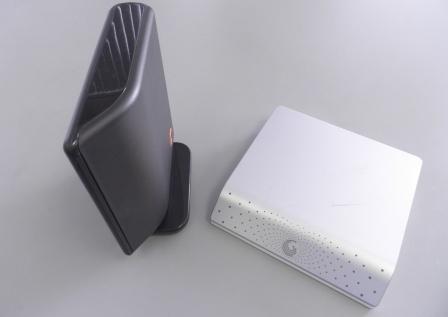
Manufactures design external enclosures that mount the drive either vertically or horizontally as shown in the picture below. Due to the high centre of gravity with the vertical units, they are extremely susceptible to being knocked over, which in turn may cause your hard drive’s spindle to seize. Avoid buying one of these vertically mounted external hard drive enclosure if at all possible.

External Cases

Vertically mounted (SUV) Horizontally mounted (Porsche)

While it’s true hard drives are designed to be mounted either vertically or horizontally, they are not designed to withstand much shock while operating. Approximately 10 years ago when hard drives were still designed with standard ball bearings in their spindle motors, they rarely seized. But in the quest for better performance, drives began using fluid dynamic bearings. With FD bearings, the metal balls were replaced with a layer of liquid. While there is no doubt that these bearings were superior in performance, they do have the disadvantage that under shock situations the fluid dynamic bearings can catastrophically seize. And that is what we are seeing so much of today. http://www.memofixdatarecovery.com/data-recovery-hard-drive.php … David Foster