Data Recovery, recovering Hard Drive data, RAID data recovery

YES we can recover your data, even if others can’t!

As a member of a worldwide consortium called the TSC or Technical Services Consortium, we are part of a family of companies that offer many of the same services, but in different geographical areas. Because we are not competing with each other, we have developed some amazing business relationships with folks that would normally be our competitors. This has allowed us to gain knowledge in areas where we were weak and to share knowledge where we are strong. As the only member of the consortium offering data recovery services, we often get called in to help with data loss situations.

Recently one of our TSC partners in the Netherlands, Sprague Europe, was approached by a well-known University in Germany. The University had had a catastrophic failure with a small RAID 5 server and the hard work of hundreds of students was in jeopardy. RAID server data recovery

Initially the University had contacted a well-respected but smaller data recovery company in the Netherlands to help. They were able to image one of the 3 drives used in the RAID 5 array, but unfortunately, all attempts at resurrecting either of the remaining two drives was met with failure.

With RAID 5 and it’s built in redundancy, we only needed to image one of the two non-responsive drives to be able to rebuild the RAID. Both drives had developed light rings on their disks and the heads were physically destroyed by travelling over the damaged areas and had become stuck in the head loader ramps. With each recovery attempt, these rings would increase in depth and width, and soon no recovery would be possible. The smaller Dutch data recovery company had exhausted their supply of parts drives and realizing the chances for success were decreasing with each attempt, they advised the University to send it to Kroll Ontrack, the largest data recovery company in the world. Ontrack had a branch in Germany and off the case went.

But again, all attempts to recover the data were met with failure and the University was almost ready to concede defeat. But as luck would have it, the head of the University’s Computer Centre was an old colleague with one of our friends at Sprague and in a last ditch effort he called Sprague for advice. Our friend at Sprague suggested Memofix “may” be able to help.

Unlike most data recovery service providers, Memofix does not charge an extra fee for working on hard drives that have been previously worked on by other data recovery companies. In fact we cherish those data recovery cases because it gives us a chance to show just how good we are. Over the years we have recovered approximately 70% of the recoveries that have been previously attempted by our competitors.

western digital data recoveryWhen I first saw the request and the summary of what had been attempted, I was skeptical if we could do any better than the two professional data recovery companies that had already tried, especially when one of them was a “world leader” in data recovery and cost did not appear to be a constraint. I spoke with the original data recovery company that tried the 1st attempts. They told me that both defective drives had heads that were bent, distorted, and stuck in the head ramp loaders. They also told me that they had gotten both defective hard drives to function for a very short period of time after replacing the head assembly. Things were looking a little more promising.

When it comes to recovering data, there is one MAJOR factor that influences the chance of recovering data and that is the condition of the disks. If the disks are in good shape, a recovery is usually going to be possible. If the disks are badly scored and ringed, then it will be next to impossible to get a set of heads to function inside the drive without damaging them almost instantaneously. For a disk to get that badly damaged usually means the drive has been running/spinning in a crashed state for a long time. The fact that these drives had their heads stuck in the loading ramps is good news, as they could no longer damage the disks. The second fact that made us hopeful was that the drives were manufactured by Western Digital and Memofix has one of the best Western Digital data recovery techs that we have ever met and we do know a lot of data recovery techs.

So we decided that we may have a chance of successfully recovering at least some of the data and consequently the case was sent to us for a final data recovery attempt.

Our initial evaluation confirmed that we would need to get one of two defective drives imaged. After much scrutiny it was determined that one of the defective drives had shifted disks. When heads are replaced, there is a procedure for adjusting the disks which can sometimes help in getting access to a non-responsive hard drive. I suspect one of the data recovery service providers had attempted this procedure or something similar. This procedure can sometimes make things worse, so we decided to concentrate on the more pristine of the two drives.

Our Western Digital data recovery specialist got right to work. His first task was to get the drive functional enough to read off the drives system area, a normally inaccessible storage area on the drive used for its own housekeeping and the storing of drive specific settings. The system area tells the drive how many heads are present and what settings to use with each head. Without this road-map, recovery may not be possible.

bent heads comparison
Bent Heads vs Good Heads

We quickly determined that two of the disk surfaces had physical damage and we would worry about those surfaces last. Modifying the system area allowed us to configure the drive to ignore the 2 damaged heads/surfaces. We then physically removed the 2 heads (corresponding to the damaged surfaces) from a good parts head stack. This would prevent further damage to those disk surfaces as well as preventing read interference from the heads going over the damaged areas. We then used this head assembly to get the drive to initialize and we started to image off the good surfaces. After approximately 20 hours of imaging, the heads assembly became too contaminated with crash debris to function and we had to modify a new set of heads to continue. After two days we had managed to image 6 of the 8 disk surfaces. We were now ready to go after the two damaged disk surfaces.

At this stage, our greatest danger was the inherent risk of developing new crashes & destroying our chances of imaging off the last two disk surfaces. Consequently, the drive was imaged only while it could be monitored by a dedicated human watching and listening for any potential new crashes. Imaging of these last two surfaces took almost a week and in the process we consumed five sets of heads and still had some areas where nothing could be read because of the damage to the hard drives’ disks.

With the best drive images we could obtain, we began to analyze what we had. Once we determined the correct RAID 5 configuration settings we were able to use the RAID’s parity to virtually rebuild the missing disk and to de-stripe the 3 drive RAID 5 volume onto a single drive. Then it was a matter of repairing some minor file system structure damage, mounting up the volume, and copying the data to a new target hard drive.

In the end, we were able to recover over 99% of all the students’ data. But there wouldn’t have been any data recovery had it not been for one individual at the University refusing to take NO for an answer.

Consequently, I think the real takeaway point, has to be the fact that not all data recovery companies have the same abilities and just because the world’s largest data recovery company says it can’t be done, doesn’t mean Memofix, the world’s most determined data recovery company, can’t prove them wrong.

We are Memofix, and YES we can recover your data, even if others can’t!

Want to be a Hero?

Memofix Data Recovery Services is looking for a few talented data recovery technicians. If you have a passion for problem solving, an unquenchable lust for knowledge and really enjoy helping people and businesses recover their irreplaceable data, we may have a home for you.

As a data recovery technician, you will join our team of proven data recovery professionals in our quest to become the most technically capable data recovery service company in the world. To become the greatest, we are looking for experts in many areas. We need skilled hard drive surgeons experienced in resuscitating damaged and crashed hard drives. We need PC3000 masters with in-depth knowledge of hard drive system areas (secret OS of the hard drive). And we need file system specialists with an intricate understanding of the various operating systems as well as a thorough understanding of RAID variations and rebuilding techniques.

If you have 2 or more years of experience in the areas listed below, we want to talk to you;

  • Diagnosing and identifying hard drive problems.
  • Diagnosing and repairing of defective hard drive PCBs including NVRAM transfers.
  • Identifying defective heads and replacement techniques in a cleanroom environment.
  • Dealing with seized spindle motors.
  • Transplanting of disks into a new body and motor.
  • Using the PC3000, Data Extractor and other specialized hard drive tools.
  • Specialized techniques such as individual head imaging.
  • Performing hard drive hot swaps with a system area compatible donor drive and PCB.
  • Identifying, repairing and rebuilding file system structure damage in FAT, NTFS, MAC and Linux type operating systems.
  • Identifying striping schemes and pertinent parameters in various flavors of RAID.
  • Repairing and Rebuilding RAID arrays physically and virtually using various software tools.

Memofix offers competitive salaries, equal opportunities, a full benefits package, and a wonderful work environment for all of our employees.

If you have the skills, aptitude, and desire to join a team dedicated to becoming the best at recovering the world’s data, please send your resume to me at [email protected]. Please reference “Hero Ad” in your email subject line.


RAID Disaster Area!

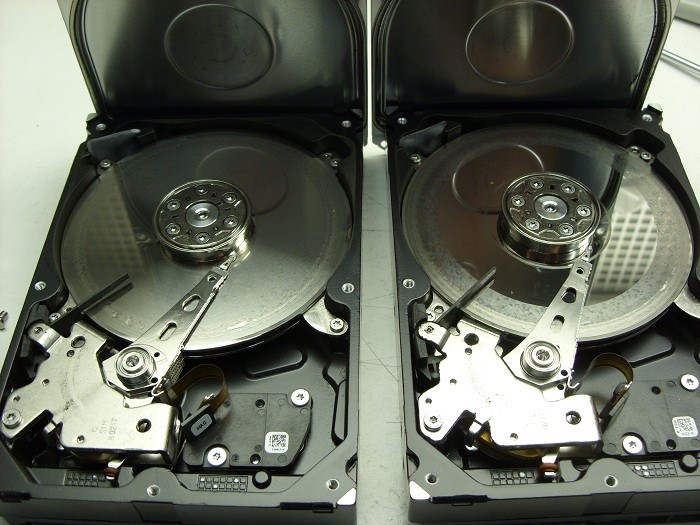
It’s been a while since I’ve posted any astonishing pictures of actual data recovery cases we receive. This morning we received a pair of matching Seagate 7200.11 500GB SATA hard drives that were in such bad shape I just had to share …

2 crashed seagates

They were part of a 2 drive RAID-1 set which means they were exact copies of each other. The client assumed having two copies of their data on two drives would ensure they would be safe. Unfortunately they were wrong.

Their assumption of safety is flawed on a several accounts by my reckoning.

First, both drives are physically in the same box . So if one falls off the table, they both fall of the table. And judging by the physical damage of these two hard drives, this might very well be what happened. Notice the scoring and rings forming all across the disks or platters of both drives. This is a real physical crash where the magnetic coating that was used to retain the data has been scraped off and left scattered through out the drive’s internals as a fine black powder.

Regardless, of how the physical damage happened, it is also apparent that the drives were running for sometime in this state. Typically minor crash debris is collected by a filter located in the top left corner of each drive. The filter is originally white in color but as you can see in the picture, both filters are now black. Crashes like this are also very audible and for a sample of what this sounds like, listen to the recording of one of these drive below.

Secondly, RAID box vendors often recommend you use two identical hard drives as was the situation here. Again, this does not sound like such a good practice to me. If one drive has a manufacturing defect, then there is a good chance the 2nd drive will have the same manufacturing defect, especially if the drives are bought at the same time from the same vendor. And even if the hard drives have no manufacturing defects, their life spans are bound to be very similar. Once one drive fails, the odds of the next one failing shortly after are quite high as well.

If your data is valuable, nothing beats a good back up on a separate distinct device that is stored in a different physical location. But should you find yourself without a backup and a failing RAID box, do your data a favor and shut yourRAID array down immediately and contact Memofix Data Recovery Services for immediate assistance.


another view


Data Recovery & Encryption, foe or friend ?

Toronto, Ontario, Canada.

To most of us, the word “encryption” conjures up images of spies and secret disks containing information that must be guarded at all costs. Few of us realize that we all rely on and use encryption almost every day in our normal lives. Whether making a cell call, sending an email, buying something with your debit card, or accessing the web wirelessly, we are using and being protected by this not so simple process.

What is encryption? Encryption is the process used to transform and disguise data so that it is unreadable or undecipherable to anyone without a pre-determined secret code or password. Basically, the data to be encrypted is sent through an elaborate algorithm using the secret code or password to scramble the data into indistinguishable rubbish.

Please note, that password protection is NOT encryption. Password protection “may” prevent access to the data, but it does not alter the actual data. Password protection can be easily bypassed.

Encryption has also become common place for protecting data on computer based storage device like hard drives and USB flash sticks. Encryption can be used to protect an entire volume, a folder or even a single file. There are several distinct implementations available:

  • SOFTWARE, Users can buy or use free encryption programs that make it possible to encrypt files, folders or even their entire hard drive or flash device using software routines to intercept and modify the data on the fly. The entire encrypting and decrypting process is handled by your computer’s CPU or processor. Popular examples include SafeGuard, SecureDoc, PGP, TrueCrypt and Safeboot. Starting with XP Professional, Microsoft includes a built in folder and file encryption feature called Encrypting File System or EFS for short. Software encryption methods are popular as they are inexpensive and can be implemented on any existing storage device. However, they are generally much slower, typically 20% slower than hardware based methods.
  • HARDWARE, There are external hard drive devices that use a standard hard drive connected through a “hardware based” encryption interface board. In many cases this encryption process is performed without the user even being aware. Many Western Digital external boxes use this method allowing 100% data protection if the drive is ever removed from the enclosure and its encrypting interface board. Hardware techniques are considerably faster than software methods.
  • SELF ENCRYPTING, Users can now buy hard drives and SSDs that utilize on-board hardware to encrypt and decrypt the data on the fly. These devices encrypt the entire contents of a storage device and are referred to as SEDs or self-encrypting devices or drives. These drives carry a premium price tag but are the ultimate in safety and speed. Some hard drive manufactures such as Seagate may also refer to this self-encrypting as FDE or Fixed Disk Encryption.

Why use encryption? Most of us have heard a story or two about personal financial data falling into the wrong hands due to a corporate laptop being stolen or lost. Or the often recreated news story about reporters picking computers out of the trash and finding “valuable” info left abandoned. Yes it does happen, as someone who regularly buys previously used hard drives can attest. But just how many of us actually have super sensitive data on our computers in the first place? If you are one of the few that must keep your data from prying eyes, then by all means encrypt away. But if you don’t need to … DON’T!

Besides the potential loss in performance, there are several other reasons not to use encryption.

  • LOSS OF PASSWORD OR KEYFILE: If you can’t remember the password or can’t find the keyfile you made 3 years ago, you will NOT get your data back, period. While there are numerous recovery techniques for decrypting or accessing encrypted volumes, they all require some form of a username/password combo or a special key file created by the encryption software.
  • OPERATING SYSTEM FAILURE: If an encrypted drive’s operating system becomes corrupted, perhaps due to a simple virus and the drive is no longer bootable or accessible, there is no easy way to repair the file system and regain access. To resolve the issue you must first decrypt the entire volume. Again you will need a user/password or keyfile (and specialized programs) to perform such an operation. Once the volume is decrypted, the file system damage can then be repaired using the file system’s own repair utilities, i.e. chkdsk.exe
  • READ ERRORS: Over time storage device can easily develop read errors and if these read errors affect the operating system files or an area used to store pertinent encryption parameters, it can become impossible to access your data. As above, complicated procedures will be required to decrypt the volume and access the data. A single read error can stop everything.

Is encryption breakable? Theoretically, with enough computing power and enough time, any encryption scheme can be broken. But if the process takes a thousand years, the value of the data may be very limited. And fortunately the increase in computing power to break the key is easily outstripped by the exponential increase in difficulty by adding an additional bit to the encryption key. Presently, most credit card companies recommend transactions using 128 bit encryption keys. 128 bits keys are considered by the experts to be safe until about 2030 although some recommend 256 bit keys due to the advent of the “quantum computer” where theoretically the difficulty may be halved.

There are 2 basic ways of breaking encryption. The hacker either breaks the password by guessing the password or the hacker uses crypto analysis to guess the message based on the natural frequency and composition of the characters in a given language. To guess a password is often very easy as people tend to use real words and they are often chosen from an individual’s personal life or interests. Even brute force using a pre-created word list is often successful. To be sure your password can’t be compromised in your lifetime it has been recommended that your password should be at least 20 random characters. Of course few of us can remember such a long sequence.

In the real world, getting around the encryption is often much easier than either of these methods. Keyboard recorders are simple to install devices that can be used to record all the keystrokes of a user including their passwords. Or perhaps a hidden camera could provide the same results. Another technique can be utilized if a user leaves their computer unattended, as the contents of RAM memory are not encrypted and there are ways to dump the RAM contents and retrieve a password. Additionally, a group of researchers/hackers recently discovered that the contents of RAM memory do not disappear as soon as the power is removed. In fact if the RAM chips can be kept cool, the data may be retained for 10 minutes or longer. Theoretically reading the RAM contents could be possible even if the power is turned off. But this isn’t really so much about breaking the password as it is about stealing the password.

Can Memofix recover your encrypted data? Usually YES, but we need your keyfile or username/password combo … PERIOD. If we could recover your encrypted data without these credentials then what would be the point of using encryption in the first place.

We regularly recover data encrypted with PPG, Safeboot, SafeGuard, SecureDoc, EFS and most other software encryption programs. We are also very successful recovering hardware encrypted hard drives where the encryption is performed by an interface board separate from the storage device. i.e. the popular Western Digital My Book.

However, SEDs or Self Encrypting Devices present a real problem. It is estimated that by 2017 over 80% of all hard drives and all SSD or Solid State Drives will be SED or self-encrypting devices. There are NO decryption methods available for these SEDs and if consumers and businesses are to adopt these new SEDs, this concern must be addressed by the manufacturers.

Encryption is here to stay whether you need it or not. If you do choose to encrypt your data, we suggest you always create a key file and store it in a secure location. Additionally, record all usernames and passwords in a secure location and until the SED manufactures create a solution for authorized decrypting, we suggest you steer clear of their products or be sure to regularly backup.

As always, when things don’t quite go as planned remember your friends at Memofix https://www.memofixdatarecovery.com/ are always willing to help!

Data Recovery pricing and why we’re NOT the cheapest

Toronto, Ontario, Canada. We are constantly reminded by our clients of just how expensive data recovery can be. No matter how much we attempt to prepare clients, many are still outright shocked at the cost. I can sympathize with many of our clients as I’ve experienced the same sensation at least a few times over the last year; like when I brought my car in for a simple brake job and the bill surged to almost a $1000; or when my furnace started making knocking noises and I was quoted over $1200 for a new blower motor. So what makes data recovery so expensive ….. or is it?

Just as your local auto service would not charge you the same price for an oil change as they would for a new exhaust system, Data Recovery pricing varies greatly. Some recoveries may take 20 minutes to resolve, while others can be on-going for a week or longer. Some problems can be handled by a junior data recovery technician, while others may require our resident genius to step in. Data loss may be the result of the accidental deletion of a few files, the dropping of a laptop or the failure of multiple hard drives from a 12 drive RAID array. Obviously the skill set and resources required to bring a crashed hard drive back to life or to reconstruct a damaged RAID array are much greater than the expertise required recovering a few deleted files.

Data Recovery is a service business with no guarantees. Sometime the data is just not recoverable no matter how much effort and parts we throw at it. And of course nobody likes to pay you for NOT recovering their data. So most reputable data recovery companies have adopted a somewhat unique service guarantee, where if we cannot recover the data you need, you will not be charged a dime. Consequently when data recovery jobs are quoted, the odds of us being able to recover the data successfully are built into the equation. In other words if we estimate the odds of a successful recovery are only 10%, then the recovery case will be quoted quite high. Looking at it slightly differently, if we attempt 10 such cases, we will be successful and get paid for just one of them. On the other hand, if our experience determines a recovery case is recoverable in 99% of the time, than the cost may be quite reasonable as there will be no risk factor built in.

What is you data worth? The most expensive data recovery I’ve been involved in was from a large world class hospital in one of the southern U.S. states. The hospital had been downloading all of its medical images, from ultrasounds to MRIs, to one server that was supposedly being backed up every night. When the server’s RAID array crashed one rainy night, they quickly learned their backup tapes were useless. The cost to re-book and recreate the over 200,000 images would have been in the millions of dollars, and many of them could never be replicated as the patients condition had changed. The job took us 3 months with a team of 4 techs and we ended up charging somewhere just over a $100K. And imagine this: we actually LOST money on it!

Providing a thorough and world class recovery service demands an investment in high end people and expensive equipment. Yes we could do data recovery cheaper like many on the web that scoop off the easiest cases and declare the rest unrecoverable (a real crime and disservice to everyone). Or we could charge ridiculous pricing like the big boys of the industry. But, doing just the easy cases so we are super profitable, or quoting everything super high so that when we do get an approval we make big money, is NOT our philosophy. We want to provide every client with the best chance of getting their data back and at a reasonable cost. Reasonable must mean we are able to be profitable enough to stay in the business and profitable enough to continue to invest in our people, our equipment and our processes. We have consciously set our pricing to be somewhere between these two extremes. A Guide to Data Recovery Pricing

So, if you find yourself in need of a data recovery service, please take the time to consider the value of your data. If it’s not worth much, go ahead and take a chance on a cheap fly by night recovery service or call you geeky brother-in-law Stan. But if you or your company can’t live without your data, don’t waste the first and best chance of a successful recovery with anyone but a professional recovery service like Memofix. … David Foster

FREE Data Recovery

Markham, Ontario, Canada. This is a story I love to tell. It reveals much of the human psyche and I find it fascinating

Back in the 90’s when Data Recovery type services were first starting to mature I was working for one of the pioneers of the industry, Nick Majors. Nick was a man of unquestionable integrity and honesty. So it was no surprise that nothing perturbed him more at the time than the massive influx of companies that suddenly “claimed” to be experts in data recovery. From cases that were sent to us for a 2nd opinion and through our own secret shopper program, where we sent data recovery cases to these so called experts, it became obvious that there were a lot of unscrupulous and opportunistic villains infecting the data recovery business. They made their money by getting in as many jobs as they could, charging an evaluation fee for each one, and then recovering the 10-15% of the cases that were the easiest (skimming the cream off the top as we referred to it back then) . They would do the cases where no parts and little intelligence were required … basically the cases that could easily be handled by any commercially available recovery software. Those they couldn’t recover were declared unrecoverable and the client was told they were out of luck.

So it was decided that we had a responsibility to save the world’s data from all these crooks and make some money off it at the same time. With huge fanfare and press releases, we announced our FREE-FIX program. Basically, we would recover people’s data for free IF it was a simple problem that we could resolve in 15 minutes or less. This would include logical problems with the file system, deleted files, formatted drives and pcb problems for common drives we had in stock. The program was intended for consumer users and was available on single hard drives with Windows or MAC data only. If we were successful, the client only paid for the return shipping and the media to put the data on. If the case was not eligible for FREE-FIX, we would provide the client with a no obligation quote for further recovery attempts.

We thought if we took the high road and did the easy stuff for free, we would kill this growing segment of con artists as they would not be able to survive without the easy jobs. And of course we also hoped that many of the ineligible cases would be approved for escalation into more desirable expensive jobs. We really felt that we would gain such a good reputation from this program that it would pay us back a thousand times.

Boy, were we wrong !!!! Yes most of the owners of the cases that qualified for FREE-FIX loved us. But the other 85% of the people were absolutely outraged at us. We were suddenly bombarded with irate clients wanting to rip a strip off of us. Those that we tried to “up-sell” because theirs’ was not a simple/free recovery, largely declined as they felt we were using bait and switch tactics. Even some of the 100 or so people who qualified for FREE-FIX every month thought we must be making money off the return media and the shipping. Shortly after the 1st month, the FREE-FIX experiment was cancelled and quickly disappeared into the growing mist of the World Wide Web, never to be heard of again. … David Foster

Tips for keeping your data safe

If you’ve spent any time on the various data recovery websites you’ve no doubt come across lots of advice on what to do once you have a data loss situation. Our website also has a page on it https://www.memofixdatarecovery.com/protect-your-data. But I’ve always felt the best advice would be to avoid such an unpleasant experience in the 1st place. So after some interesting discussions with our data recovery technicians, we have created a list of useful tips and suggestions that may keep you from losing your data in the first place.

1. Start by choosing the safest storage device you can. Here are some specific recommendations that may help …

  • Don’t buy the latest and greatest hard drive. Stick with a true and tested hard drive model that has been around a while. Not only will the bad models have been discontinued, but any bugs or known issues on seasoned models, will have been addressed. Search the web to discover problems other users may be having with a specific drive model. For example, don’t buy the first helium filled hard drives until time has tested them 1st.
  • Don’t use an old hard drive. If your drive is older than 5 years consider replacing it. And no matter how old your drive is, if it starts acting up in any way, whether making a strange noise once in a while or whether read errors keep popping up, make a copy of your data and get rid of it, before it fails.
  • Buy the lightest hard drive you can! Huh? Preferably one with a single disk. Sounds strange you say? Less mass requires less power = less heat & less stress combined with less parts = less crashes. When a hard drive requires 4 disks to keep up with the maximum capacity being offered by the competition, you know they’re likely stretching the design limitations.
  • Consider using a laptop drive in your desktop. Laptop drives by design are meant to take more physical abuse and are designed to be light in weight, low in power needs and quiet in operation.
  • If you’re using an SSD or Solid State Drive, ensure you regularly backup. SSD drives use extremely complicated and always proprietary methods of distributing the data across multiple memory chips. The point is, if your SSD becomes damaged, recovering your data may be very very very expensive … if it is even possible. I also wonder how an SSD will stand up to a power surge. If a hard drive gets a power surge the electronics get fried but the physically stored data remains intact. In an SSD, fried electronics could very well be your critical data disappearing into the cosmos.
  • Use USB Flash Sticks only for transferring data from one computer to another. Do not use them as temporary or permanent storage devices. They are very susceptible to both physical damage and ESD damage. Every few months a student walks in the door with the sole copy of their thesis on an inaccessible USB flash drive.

2. Then maintain and protect your storage device or hard drive with these suggestions

  • Connect your computer to a UPS or surge suppressor. This simple device can prevent electrical surge damage to your drive as well as preventing damage to any open files or the file system itself should your power source be interrupted.
  • Ensure your system has adequate ventilation. One of the most common causes of drive failure is overheating, so make sure your computer’s fans work or even consider adding an additional one.
  • Use an antivirus program and keep updated with the latest virus definitions.
  • Be gentle! A hard drive is a delicate device. Be sure it has a chance to stop spinning before attempting to move your desktop or laptop computer. And be extremely careful not to knock over any external hard drives you may have attached. Every week we see damaged external drives where the external case was merely tipped over while it was running.


3. And finally protect your data just in case bad things happen!

  • Backup the important stuff! Yeah, yeah … we all know this and yet few of us do it, me included. If it’s important to you, prove it and back it up.
  • Backup to the Cloud. While it may still be slow and cost a few bucks, a cloud backup service of at least your most critical stuff is an excellent idea. And most of us need not worry about the prying eyes of the United States NSA.
  • Don’t Backup Archival Data to USB Flash Sticks! The data is stored electronically and unless the device is re-charged periodically by plugging it into a powered computer, the data will start to leak away over time. If you put your data on a USB stick and throw it in a drawer for a year or two, odds are your data will be gone or seriously corrupted. Some authorities on the subject claim your data could be in jeopardy in as soon as 3 months if not re-charged.
  • Defrag often! If the data is contiguous (all stored sequentially together) there are ways to rip off data files even if the drive’s file system or “index of file locations” is totally missing. Be sure to use you computers defragmentation utility on a regular basis.
  • Don’t encrypt your data, unless absolutely necessary. Even if you never forget the password, a failing hard drive combined with encryption means the odds of getting your data back are slim. If you must use encryption, use it only on individual files that must be guarded at no cost.

While it’s virtually impossible to be 100% diligent in safeguarding our data at all times, hopefully a few of these tips will lower the chances of you losing your data. But if all else fails and you find yourself in a data loss predicament, please give us a call.

(this blog post while slightly modified, was originally published on January 25th, 2010)