Data Recovery, recovering Hard Drive data, RAID data recovery

YES we can recover your data, even if others can’t!

As a member of a worldwide consortium called the TSC or Technical Services Consortium, we are part of a family of companies that offer many of the same services, but in different geographical areas. Because we are not competing with each other, we have developed some amazing business relationships with folks that would normally be our competitors. This has allowed us to gain knowledge in areas where we were weak and to share knowledge where we are strong. As the only member of the consortium offering data recovery services, we often get called in to help with data loss situations.

Recently one of our TSC partners in the Netherlands, Sprague Europe, was approached by a well-known University in Germany. The University had had a catastrophic failure with a small RAID 5 server and the hard work of hundreds of students was in jeopardy. RAID server data recovery

Initially the University had contacted a well-respected but smaller data recovery company in the Netherlands to help. They were able to image one of the 3 drives used in the RAID 5 array, but unfortunately, all attempts at resurrecting either of the remaining two drives was met with failure.

With RAID 5 and it’s built in redundancy, we only needed to image one of the two non-responsive drives to be able to rebuild the RAID. Both drives had developed light rings on their disks and the heads were physically destroyed by travelling over the damaged areas and had become stuck in the head loader ramps. With each recovery attempt, these rings would increase in depth and width, and soon no recovery would be possible. The smaller Dutch data recovery company had exhausted their supply of parts drives and realizing the chances for success were decreasing with each attempt, they advised the University to send it to Kroll Ontrack, the largest data recovery company in the world. Ontrack had a branch in Germany and off the case went.

But again, all attempts to recover the data were met with failure and the University was almost ready to concede defeat. But as luck would have it, the head of the University’s Computer Centre was an old colleague with one of our friends at Sprague and in a last ditch effort he called Sprague for advice. Our friend at Sprague suggested Memofix “may” be able to help.

Unlike most data recovery service providers, Memofix does not charge an extra fee for working on hard drives that have been previously worked on by other data recovery companies. In fact we cherish those data recovery cases because it gives us a chance to show just how good we are. Over the years we have recovered approximately 70% of the recoveries that have been previously attempted by our competitors.

western digital data recoveryWhen I first saw the request and the summary of what had been attempted, I was skeptical if we could do any better than the two professional data recovery companies that had already tried, especially when one of them was a “world leader” in data recovery and cost did not appear to be a constraint. I spoke with the original data recovery company that tried the 1st attempts. They told me that both defective drives had heads that were bent, distorted, and stuck in the head ramp loaders. They also told me that they had gotten both defective hard drives to function for a very short period of time after replacing the head assembly. Things were looking a little more promising.

When it comes to recovering data, there is one MAJOR factor that influences the chance of recovering data and that is the condition of the disks. If the disks are in good shape, a recovery is usually going to be possible. If the disks are badly scored and ringed, then it will be next to impossible to get a set of heads to function inside the drive without damaging them almost instantaneously. For a disk to get that badly damaged usually means the drive has been running/spinning in a crashed state for a long time. The fact that these drives had their heads stuck in the loading ramps is good news, as they could no longer damage the disks. The second fact that made us hopeful was that the drives were manufactured by Western Digital and Memofix has one of the best Western Digital data recovery techs that we have ever met and we do know a lot of data recovery techs.

So we decided that we may have a chance of successfully recovering at least some of the data and consequently the case was sent to us for a final data recovery attempt.

Our initial evaluation confirmed that we would need to get one of two defective drives imaged. After much scrutiny it was determined that one of the defective drives had shifted disks. When heads are replaced, there is a procedure for adjusting the disks which can sometimes help in getting access to a non-responsive hard drive. I suspect one of the data recovery service providers had attempted this procedure or something similar. This procedure can sometimes make things worse, so we decided to concentrate on the more pristine of the two drives.

Our Western Digital data recovery specialist got right to work. His first task was to get the drive functional enough to read off the drives system area, a normally inaccessible storage area on the drive used for its own housekeeping and the storing of drive specific settings. The system area tells the drive how many heads are present and what settings to use with each head. Without this road-map, recovery may not be possible.

bent heads comparison
Bent Heads vs Good Heads

We quickly determined that two of the disk surfaces had physical damage and we would worry about those surfaces last. Modifying the system area allowed us to configure the drive to ignore the 2 damaged heads/surfaces. We then physically removed the 2 heads (corresponding to the damaged surfaces) from a good parts head stack. This would prevent further damage to those disk surfaces as well as preventing read interference from the heads going over the damaged areas. We then used this head assembly to get the drive to initialize and we started to image off the good surfaces. After approximately 20 hours of imaging, the heads assembly became too contaminated with crash debris to function and we had to modify a new set of heads to continue. After two days we had managed to image 6 of the 8 disk surfaces. We were now ready to go after the two damaged disk surfaces.

At this stage, our greatest danger was the inherent risk of developing new crashes & destroying our chances of imaging off the last two disk surfaces. Consequently, the drive was imaged only while it could be monitored by a dedicated human watching and listening for any potential new crashes. Imaging of these last two surfaces took almost a week and in the process we consumed five sets of heads and still had some areas where nothing could be read because of the damage to the hard drives’ disks.

With the best drive images we could obtain, we began to analyze what we had. Once we determined the correct RAID 5 configuration settings we were able to use the RAID’s parity to virtually rebuild the missing disk and to de-stripe the 3 drive RAID 5 volume onto a single drive. Then it was a matter of repairing some minor file system structure damage, mounting up the volume, and copying the data to a new target hard drive.

In the end, we were able to recover over 99% of all the students’ data. But there wouldn’t have been any data recovery had it not been for one individual at the University refusing to take NO for an answer.

Consequently, I think the real takeaway point, has to be the fact that not all data recovery companies have the same abilities and just because the world’s largest data recovery company says it can’t be done, doesn’t mean Memofix, the world’s most determined data recovery company, can’t prove them wrong.

We are Memofix, and YES we can recover your data, even if others can’t!

Deleted SSD Files … Gone Forever?

It wasn’t long after the introduction of the PC that computer enthusiasts figured out that if you deleted a file on your hard drive, it could generally still be recovered. This was possible because deleting a file only deleted its index entry while the file itself remained intact and undamaged. Armed with this knowledge, many IT professionals rescued deleted files and won the accolades of their panicked customers in the process. But the rules have changed with the modern SSD or Solid State Drive and in most cases, if a file is deleted from an SSD, the file is deleted forever!

data recovery Ontario
To understand why, it helps to understand a little more about SSDs.

Unlike a hard drive which can simply write over existing data, an SSD must 1st erase existing data before it can write new data. The process of erasing a data block is very slow in comparison to writing or reading a data block, and as a result 1st generation SSDs became considerably slower over time. To address this concern, newer SSDs started preemptively erasing recently freed blocks during their idle time. This process is referred to as garbage collection and is found in all current SSDs.

However, initially SSDs did not understand or communicate with operating systems like Windows, consequently when Windows deleted a file and marked the space as free for re-use, the SSD knew nothing about it. As far as the SSD was concerned, this space was written to and was thus in-use. To overcome this build-up of unknown and thus unavailable space, SSD manufacturers introduced a feature called TRIM. TRIM allows the operating system to communicate and inform the SSD of free data blocks as they become available. The SSD will then add these blocks to its list of blocks to be preemptively erased. Unfortunately in the real world, these blocks are erased and prepared for re-use almost immediately. Consequently, a deleted file is now totally unrecoverable within moments of being deleted.

Even if you do a quick format on an SSD, the data will be gone almost instantaneously and forever! Previously with hard drives, it was still possible to recover the original data files even if you formatted your hard drive. See our Recovering Data After a Format blog post for more information on that topic.

There are exceptions where deleted SSD data can still be recovered. This is usually because the SSD, operating system or storage configuration does not support TRIM. Below are some examples where TRIM is not supported and hence, deleted files may still be recoverable:

  • Using an older 1st generation SSD or Solid State Drive
  • Running Windows versions before Vista and MAC OSX versions prior to 10.6.8
  • Using an SSDs inside an external USB or Firewire enclosures, and most NAS boxes.
  • File system has become corrupted and the volume is no longer recognized or accessible.
  • SSD formatted with FAT16 or FAT32
  • PCI Express SSDs generally do not support TRIM
  • Encrypted volumes do not usually support TRIM
  • SSD RAID arrays do not typically support TRIM.

Solid Sate Drives are becoming much more common as the prices comes down and their benefits become apparent, but as always, there are tradeoffs, and understanding the implications is always important. If we can help resolve your data loss situation or if you just want a second opinion, please don’t hesitate to contact us at 1-800-MEMOFIX or [email protected].


Toronto’s Weekend RAID Warriors


It was a beautiful Friday afternoon and the start of the long weekend was only hours away. The boys in the lab all had plans of some sort or another, but then Bob walked in. And RAID away I knew someone’s plans would be changing.

data recovery server

Bob Giannoulis, the head of our Client Services, had just spent the last 20 minutes discussing a huge data loss situation with a potential customer. The customer, one of North America’s largest providers of programmable digital mobile content, had lost a critical server. The live data content stored and constantly refreshed from a big old server was sitting in a huge data centre just a few kilometers from our lab. Their product was used by everyone from government and recreational complexes to big businesses and even Vegas casinos.

Unfortunately, most of these clients had performance contracts which penalized any delay or loss of access to online content. Consequently, our client was under extreme stress as several of his larger clients were threatening to terminate their contracts or pursue legal actions or both.

The client was running a RAID 5 setup with 14 hard drives. On Wednesday evening during a thunderstorm the RAID server went down momentarily with a single failed hard drive, but thanks to the redundancy of RAID 5, the server recovered and continued to operate, albeit in a degraded and much slower state. An automatic email message informed our client’s IT people about their hard drive failure and the fact the spare drive was also down. Within an hour or two their tech arrived to replace the defective hard drive and start the 7-8 hour RAID rebuilding process.

After about an hour into the rebuild, things started to go bad! A 2nd hard drive began to physically crash and within minutes the rebuild was aborted in mid process. The IT technician, already driving home, gets a 2nd email message concerning the catastrophic failure of their RAID server and quickly returns to the data center. The server is now totally down and none of their digital content servers can “call home”. No worries, he’ll just swap out the failed drive and re-start the rebuild process. But the rebuild apparently wouldn’t start, likely due to the fact there were now 2 disk drives down. More hands are called in, and with sparse options they decide to restore a backup of the RAID server to a new set of drives and use one of these drives from the back up set to rebuild the downed RAID array. As Friday morning arrives, the IT teams latest attempts are deemed a failure and the pressure to get the server up is not letting up.

I think it’s worth noting that RAID of any type is NOT a replacement for a good backup. Yes the R in RAID stands for redundant but the redundancy is very delicate and often short lived. You see, the redundancy in RAID 5 is based on being able to replicate the data from ONE failed hard drive, but once one drive fails the odds greatly increase that a second drive will fail shortly after. It makes sense when you consider most RAID arrays are built with identical drives, bought on the same day from the same supplier. They are semi-clones of each other, so as a critical component begins to fail on one drive, it’s just as likely to begin to fail on another hard drive. Add in the extra stress of rebuilding the complete array and it’s pretty clear that disaster is lurking just around the corner.

This is about the spot where Memofix Data Recovery Services comes back into the picture … just after 4pm on the Friday of the Canada Day long weekend a panic stricken gentlemen and a young nerdy guy walk into our facility and hand deliver their RAID server to us. They look tired, frazzled and beaten. This is our first challenge … to give them hope! We know if the data they need is still there, and if they didn’t do too much to the RAID array, we should be able to get it back! The client’s nerdy young guy is their lead IT tech and he’s mentally quick and thankfully possesses a solid memory of each step that was taken in their own efforts to resurrect the RAID server. Our tech and the nerdy young guy are quickly sharing the details of the situation and it’s not long before our confidence and positivity lifts the spirits of our once saddened clients. We are given the approval to do whatever we can to get their data back by Tuesday morning.

SAS drives for RAID 5 data recovery

With no further ado, we are left alone in our lab to try and resurrect this fallen giant of a storage device. It consists of fourteen 300 GB SAS hard drives and a few extra hard drives still to be sorted out. As always, we began by creating duplicate images of all the working drives before turning our attention to the failed disk drives. Often when a RAID reports a hard drive being down or offline it’s not actually dead or defective, so we 1st diagnose the two drives to see if either is accessible. We are hoping if we can get just one of the two drives working we’ll be able to rebuild the RAID array.

Briefly applying power to the 1st drive initiates a horrible screeching noise that we’ve heard way too often. This drive is likely badly crashed and a quick inspection under class 100 cleanroom conditions reveals it to be true. There are a series of deep rings across the top disk surface and most likely similar damage below. This drive will not be recoverable. Yikes!

Diagnosing the second drive, we are relieved to find the drive in a functional state with no painful noises being heard. However, the drive has triggered its built-in SMART monitoring system to report problems but the drive is still accessible. We quickly determine the cause of the SMART errors is due to one of the heads being defective and unable to read. Inspecting the hard drive’s three disks under class 100 cleanroom conditions shows no visible or apparent disk damage and removing the heads and inspecting them under a microscope shows no damage as well. This is good.

Checking our database of parts drive shows we have 3 of these exact model drives to use for parts and it isn’t long before our best cleanroom technician has the drive happily but slowly imaging along. It’s almost 8pm now and the imaging will likely take 5-6 hours. We decide to use this time to fuel up on some food and get some rest. The plan is for our best RAID file system specialists to return to the lab on Saturday morning and assuming the imaging is complete, continue with the recovery.

Our tech arrives at 8:30 am and as expected all the imaging has completed. There are a few read errors on the drive that required new heads but otherwise everything looks good. Now the task is to determine the original RAID configuration such as the proper drive order, the stripe size and the parity scheme. Sometimes the configuration is easy to determine, but due to the repeated attempts to self-fix the array we have our work cut out for us. By 1 pm we are fairly certain we have the correct parameters and we attempt to mount the RAID array virtually. But something is not right and we spend another 4 hours before we successfully mount the RAID 5 array virtually.

With the RAID 5 array now properly setup, we can mount the clients DATA volume. But nothing is straight forward here and our attempts to copy off the data using the DATA volumes own NTFS file system prove futile, especially on many of the identified critical files. Our tech has spent the better part of the day working on the world’s biggest jigsaw puzzle and he’s getting mentally tired so we decide to call it quits for the day.

Sunday morning arrives and our RAID specialist digs into the new problem. There appears to have been some overwrite or corruption of the volume’s MFT or Master File Table which acts as an index pointing to the location of files. Again, several more hours are spent searching through the RAID array for matching fragments of the MFT that we can use to repair the damaged areas. We are successful in finding the final missing remnants buried deep within some temporary system files. The MFT is now repaired, the DATA volume mounted and the copying of the data begins. Our tech now heads home but continues to monitor the case remotely. The copy completes during the holiday Monday and he tests a large sample of the data and ensures it loads error free. We can now declare this successful and a quick call to the client has them meeting up with our tech at our lab to pick up the data. If smiles were dollars we would be rich!

As a service provider of last resort, we tend to see the worst scenarios and this was no different. Nobody likes to call in outside help, especially if your reputation is built on data security and you have a potential data loss situation. But if you find yourself in a similar situation do the right thing and bring in the professionals. At the very least we will stop any further damage by capturing protected images of all the hard drives before any more modifications are made.

Memofix provides users with a 24-7-365 day cell number for contacting us off hours or on weekends. If disaster should strike you at an inopportune time please call me, David at (647) 448-5302 to arrange an emergency intervention.

* note: the actual business description has been misrepresented to protect our client’s identity

Memofix at iTech 2013 Toronto

We love talking about IT with our customers, particularly if it involves storage technology. We are a company of geeks who are always willing to share our technical expertise on hard disks, tape drives and data recovery with clients and business partners. And now we’re being allowed out in public.

Memofix will be at iTech 2013, at the Toronto International Centre, on Thursday, May 16th. For the past decade iTech has become known as Canada’s IT Infrastructure Conference and allows technology professionals to speak one-on-one with industry vendors, all in one place. The seminar sessions deliver information on the latest trends, cutting edge products and services and help them research solutions for their IT strategy.

We are excited to be at the show because it gives us an opportunity to meet with many of our past clients and discuss the challenges they have in the area of storage. More importantly we love meeting new customers who get to find out what we are all about. We think a face-to-face conversation allows us to convey our love for all things storage and build a trust factor based on our expertise and the fact that we love to help solve problems.

At the conference we will be focusing on 3 important services that generate the most interest from our customers.

Data Recovery: A malfunctioning storage device can be a minor nuisance or severely disrupt your business operations. Unfortunately the failure of hard drives, RAID arrays, and other data storage technologies is a fact of life. Find out how Memofix can serve as your emergency support partner and how we retrieve or recover data from all types of data storage media. Businesses of all sizes across Canada put their trust in Memofix Data Recovery Services to recover data from hard disks, tape cartridges flash media of all categories and NAS, SAN, and multi-disk servers.

Tape and Hard Disk Repair: All the industry experts will tell you, “Tape is dead”. For companies that continue to use tape as their backup or archive strategy it is getting harder to find a support vendor and there are few service organizations in North America that specialize in tape drive repair. Memofix, with 25 years of experience, is among that select group and we provide direct support for some of the largest manufacturers of tape storage technologies. Our tape and hard disk repair services allow companies to extend their IT budgets by keeping existing devices running and avoiding an early replacement. We also offer extended warranties for tape storage devices that are very cost competitive with OEM alternatives.

Cloud Backup: The future of backup is not cloudy (sorry, bad pun). As companies cope with ever increasing amounts of information they realize that it’s critical to have a dependable backup solution that can scale with their business needs. Come by our iTech booth and find out how our Cloud Backup solution can prioritize files for backup and securely transmit an encrypted copy to an offsite Canadian-based data centers. The Memofix Cloud Backup service can save you money, simplify your IT operations and give you an increased sense of security about your data.

Since 1986 Memofix has been a Canadian market leader specializing in the repair of storage devices, data recovery solutions and partnering with manufacturers as their warranty depot. Our company takes pride in the professionalism of and experience of our technicians and our process of continual improvement. Come by our booth at the iTech conference and find out why we are quality obsessed and customer focused.

RAID Disaster Area!

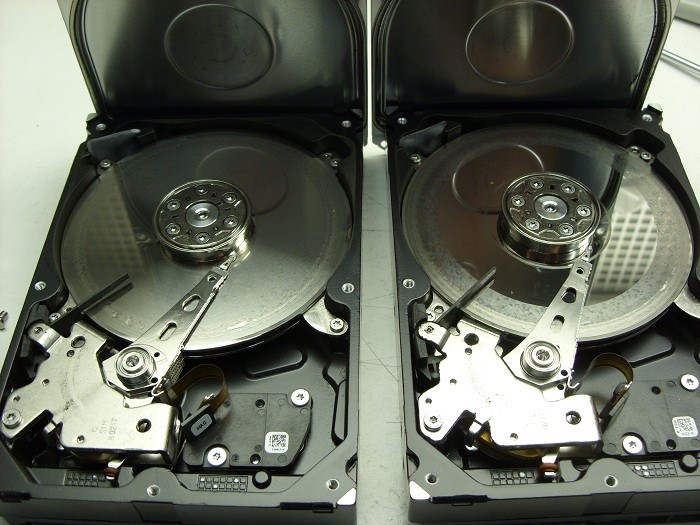
It’s been a while since I’ve posted any astonishing pictures of actual data recovery cases we receive. This morning we received a pair of matching Seagate 7200.11 500GB SATA hard drives that were in such bad shape I just had to share …

2 crashed seagates

They were part of a 2 drive RAID-1 set which means they were exact copies of each other. The client assumed having two copies of their data on two drives would ensure they would be safe. Unfortunately they were wrong.

Their assumption of safety is flawed on a several accounts by my reckoning.

First, both drives are physically in the same box . So if one falls off the table, they both fall of the table. And judging by the physical damage of these two hard drives, this might very well be what happened. Notice the scoring and rings forming all across the disks or platters of both drives. This is a real physical crash where the magnetic coating that was used to retain the data has been scraped off and left scattered through out the drive’s internals as a fine black powder.

Regardless, of how the physical damage happened, it is also apparent that the drives were running for sometime in this state. Typically minor crash debris is collected by a filter located in the top left corner of each drive. The filter is originally white in color but as you can see in the picture, both filters are now black. Crashes like this are also very audible and for a sample of what this sounds like, listen to the recording of one of these drive below.

Secondly, RAID box vendors often recommend you use two identical hard drives as was the situation here. Again, this does not sound like such a good practice to me. If one drive has a manufacturing defect, then there is a good chance the 2nd drive will have the same manufacturing defect, especially if the drives are bought at the same time from the same vendor. And even if the hard drives have no manufacturing defects, their life spans are bound to be very similar. Once one drive fails, the odds of the next one failing shortly after are quite high as well.

If your data is valuable, nothing beats a good back up on a separate distinct device that is stored in a different physical location. But should you find yourself without a backup and a failing RAID box, do your data a favor and shut yourRAID array down immediately and contact Memofix Data Recovery Services for immediate assistance.


another view


Top 5 Worst Mistakes A HDD User Can Make!

Or Mistakes I See Every Day That Can Be Easily Avoided
A Diatribe by Rob Armstrong, Memofix Data Recovery Engineer

Every day in Data Recovery labs across the globe, hard drives (HDDs) are received from people who were convinced they knew what to do when their HDDs failed. Unfortunately, most have been horribly misinformed by friends, family, sweaty nightmare, rumor and/or innuendo, or even worse poor Search Engine results written by non-professionals who think they know HDDs inside and out. The truth is, I have been in the Data Recovery industry for close to seven years, and I learn more about hard drives and each manufacturer and model EVERY DAY. It is not a simple or straightforward undertaking, and is unfortunately one of those things in life that is best left up to the professionals…for no other reason than most, if not all, Data Recovery Labs have a free evaluation service. If you attempt to “fix” your HDD at home, you could conceivably damage the drive beyond the point where it can be recovered – even by an accredited lab.
So here is the advice of a Data Recovery Tech who just wants the public to be better informed as to what they should do when the unthinkable happens (and yes, I am aware that if people heed my advice, we will be receiving fewer cases for recovery):

1. If the HDD is Dropped or Physically Traumatized in Any Way

Whether the device is running or not, once dropped, you should not apply power again. If you are truly concerned with not losing your data – send it in to a data recovery lab right away. Some would advise to apply power just once to see if you can get access – even for a short window of time – to copy off everything on there before it fails for good. Here’s the problem with that thinking: if you dropped the drive and the heads inside the drive physically bent due to the impact, then when you apply power, the heads now come into physical contact with the platters (whereas before the trauma they floated above the surface by several microns) and your data is scraped off at 7200 rotations per minute – becoming unrecoverable.

2. If You Have Sporadic Access to Your HDD

While working, you see the “hourglass” icon come up…too many times…or it takes waaaay too long to save, or sometimes your HDD boots to Windows OK, sometimes it doesn’t. Your HDD defaults to the “blue screen of death” sometimes – but not every time – you boot. These could be indicators that your drive is failing either physically or logically as bad sectors proliferate (reported as “Read Errors”) or your hardware may be slowly failing. In any case, the next time you have access to your HDD, COPY IT! All of your critical files and folders, profiles, e-mail documents, anything you deem important. You may never get another chance, and I’ve heard of many instances where consumers just kept rebooting until they had access – then did not back up once they have it. And no - putting your HDD into a refrigerator is not going to help.

3. If a Drive Fails in Your RAID Array

Hard drives can fail at any time without any type of warning (I know – you didn’t want to hear that), and therefore quite often, one drive in a RAID array will fail well before the others. Obviously, the way in which the data is written to a RAID makes it extremely simple to rebuild should one drive fail (with parity, each drive’s contents are re-buildable using the other drives). However, when multiple drives fail simultaneously – send the array into a Data Recovery lab. Once again, you will get a FREE evaluation, which will determine EXACTLY what is wrong with the RAID and what it will take to recover the data. Too many times have we seen RAID arrays where the consumer has replaced too many drives, kept the power on damaged drives too long, or “accidentally” reformatted the whole RAID after rebuilding didn’t work right away. Again, how important is your data?

4. If You Use One External for Both Mac and PC

Stop it. You just stop that right now. In this day and age, external HDDs are cheap enough to buy one for each of your O/S’s, and moving your HDD from one system to the other and back can cause your HDD to fail. In the end, it comes down to filesystem difference and the incompatibility of the two O/S’s. The way data is stored and written in a Mac environment is VERY different from the way a PC writes, and most systems have a difficult time resolving both O/S’s. You can’t mount a Mac drive in Windows (unless using a third-party program), and vice-versa, so you shouldn’t be using the same HDD with both systems. I’m sure some of you will yell and scream after hearing this advice, and have used one external HDD for both Mac and PC without any problems – but if the possibility exists that you will lose everything, isn’t it worth two externals?

5. If You Use Your USB Device for Storage

Again, stop it. Years ago, I assisted a Data Recovery company with customer service while also working in their lab, and many an argument was had with consumers over the definition of a “backup”. A backup is a secondary copy of your data. That means it exists not only in two locations or folders, but on two completely separate drives. This is the only way to become completely secure in the knowledge your data is safe from loss. As such, USB devices (aka thumb drives, USB sticks) should be used only for transferring data from one HDD to another immediately. Too many USB devices have been received that were smashed because it ended up forgotten and on the bottom of the purse, or lost and chewed up by the family dog (no, really). Do not store any data on your USB device that is critical for any extended period of time – unless you have a true backup on another HDD.

So there you have it. The early days of Data Recovery were a lot like the introduction of Science into public discourse hundreds of years ago. There were scientific methods we were using along with basic computer know-how to recover data – proven methods – but there was also a “fringe” element to recovery, mixing science and…guesswork. We would adjust the lid on a drive, believing that by doing so, the airflow inside the drive or magnetic field would affect the voice coil to get better results. I even remember sitting at my workstation all day and holding a drive, because I believed that if I let go of the drive it would stop working – some superstitious nonsense about my personal electromagnetic field affecting the HDD. Basically if the method worked for one person, we would all try it – regardless of how little sense it made. That was then.
Now, we as Data Recovery Technicians know exactly how to recover data from any HDD, using proven scientific method – no more guesswork. And that is why you should ignore rumor and poor forum scuttlebutt when it comes to the recovery of your critical data, and just send the drive in for a free evaluation. When the unthinkable happens. Which it shouldn’t, now that I’ve given you 5 ways to avoid it!

RAID Data Recovery and Physical Damage

One of our best Toronto data recovery partners recently had a RAID data recovery case involving eight hard disk drives configured in a RAID 5 setup. As you may know, RAID 5 allows the failure of any 1 hard drive and can be rebuilt with no data loss. But unfortunately in this RAID data recovery situation, there were two defective hard drives. Further investigation revealed that one one of the hard drives had actually failed 5 months ago and the stale data residing on it was of no value to the client. This left our data recovery partner with all their hopes pinned on the one remaining defective disc drive which had apparently just failed and was the ultimate reason for their RAID failure.

When they contacted Memofix later that morning, we asked them if there were any loud clicking or other unusual noises coming from the hard disk drive. They said no, but they noted that the hard drive model was not being reported properly by the SCSI BIOS at boot up. The model was displayed properly, BUT the capacity was indicated as 0 bytes!

After conferring with a few of our RAID data recovery techs we advised the client that the problem was most likely a corrupted module in the hard drive’s “system area” and we suggested we could fix it very easily. The “system area” is a storage area on the hard drive reserved by the drive itself for storing unique settings required by the hard drive to function. If a hard drive can’t read some of the modules, it often reports a zero byte size which prevents any access to the stored data.

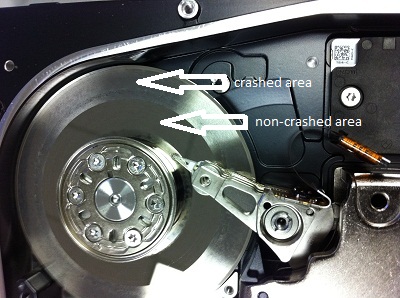
As we are located in the Toronto area, the partner packaged up the defective hard drive and brought it immediately to Memofix for further analysis. When we first hooked up the drive, there was a very light, almost indecipherable ticking noise. It did not sound serious and in fact our data recovery experts still believed the problem was related to a corrupted system area. However our attempts to repair the module were unsuccessful as the hard drive could not write back the changes we made. It appeared we had an issue with the hard drive’s head assembly that would need to be fixed first. So we opened up the hard drive under class 100 conditions in our Toronto data recovery lab to get a better look. And boy did we get a better look … see the picture we took below. 🙁 Notice the heavily crashed area where the smooth platter surface has been roughed up severely as well as an additional ring of damaged at the inner hub of the platter.

There will be no data recoverable from this crashed hard drive! It just goes to show you that even the best data recovery specialists can be fooled as it’s not always possible to hear severe damage with your ear.

By the way, even though this 8 drive RAID array had two bad hard drives, Memofix was still able to rebuild the RAID with the one stripe being bad throughout the RAID. This results in the recovery of 5 good chunks of data , followed by 1 bad chunk of data through out the volume. The RAID data recovery results may not be exactly stellar but the client was able to regain many smaller document type files.

raid recovery toronto
badly crashed SAS or Serial Attached SCSI hard drive
SAS SCSI Drive involved in a terrible crash

Remote Data Recovery

Toronto GTA, Ontario, Canada. Recovering data remotely is a service presently being offered by several of the larger data recovery companies. It sounds so convenient, no shipping, no computer disassembly, no risk, just call someone up and they remotely connect to my computer, and “poof” my data is restored. If only it were so simple. In reality it’s much more of a marketing ploy then a realistic recovery option. The complexities and dangers of offering remote service seem to counter the very pillars of data safety.

First you must consider that for a remote data recovery service to be successful the hard drive must be functioning properly; otherwise there is a serious risk of causing further damage. If the drive has physical problems and is beginning to fail, there may only a short window before the damage becomes insurmountable. As every data recovery company will advise, if the data is important, shut it off immediately and do nothing. So unless you’re knowledgeable enough to determine the condition of your hard drive or you don’t mind a 50/50 chance of doing further damage you may want to reconsider a remote data recovery service.

Furthermore, this service requires the user to have some technical computer skills as the original hard drive must be removed and installed in a second web attached computer along with possibly an additional hard drive to copy the recovered data to. Some assistance will also be required to setup and establish the remote link. And while some users may feel comfortable with these tasks, the real concern is with the increased risk of causing further damage whether due to physical handling, static shock, or the unintended running of automatic drive utilities like chkdsk.

It is our policy and that of most other professional data recovery services to create an exact image or mirror of the original drive. The original drive is then put away for safe keeping, while any alterations to the file system structures or running of utilities are completed on a copy of the copy. In a remote data recovery situation, you do not have the luxury of having a backup copy in case things go wrong.

We also see many cases of apparent file structure damage where the storage device or hard drive initially appears to be operating fine but as we attempt to image it we discover read errors or the drive starts failing in some other way. In instances like this there is a strong chance the file structure damage was actually caused by the physical issue. Attempting to recover data from a drive like this will just aggravate the situation and risk further damage to the storage device or filesystem.

In my past life, I worked for one of the larger data recovery companies that considered offering a remote recovery option. At the time we had multiple lab locations across the USA and we were already using remote connections to share the data recovery expertise spread throughout our different labs. Our more senior data recovery engineers essentially used remote access to evaluate and direct a more junior tech in how to proceed with a difficult data recovery. Prior to us offering the service to the general public, we investigated our competitors offering by conducting a secret shopper campaign where we attempted to engage their remote data recovery services. Surprisingly, we were repeatedly met with opposition when we requested a remote recovery. They tried to sell us data recovery software, followed by in-lab service before reluctantly agreeing to only attempt a remote recovery IF we approved a minimum of $1500 for the recovery if successful. And this was without ever looking at the media. It’s readily apparent that the entire concept was being used to get you to call them so they could then attempt to try and talk you into shipping the case to their lab.

Remote data recovery has most of same limitations and capabilities as that of a good data recovery software program. The drive must be functional and it must be connected to a working computer system. In many situations a data recovery program will perform as good as a remote recovery service. In fact, the remote recovery tech is more then likely going to be running utilities as part of the effort to salvage your data. So why pay for someone to hook up remotely and run utilities on your system. You can do that yourself and with less complications and time wasted establishing a safe connection.

There are a few occasions where remote data recovery does makes sense, where due to the isolation of the location there is no other option, but for those cases that can be delivered to a full service data recovery lab you would be very unwise not to take advantage of the hands on experience of a data recovery specialist. https://www.memofixdatarecovery.com/ … David Foster