Data Recovery, recovering Hard Drive data, RAID data recovery

After-Hours Emergency Service (647) 448-5302

The Challenge of Being Unique

Today’s blog features a guest post from Andrew Gotshal, one of the original founders of Memofix. – David Foster

Occasionally, when meeting with manufacturer partners or corporate executives, I’m asked what makes Memofix different in the marketplace. What sets us apart from other technical services organizations? What unique advantage or value do we provide to customers?

It’s easy for us to list all the important stuff that OEMs and customers want to hear. With over 25 years of experience we have a proven track record. The majority of our business comes from returning clients and word of mouth referrals, demonstrating our commitment to customer satisfaction and quality. We regularly pass performance tests and service level agreement metrics with our manufacturers; which means we deliver on our depot warranty commitments. Our technical expertise allows us to tackle tough problems and provide complete solutions. But most competitors who are focused on customer responsiveness and quality can provide those same attributes. So why are we different?
Server data recovery

Our company is a family of individuals from different backgrounds and unified by one important characteristic – we’re Geeks. Capital “G” Geeks who want to understand the technology that we are working on, to figure out why a problem is occurring, how do we fix it and can we make recommendations to ensure it doesn’t happen again. Customers who throw us unique challenges tell us that they like our thought process. Instead of jumping to a conclusion we start running through the various scenarios that could result in the reported problem. Then we start our testing process to eliminate one or the other and focus on the root cause. Think of us as the child who takes apart the family computer so we can figure out how it works. Except when we put it back together again, we’ve made a few improvements and it runs a lot better.

Memofix loves storage technology, it runs in our blood. That’s not to say we are singularly focused – we are after all one of the largest national providers of depot services for a leading notebook OEM. But in the same way that you have a fondness for that first person you dated seriously, we look back on our start as the repair centre for the first Seagate drives that entered the Canadian market. This has led to our investment in specialized equipment to analyze and recertify hard drives. Because we have some of the brightest technicians in Canada we are one of a select group in North America that can repair hard disks and complex tape backup technology. Our membership in the Technical Services Consortium (www.tsc-ww.com) gives us global access to service expertise, parts and process improvement. After almost 30 years in this industry we continue to look for ways to improve our capabilities and provide more value to our business partners and customers.

We have tackled some unique challenges for our customers and the ones that we are proudest of generally were not the most profitable but they appealed to our Geek side. Here are some examples:

  • A clinic in Haiti relied on their 20 year old X-Ray machine to provide badly needed medical care. When the hard disk started to malfunction they searched extensively for a solution because replacement was not an option. We were able to supply the parts needed from our spares (largest spare parts inventory in Canada), recover the data and earn a big thank-you from the medical staff.
  • Customers regularly come to us with specialized production equipment that is decades old, with a similarly aged hard disk as an important component. In almost every case we have the parts and the technical expertise to keep this equipment running, including a 3.2MB hard disk that we provided to a data recovery customer just last week.
  • Where a replacement drive is not available for an older system, we have been successful in using newer drives and reducing the capacity so that it will be accepted by the legacy operating system or application (known as destroking). In some cases our technicians will also need to reconfigure the firmware on the drive, an important skill for us and rarely found outside OEM organizations.
  • During the recent hard disk shortage, caused by flooding in the Philippines, several OEMs approached us to leverage our expertise in firmware re-configuration, in an effort to use alternative drives for computers that had been designed for specific models and brands of hard drives.
  • We have been able to provide feedback to our OEM partners on their testing process, helping them to understand that perfectly good drives were failing due to their audit software. The result for our manufacturer partner was a higher yield and lower replacement costs.
  • Several retail chains rely on us to wipe personal data from storage devices returned by their customers. Wiping Xbox hard drives and flash drives presents a unique challenge because the operating system is embedded with the consumer data. Our technicians were able to create an algorithm which would detect where the OS is located on the HDD or flash drive. This meant wiping all data up to the OS, recognize where the OS is and leave it intact, and start removing consumer data immediately after.

Another important element of our uniqueness is attitude. We are never more important than the customer’s we serve. We customize programs to accommodate the customer’s process branding, financial models, and security. Manufacturers come to Memofix in order to reduce their costs and we approach each new project with that objective in mind, including pricing our services based on the OEM realizing those financial savings. We are willing to share the risk and create a partnership versus simply being a supplier.

The challenge of being unique comes from constant re-evaluation of what’s important for your partners and clients, and how we adapt to meet those changing needs. To be relevant to the marketplace you have to stay focused on the customer and not your competitors. You have to resist the urge to concentrate on revenue and expense reduction, and instead invest in skills, people, technology and process in order to be successful through long-term relationships. We try to meet that challenge every day and so far our customers are telling us that we’re doing OK.

Andrew Gotshal

Founder, Memofix

 

Memofix Announces Cloud Backup Service

October 24th, 2012

Professionals and companies are coping with an ever increasing amount of information and they realize that it’s critical to have a dependable system in place to safeguard their valuable data files. That system may involve additional storage capacity or tape backup technology which requires an increase in equipment purchases and technical support to manage a regular backup process.

Memofix can provide you with a Cloud Data Backup service that can simplify your IT operations and give you economies of scale. A cloud backup, recovery and restore solution takes advantage of your existing infrastructure, so you don’t need to buy or install expensive equipment. Our cloud backup software integrates with IT environments to locate and prioritize files for backup, and then securely transmits encrypted copies of those files to offsite data centers. This results in a lower total cost of ownership compared to the purchase and maintenance of complex tape backup systems.

Our Infrastructure is powered by IBM’s Award Winning Tivoli Storage Manager Software, ensuring compliancy with government mandates while securing your most important asset, your data. This managed solution includes daily backup notifications summarizing the previous days backup details, full technical support and a full monitored service. Memofix provides automated, policy-based, data backup and restore services that can easily be customized for you or your company’s specific requirements.

Our backup process creates a copy of your files or application data, compresses and encrypts it, and then securely transfers the copy at a prescheduled time to servers which are located at a secure Canadian facility. Backups can be scheduled, performed manually, or performed remotely using a Web-based interface.

Memofix Cloud Backup service advantages:

• Smarter use of IT resources. Our cloud backup, recovery and restore solution allows you to redirect IT resources to more strategic initiatives. Select a backup schedule as often as you want, specify the number of days or versions to keep, and data is saved automatically. You never outgrow your backup requirements and only pay for the space you need.
• Stronger compliance safeguards. A cloud backup solution provides more reliability and redundancy than tape backup. Your data resides in a secure Canadian sate of the art facility. Our service supports Windows, Linux and Mac operating systems, and SQL, Exchange, Oracle and other databases.
• Eliminates the shortcomings of tape backup. Tape backups may be vulnerable to obsolescence and can be lost or damaged while being transported off-site. Recovering data from a tape system can be a slow process, especially if a tape needs to be retrieved from an off-site vault.
• Improved reliability and speed of recovery. Our cloud backup solutions provides instant restoration of data, including individual files and access to previous versions of your files. You can archive backups for long term storage and retrieve files as needed.

The Memofix Cloud Backup service can save you money, simplify your IT operations and give you an increased sense of security about your data. Let us show you the advantages of our solution over your current backup process.

For more information please contact Larry Shulman via phone at 905.660.4936, extension 25, or by email at [email protected].

Recovering Data After a Format

For many years it’s been common knowledge among the more technically savvy computer enthusiasts, that even if you format your hard drive, the data can be recovered. Any simple data recovery software program and even most computer stores with a service department should be able to quickly restore your hard disk drive data after a format. And while this rule has been true for many years, there’s now a new sheriff in town, and he plays by different rules. With the advent of Vista and Windows 7, formatting your disc drive may now permanently destroy your computer data. Read on for the details …

In Windows, there are two types of formats that can be implemented; a quick format and a regular format. In the picture below, a quick format is selected, while un-checking the box would perform a regular format.

Data Recovery Services
Windows Format Screen

On older versions of Windows, up to and including Windows XP, a quick format overwrites the beginning of the MFT or Master File Table. The MFT is an index of all the files stored on a volume. Formatting re-initializes the MFT to appear to contain no data files by truncating the length of the known MFT. However, the orphaned index entries from before the quick format are still intact and can be used to recover all the previously existing files. With older versions of Windows, a regular format does exactly the same but it also tests for bad sectors across the entire drive. This test is non-destructive and does not overwrite any other data areas, so again all data files should be recoverable.

On newer versions of Windows, from Vista on and including Windows 7 and 8, a quick format does the same as with older versions and the data should be recoverable. BUT the regular format has changed substantially. It now overwrites “every” sector on the hard drive and as a result no data will be recoverable once this command is executed.

So why would Microsoft change the regular format to now erase every trace of data? Personally I believe it is in response to the increased awareness over data security and in particular the news coverage of personal data being discovered on tossed computers (see this interesting story on one couples adventure with leftover data files). Now, with just a simple regular format, Microsoft allows an end user to effectively do a complete and secure erase of all your hard drive’s personal content.

With new power comes new responsiblity, so be sure you know what you’re doing before formatting any hard disk drive, because even your friends at Memofix Data Recovery Services may not be able to help you.

Data Recovery and the Thailand floods

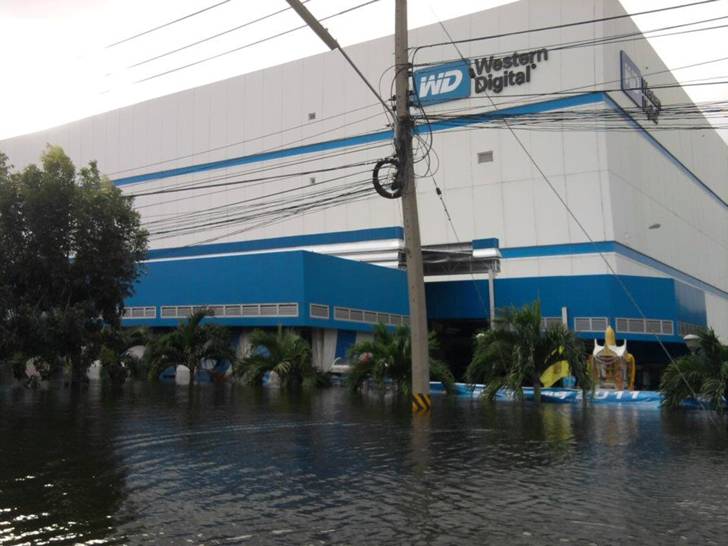
If you’re not aware, Thailand, the 2nd largest producer of hard drives in the world, has been experiencing some intense flooding which in turn has significantly depleted the worldwide supply of hard disk drives. Western Digital appears to be the worst hit and as result will likely lose its ranking as the #1 producer of disc drives.

Does this affect the data recovery business? YES, you may pay more.

The majority of Data Recovery cases require the replacement of various defective hard drive components and in particular the head assembly. These individual hard drive components cannot be bought on the open market and consequently data recovery companies source complete hard drives for breaking down into parts. This need for specific hard drive parts has in turn fostered a growing business in used hard drive sales. And while a disk drive may have originally sold for $79, these vendors have long been demanding double the price when supplying a data recovery service provider.

NOW, with the worldwide shortage of new hard drives, the used hard drive market is exploding and prices are exploding even more. Many data recovery companies will need to start charging higher rates to cover the increase in parts cost. However, Memofix Data Recovery Services sources 98% of its parts drives from our mother company Memofix Hitech Services and as a result we rarely need to order parts. Memofix has over 26,000 hard drives in stock and services up to 3000 new hard drive every month. With such a large supply we charge less, try harder and complete recoveries quicker. When it matters, call Memofix!

http://www.memofixdatarecovery.com/data-recovery-hard-drive.php

Laptop Hard Drive Crash

An Unrecoverable Notebook Hard Drive
Many of the 2.5″ hard drives designed for laptop, notebook and netbook applications use glass platters. The glass platters can be manufactured with smoother and flatter surfaces which allow the heads to be flown closer to the disk surface. This in turn allows the manufactures to increase the density and store more data in the same space.
However, glass isn’t exactly known for its indestructibility and this picture illustrates the problems. This Western Digital laptop drive originally had two disks but the top disk has shattered into a hundred pieces. No useful data will be recoverable in this situation.

Recovering the past …

North York, Ontario, Canada.

Everyone once in a while we get an interesting case that makes you scratch your head. We recently had a client that had re-formatted her hard drive and re-installed a bunch of programs before realizing that over 5 years of digital photographs were inadvertently forgotten. In a panic she arrived desperate for some advice or assistance in retrieving her photos. We quickly calmed her fears and assured her if there were photographs left intact on her hard drive, we could recover them.

Once in the lab we discovered that her actions had only overwritten a small portion of the drive’s file system and we were able to provide her with 85% of her pictures intact and in their original folders. We also recovered hundreds of orphaned photos which we gathered and put into a separate folder. She was ecstatic and went on her way happy to have her pictures.

A few days passed and we received a call from one very unhappy client. Apparently, we have included photographs which do not belong to her and they are of a very racy nature. She is irate and offended. Of course her husband denies any knowledge of these pictures, nobody else has access to her system, and the people in the pictures are not familiar to her or her husband.

I’m at a loss to explain how this could happen. My only thought is that the target drive we imaged her drive to, was not erased prior to us using it, and we have recovered images from what is left of some former client’s data image. But our target drives are always prepared in advance with a pre-determined pattern written on every sector, and we are extremely meticulous in these processes. We quickly pull out our virgin image of her drive, which we retain for 30 days, and we confirm that the areas of our drive not used by the present image are still filled with our pre-determined pattern. Ok so what the heck?

In order to get to the bottom of this issue we had the client once again send in her original hard drive. Our image was then compared with the original and not one byte was out of synch. It’s pretty clear that the mystery pictures were on her original drive before she ever brought it to us. A conversation ensues with the client as to the history of the computer and the hard drive inside it. She reveals that the original hard drive was filled to capacity several years ago and her son-in-law upgraded her to a larger drive. Uh-huh … I think we’re getting somewhere. Where did the son-in-law purchase the “new” drive? “Oh it wasn’t so new, he purchased it on eBay.” The pieces quickly merge together as we realize that the images have survived several formats and at least 2 years of constant computer use. Who took the pictures originally and who the cute girl is, we may never know, but we do know there is one husband who is very happy not to recognize her.

Laptop, Notebook, & Netbook Data Recovery

Toronto GTA, Ontario, Canada. Data recovery from laptops, notebooks and netbooks is not that much different then recovering data from desktop systems. The most noticeable difference lies in the size of the storage device or hard disk drive being used by each computer. Most modern desktop computer systems uses a larger 3.5” HDD or hard disc drive while a typical laptop or notebook style computer will use a smaller 2.5” HDD. Additionally many newer notebooks and netbooks are starting to use SSD or Solid State Drives. This discussion will focus solely on hard drives.

While most people assume it’s tougher to recover data from a smaller 2.5” laptop hard drive versus the 3.5” desktop drive, it is actually the opposite in most circumstances. When data is lost due to a physical or mechanical issue with a hard drive, our historical statistics clearly show that 2.5” laptop or notebook hard drive owners have an almost 10% better chance of seeing their data again versus 3.5” desktop drives owners. In my previous life at another recovery company, this same statistic also held true. Hmm … seems strange, especially when I see some data recovery service companies adding a surcharge for dealing with laptop hard drives.

So why are we more successful with 2.5” hard drive recoveries? First 2.5” hard drives sustain less damage when they do crash and second they are more accepting of standard data recovery procedures.

Laptops, notebooks, netbooks AND 2.5” hard drives are designed to take more physical abuse then your typical desktop computer or hard drive. By design and virtue of their tiny mass, 2.5” hard drives can absorb anywhere from 3-5 times as much shock as a typical desktop drive. Portable computers also use shock absorbing mounting brackets to further isolate the hard drive from any external bumps or drops. These damage saving features decrease the severity of damage due to crashes.

Laptop and other portable computer manufactures are also concerned with decreasing the energy consumption and heat dissipation of their products. Fortunately, both of these pursuits provide additional benefits for preserving your data. For example, most laptops save energy by spinning down the hard drive when the laptop is not used for a predetermined period of time. And because hard drives are much more susceptible to damage when they are spinning, this energy saving feature can really save data. 2.5” laptop hard drives take it even a step further and use ramps to lift the heads physically off the disk surface when the drive is spun down while many 3.5” hard drives continue to land the heads on the surface of the disks or platters. Once again an energy saving feature that helps prevent damage to the disk. And there is also some validity in the argument that saving energy creates less heat which in turn causes less drive failures.

Laptop, notebooks and netbook drives are also much more tolerant of data recovery techniques. Head xplants or the process of replacing a bad head assembly with a good head assembly is one of the more commonly used data recovery techniques, but because each hard drive’s head assembly is ever so slightly different and the hard drives electronics were tuned to work specifically with the original head assembly, xplants are often not successful. However this procedure is much more successful when attempted between two 2.5” hard drives versus between two 3.5” hard drives.

Because 2.5” hard drives are principally used in portable devices that by definition will operated while the user is mobile, they are designed to deal with harsher conditions and recover from a larger range of off track data situations then a typical 3.5” hard drive. Consequently they are more accepting of new heads with their slight differences. You can compare it to a racing car and a jeep. The racing care is tuned for high performance and is capable of going very fast and taking corners at incredible speeds as long as the road is smooth. But when the road turns too dirt and mud the racing car gets stuck. On the other hand, the jeep may not go as fast but when the road gets rough, it’ll keep on going.

Media damage, whether disk or platter damage, head crashes, or rings forming on the disk are always a problem. And once again, we find 2.5” hard drives are just more tolerant of damage. As a method of preventing damage in the first place, 2.5” hard drives fly the heads at a greater height above the disks then 3.5” hard drives. This allows a laptop or notebook drive to take more physical abuse or impact without having it’s heads coming into contact with the disk surfaces. This design also allows them to float above damage that would impede the positioning or even damage the heads of a typical 3.5” hard drive and thus giving us a much better chance of recovering data.

So even though your laptop hard disk drive may be smaller then it’s big brother the desktop drive, it’s still the leader in data loss prevention and the better drive to be using should you ever need the services of a professional data recovery company, like Memofix Data Recovery Services. http://www.memofixdatarecovery.com/

… David Foster