Data Recovery, recovering Hard Drive data, RAID data recovery

MELTED DATA

Almost every month someone in Canada sends a hard drive that has been involved in a house fire. They often resemble burnt bricks like the picture below of a drive we recently received from a client in London, Ontario. None of our techs were in a hurry to get their hands dirty, but as terrible as these situations look, there is often an easy recovery lurking just under the mess!

Plastic melts easily and this external hard drive is in-cased in plastic like a pair of jeans on a teenager in the 80’s.


But with a little invasive surgery we are able to free the hard drive from its prison.

But will the prisoner be able to talk?

As we have discussed various times in this blog, it is the condition of the disks that will ultimately decide if we can make this hard drive talk again. So let’s open the bonnet and have a peak under the hood …


WOW! It looks pristine. Notice the lack of any contamination due to the fire or the liquids used to douse it. We proceeded to perform a full recovery on this case by replacing only the PCB


Below is another fire victim from a client in Montreal, Quebec which was not in such great shape when we opened the lid. In fact, it may not be recoverable … but we’ll never know for sure as the client declined our quote.

As a general rule for data recovery purposes, fire damaged drives are not typically unrecoverable due to the heat and smoke of the fire, BUT more often, it is the excessive use of firefighting liquids that do the damage, especially if they are allowed to dry out. The drying out leaves mineral and other debris deposits on the disks which are tough to overcome.


And here is a look of what happens when someone applies power to a fire damaged hard drive that has had the sealed assembly breached. You can see the deep ring on the inside of the disk where the heads are. This disk drive will NOT be recoverable.


So if you have a sad looking case of melted data don’t give up hope, data recovery may be as easy as a PCB replacement.


WARNING - WARNING - WARNING

In my last blog I recounted how we managed to recover the data from a multiple hard drive RAID array AFTER two different European data recovery companies had failed. In that situation, we were the white knight, coming in to save the data where others had failed. But recently, we were painted as the villain for performing similar data recovery magic right here in Toronto. In fact, the title of this blog came from our 1st ever negative Google review as a result of this recent case.

To summarize, we received a 2.5” Western Digital WD hard drive for data recovery. The particular model drive sent in, has a USB3 interface built onto its PCB (printed circuit board) and it does not have typical SATA connections. From experience, we have found that data recovery imaging utilities (both in-house written and commercial) work terribly with USB interfaced hard drives. As a result, we don’t attempt to access or image USB3 type WD drives using their native USB PCB. Instead, we have learned how to convert a particular standard WD SATA PCB to work with these native USB drives.

So when we received this case, we immediately converted one of SATA PCBs to work with this drive. The conversion process required us to remove one small 8 pin programmable chip from the client’s original USB3 PCB and transfer it onto our SATA PCB. Once we did this, we were able to evaluate the drive fully and concluded that the drive had bad heads and likely minor disk damage. We contacted the client and quoted them $1300, which they declined. We transferred the client’s 8 pin chip back to their original PCB and returned the drive to the client.

The client then took it to another data recovery company who claimed it was unrecoverable because we had damaged the PCB and furthermore we left solder paste around the 8 pin chip and were thus “VERY AMATEURISH”. Ok we forgot some totally inconsequential solder paste on the PCB. But we never once applied power to the PCB so the claim we damaged it seemed unfounded. Of course there was a chance we damaged the small 8 pin chip so we suggested the client bring it back to us. They did; we removed the chip and verified it’s functionality using a chip reader. While it was here, we re-established the fact that we could still recover the data, but again the client did not want to pay us anything and left with their drive intact but with no solder paste residue to complain about.

Apparently, the client then went to KROLL ONTRACK, “the industry leader and the largest data recovery provider in Canada and in the world”. The client claims they also declared the drive unrecoverable due to the same “damaged” PCB.

The client then came back to us, and we again re-iterated that we had not damaged anything, and we could still recover the data for him. In fact, just to keep our good guy image alive, we offered to reduce the cost by $300. At 1st the client accepted thinking we offered the recovery at $300. But when he realized we weren’t giving it away and still required $1000 to complete the recovery he declined and created his mean spirited Google complaint.

Whether this client was trying to get a free recovery or not, I don’t know, or care, but in the end I am aghast that 2 other professional data recovery companies in Toronto cannot recover the data from a situation where we regularly do.

It helps to realize, that the world wide data recovery industry has no standards, no way of knowing a company’s competency, or a company’s integrity. There are lots of bad guys waiting to take your money for very little in return and many posers issuing inaccurate statements about what is recoverable and what is not. The damage they can cause is inexcusable. I have heard it said that something like 70% of small companies that lose their data permanently are out of business within 6 months. Don’t be one of them!

If your data is important, don’t believe the 1st “It’s UNRECOVERABLE” that you hear. Data recovery companies and technicians are not created equal. Please seek a 2nd or 3rd or 4th opinion, or maybe you should just come to Memofix Data Recovery Services first.


What is a CRASHED hard drive?

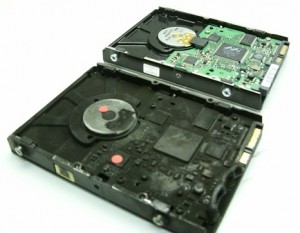
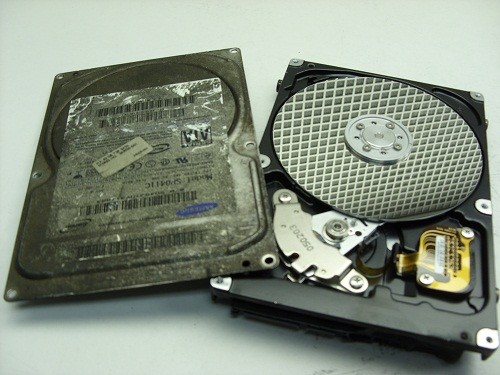
We hear the words “my hard drive has crashed” at least a hundred times a month and yet it is seldom what we discover when we open the lid of someones “crashed” hard drive. The picture below shows two Seagate 500 GB hard drives we recently received for data recovery. Both drives were declared crashed by their owners! However only one appears to be physically crashed.

data recovery toronto

The drive on the left is in pristine condition. The disks are extremely shiny and consistent across the entire surface of the disk surface. The clients problem was determined to be a bad PCB or printed circuit board.

The drive on the right is not so pristine and has physically CRASHED! The smooth shiny disk surface has been scored and ringed by constant contact with the heads while the disks were spinning. This amount of damage could only occur if the drive was left running for a long period after the initial contact damage. Click on the picture for a closer more shocking look.

The drive on the left should be recoverable. The drive on the right is NOT recoverable.

If you require a price estimate on our data recovery services, follow this link for a quick reply … Canada’s Data Recovery Experts

Choosing a Data Recovery Service Before You Need Them

Today’s blog features a guest post from Larry Shulman, our Business Development Manager and a veteran of the Canadian computer industry.

IT managers have a tough job today. Most are dealing with demand for expanding data storage capacity, keeping a complex computing infrastructure running with less dollars and planning for disaster recovery and business continuity. Memofix, drawing on our experience as an extension of our customer’s IT department, has some suggestions on what to look for when choosing service partners for specific challenges.

Too often our clients come to us in the midst of an emergency. They may have a hardware failure and require an immediate turnaround on a repair or replacement unit. Perhaps a hard drive or RAID system has crashed and the data is critical to their operation. At that point in the crisis customers may not have the luxury of worrying about the security of the data contained on those devices or about how to solve a complex technical issue. Memofix is known for their responsiveness in these situations but we can’t help think that a small amount of research would also give our customers added confidence that they are not put at undue risk.

When it comes to data recovery we think our customers, both IT managers and technology resellers, need to look deeper at the service partner they are considering. A prospective data recovery partner will have access to sensitive data that only they can access. Therefore don’t just rely on technical ability to recovery data in a timely manner. You need to partner with someone who takes privacy and data security as seriously as you do. Therefore we think you should do the following:

  • If you’re looking for data services of any kind, do a back ground check. If you are sending storage devices or media to a supplier, for repair or data recovery services, can you trust them to ensure proper security measures are taken? Memofix recommends that you ask for references and check them out thoroughly. We regularly sign NDAs (non-disclosure agreements) for our customers and our technicians that work on any data device are subject to an extensive background check before they are hired.
  • Tour the supplier’s facilities and talk to their management and employees. You want to make sure that your potential partner has an efficient operation and that their staff is motivated to solve problems on behalf of the customer. Memofix has an open door policy for potential new clients or existing customers and we’re more than happy to let you visit.
  • Ask for a demonstration of the services you are looking for. For data recovery it’s easy to demonstrate how to solve simple problems but the supplier should be able to walk you through the process of rebuilding a drive or extracting data from a failed RAID. Memofix can address any specific types of devices that you need to support and we’ll even provide some advice on how to avoid having to call us.
  • Make sure that a prospective partner has invested in areas that support your requirements. Memofix has made a significant investment in our data recovery lab, in our technicians and in stocking over 20,000 hard drives for spare parts.

Memofix has every confidence that we will meet or exceed the scrutiny that we recommend. We provide depot work for some of the largest storage OEMs in the industry which means we’ve passed stringent audits and assessments. Make sure that you put any prospective data recovery partner through a similar process before handing over any storage device or media. Or simply contact Memofix and come by for a visit.

Levels of Data Recovery for Hard Drives

Toronto, Ontario, Canada.

Data Recovery Service Providers often categorize hard drive data recoveries into different levels and Memofix Data Recovery Services is no exception. While we don’t provide flat level pricing to individual consumers, we often provide our MACC or Memofix Authorized Care Centre partners with flat rate pricing based on three categories or levels of data recovery. Our definitions of these levels are described below and can be helpful in preparing yourself for the costs and degree of difficulty involved with each increasingly complicated recovery scenario.

LEVEL 1

Level 1 is the lowest level and requires the least expertise and resources. Level 1 means the hard drive is still 100% fully functional. It is recognized by the computer and if the user was to reformat their hard drive they would be able to continue to use it, albeit without their original data.

Level 1 type problems are NOT the fault of a failing hard drive. Level 1 type problems ARE the result of damage, corruption or deletion of all or part of a hard drive’s file system. These actions could have been done deliberately, accidentally, or even unknowingly. The file system is “actual data” written on the hard drive and for our purposes, it can be thought of as a big index that points to the locations on the hard drive where a particular file or folder is stored.

If that index is damaged or corrupted, the operating system may not be able to locate a particular file or folder. Or if the index is for a file or folder used by the operating system, then the drive may not be able to boot or be accessed using conventional methods.

Examples of Level 1 type problems would include;

  • Deleting a file or folder
  • Formatting your hard drive
  • Restoring the operating system
  • Boot Virus Infection

Many level 1 data loss situations can be remedied by a tech-savvy end-user using readily available data recovery software. However there are precautions and the peace of mind that only a professional data recovery service company can give you, so if your data is absolutely CRITICAL to retrieve, do NOT attempt this. However, if you can afford to take the risk or just can’t afford the cost of professional help please read an earlier blog I wrote on the subject of do-it-yourself data recovery … http://www.memofixdatarecovery.com/blog/index.php/diy-data-recovery-do-it-yourself/


LEVEL 2

Level 2 is the middle level and requires more expertise and resources then level 1. Level 2 means the hard drive is not functioning properly but the problem(s) will not require work to be done in a clean room environment. Level 2 data loss situations are normally something an end-user cannot solve themselves. Nowadays even switching a PCB is not a simple process, as the drives HDA (head disk assembly) is fine tuned to work with the same PCB it was manufactured with. In fact, the drive’s PCB contains stored values which determine critical settings used by the heads to position and read data optimally. PCBs from the same model hard drive and with the exact firmware can NOT be simply swapped out unless these stored values are first transferred to the new replacement PCB.

Examples of Level 2 type problems would include;

  • Defective PCB or Printed Circuit Board electronics
  • Overwrite or corruption to the hard drive’s “system area” (special files used exclusively by the hard drive for its own operation and maintenance.
  • Corruption to the drive’s firmware.
  • Excessive read errors or hard media defects that are not the result of weak or bad heads.
  • Issues with full disk encryption or file encryption


LEVEL 3

Level 3 problems indicate a major failure with the hard disk drive. Level 3 means the hard drive WILL require extensive cleanroom work to enable any recovery. Typical level 3 recoveries involve head crashes where the drive’s heads have come into contact with the disk surfaces. This usually causes damage to the both the disks and the heads. To recover any data the drive must first be made functional again. First we purge the sealed head disk area of any free particles and then we replace the heads from a new and exact version of the original hard drive. Then we attempt to copy off the used areas of the bad hard drive. During this process the heads will often go bad again due to the damage on the disks. So we must repeat this procedure until we have imaged or copied off all of the used areas on the bad hard drive. This process can take 2 days to 2 months in extreme cases. In the worst cases, the damage is so severe that newly installed heads are instantly destroyed and no recovery will be possible. Another common level 3 scenario occurs when a hard drive is dropped and the spindle motor that spins the disks is seized. This requires the transfer of the disks onto a new motor and typically requires multiple head xplants as well.

Examples of Level 3 type problems would include;

  • Damaged heads and disks
  • Seized or non-spinning spindle motors
  • Stiction, where the heads have become stuck to the disks
  • Fire or water damage
  • Dropped, knocked over, bumped, or physically abused hard drives


So to be brief and to summarize,

  1. If a client or user has deleted a file/folder or reformatted AND their hard drive was and is still working perfectly, then it is a LEVEL1 data recovery scenario.
  2. If the drive was physically abused in any way, or if it makes any unusual noises it is likely a LEVEL 3 data recovery scenario.
  3. For anything else, a LEVEL 2 data recovery scenario is most likely.

In a future blog we will discuss USB flash, camera cards and SSD data recovery levels.

Data Recovery & House Fires

If you’ve ever been the victim of a house fire, you understand what a mess it can create. But interestingly enough, a lot of the mess can be attributed to the actions used to extinguish the fire, versus the fire itself. In particular, the spraying of water and other firefighting liquids can create a wet soggy environment which is definitely not friendly for electronic devices such as your computer or the hard disk drive that resides inside.

Recovering data from hard drives which have been exposed to heat, fire, and water is not as exponentially difficult as some data recovery companies may lead you to believe. Even a hard drive as badly burnt as the one below was a fairly easy recovery for our skilled data recovery technicians located in Toronto. Notice the difference in color due to the soot and smoke, as well as the melted PCB and plastic connectors.

Will my data be recoverable after a fire?


But what really determines if the data will be recoverable or not? We can replace melted PCBs. We can replace damaged head assemblies. We can rebuild missing NVRAM data. But it is the condition of the disks or platters that are most important when determining the chances of successfully recovering the data on any damaged hard drive. In most of the fire cases we see, the hard drive’s pressure equalization valve and lid seal are successful in protecting the disks from exposure to the fire or fire retardant liquids. In those where the seal was penetrated we may find some water residue which can usually be cleaned successfully.

And when we open this fire burned drive, we see a pristine gleaming disk with no apparent water, soot, or other residues being present. And as is typical with most house fires the heat was not severe enough to warp or bend the disk(s) in anyway. So once we replaced or rebuild the damaged components we were able to get the hard drive functioning long enough to create a sector by sector image of the hard disk drive. We then successfully recovered all the client’s files from this image.


Inside a fire burned or well done hard drive.

Not all recoveries are as simple as this burn victim, but our extensive expertise allows us to successfully recover data from over 90% of the burned hard drives we receive for data recovery. If your hard drive is the victim of fire and you need your data recovered, we would recommend that you seal the disk drive in a zip lock baggie as soon after the fire as possible. This will prevent any water residues from evaporating and leaving mineral deposits on the disk surfaces which may hamper our recovery attempts. And remember, even if things look grim, we can often put a smile back on your face. www.memofixdatarecovery.com


Data Recovery & Encryption, foe or friend ?

Toronto, Ontario, Canada.

To most of us, the word “encryption” conjures up images of spies and secret disks containing information that must be guarded at all costs. Few of us realize that we all rely on and use encryption almost every day in our normal lives. Whether making a cell call, sending an email, buying something with your debit card, or accessing the web wirelessly, we are using and being protected by this not so simple process.

What is encryption? Encryption is the process used to transform and disguise data so that it is unreadable or undecipherable to anyone without a pre-determined secret code or password. Basically, the data to be encrypted is sent through an elaborate algorithm using the secret code or password to scramble the data into indistinguishable rubbish.

Please note, that password protection is NOT encryption. Password protection “may” prevent access to the data, but it does not alter the actual data. Password protection can be easily bypassed.

Encryption has also become common place for protecting data on computer based storage device like hard drives and USB flash sticks. Encryption can be used to protect an entire volume, a folder or even a single file. There are several distinct implementations available:

  • SOFTWARE, Users can buy or use free encryption programs that make it possible to encrypt files, folders or even their entire hard drive or flash device using software routines to intercept and modify the data on the fly. The entire encrypting and decrypting process is handled by your computer’s CPU or processor. Popular examples include SafeGuard, SecureDoc, PGP, TrueCrypt and Safeboot. Starting with XP Professional, Microsoft includes a built in folder and file encryption feature called Encrypting File System or EFS for short. Software encryption methods are popular as they are inexpensive and can be implemented on any existing storage device. However, they are generally much slower, typically 20% slower than hardware based methods.
  • HARDWARE, There are external hard drive devices that use a standard hard drive connected through a “hardware based” encryption interface board. In many cases this encryption process is performed without the user even being aware. Many Western Digital external boxes use this method allowing 100% data protection if the drive is ever removed from the enclosure and its encrypting interface board. Hardware techniques are considerably faster than software methods.
  • SELF ENCRYPTING, Users can now buy hard drives and SSDs that utilize on-board hardware to encrypt and decrypt the data on the fly. These devices encrypt the entire contents of a storage device and are referred to as SEDs or self-encrypting devices or drives. These drives carry a premium price tag but are the ultimate in safety and speed. Some hard drive manufactures such as Seagate may also refer to this self-encrypting as FDE or Fixed Disk Encryption.

Why use encryption? Most of us have heard a story or two about personal financial data falling into the wrong hands due to a corporate laptop being stolen or lost. Or the often recreated news story about reporters picking computers out of the trash and finding “valuable” info left abandoned. Yes it does happen, as someone who regularly buys previously used hard drives can attest. But just how many of us actually have super sensitive data on our computers in the first place? If you are one of the few that must keep your data from prying eyes, then by all means encrypt away. But if you don’t need to … DON’T!

Besides the potential loss in performance, there are several other reasons not to use encryption.

  • LOSS OF PASSWORD OR KEYFILE: If you can’t remember the password or can’t find the keyfile you made 3 years ago, you will NOT get your data back, period. While there are numerous recovery techniques for decrypting or accessing encrypted volumes, they all require some form of a username/password combo or a special key file created by the encryption software.
  • OPERATING SYSTEM FAILURE: If an encrypted drive’s operating system becomes corrupted, perhaps due to a simple virus and the drive is no longer bootable or accessible, there is no easy way to repair the file system and regain access. To resolve the issue you must first decrypt the entire volume. Again you will need a user/password or keyfile (and specialized programs) to perform such an operation. Once the volume is decrypted, the file system damage can then be repaired using the file system’s own repair utilities, i.e. chkdsk.exe
  • READ ERRORS: Over time storage device can easily develop read errors and if these read errors affect the operating system files or an area used to store pertinent encryption parameters, it can become impossible to access your data. As above, complicated procedures will be required to decrypt the volume and access the data. A single read error can stop everything.

Is encryption breakable? Theoretically, with enough computing power and enough time, any encryption scheme can be broken. But if the process takes a thousand years, the value of the data may be very limited. And fortunately the increase in computing power to break the key is easily outstripped by the exponential increase in difficulty by adding an additional bit to the encryption key. Presently, most credit card companies recommend transactions using 128 bit encryption keys. 128 bits keys are considered by the experts to be safe until about 2030 although some recommend 256 bit keys due to the advent of the “quantum computer” where theoretically the difficulty may be halved.

There are 2 basic ways of breaking encryption. The hacker either breaks the password by guessing the password or the hacker uses crypto analysis to guess the message based on the natural frequency and composition of the characters in a given language. To guess a password is often very easy as people tend to use real words and they are often chosen from an individual’s personal life or interests. Even brute force using a pre-created word list is often successful. To be sure your password can’t be compromised in your lifetime it has been recommended that your password should be at least 20 random characters. Of course few of us can remember such a long sequence.

In the real world, getting around the encryption is often much easier than either of these methods. Keyboard recorders are simple to install devices that can be used to record all the keystrokes of a user including their passwords. Or perhaps a hidden camera could provide the same results. Another technique can be utilized if a user leaves their computer unattended, as the contents of RAM memory are not encrypted and there are ways to dump the RAM contents and retrieve a password. Additionally, a group of researchers/hackers recently discovered that the contents of RAM memory do not disappear as soon as the power is removed. In fact if the RAM chips can be kept cool, the data may be retained for 10 minutes or longer. Theoretically reading the RAM contents could be possible even if the power is turned off. But this isn’t really so much about breaking the password as it is about stealing the password.

Can Memofix recover your encrypted data? Usually YES, but we need your keyfile or username/password combo … PERIOD. If we could recover your encrypted data without these credentials then what would be the point of using encryption in the first place.

We regularly recover data encrypted with PPG, Safeboot, SafeGuard, SecureDoc, EFS and most other software encryption programs. We are also very successful recovering hardware encrypted hard drives where the encryption is performed by an interface board separate from the storage device. i.e. the popular Western Digital My Book.

However, SEDs or Self Encrypting Devices present a real problem. It is estimated that by 2017 over 80% of all hard drives and all SSD or Solid State Drives will be SED or self-encrypting devices. There are NO decryption methods available for these SEDs and if consumers and businesses are to adopt these new SEDs, this concern must be addressed by the manufacturers.

Encryption is here to stay whether you need it or not. If you do choose to encrypt your data, we suggest you always create a key file and store it in a secure location. Additionally, record all usernames and passwords in a secure location and until the SED manufactures create a solution for authorized decrypting, we suggest you steer clear of their products or be sure to regularly backup.

As always, when things don’t quite go as planned remember your friends at Memofix https://www.memofixdatarecovery.com/ are always willing to help!

FREE Data Recovery

Markham, Ontario, Canada. This is a story I love to tell. It reveals much of the human psyche and I find it fascinating

Back in the 90’s when Data Recovery type services were first starting to mature I was working for one of the pioneers of the industry, Nick Majors. Nick was a man of unquestionable integrity and honesty. So it was no surprise that nothing perturbed him more at the time than the massive influx of companies that suddenly “claimed” to be experts in data recovery. From cases that were sent to us for a 2nd opinion and through our own secret shopper program, where we sent data recovery cases to these so called experts, it became obvious that there were a lot of unscrupulous and opportunistic villains infecting the data recovery business. They made their money by getting in as many jobs as they could, charging an evaluation fee for each one, and then recovering the 10-15% of the cases that were the easiest (skimming the cream off the top as we referred to it back then) . They would do the cases where no parts and little intelligence were required … basically the cases that could easily be handled by any commercially available recovery software. Those they couldn’t recover were declared unrecoverable and the client was told they were out of luck.

So it was decided that we had a responsibility to save the world’s data from all these crooks and make some money off it at the same time. With huge fanfare and press releases, we announced our FREE-FIX program. Basically, we would recover people’s data for free IF it was a simple problem that we could resolve in 15 minutes or less. This would include logical problems with the file system, deleted files, formatted drives and pcb problems for common drives we had in stock. The program was intended for consumer users and was available on single hard drives with Windows or MAC data only. If we were successful, the client only paid for the return shipping and the media to put the data on. If the case was not eligible for FREE-FIX, we would provide the client with a no obligation quote for further recovery attempts.

We thought if we took the high road and did the easy stuff for free, we would kill this growing segment of con artists as they would not be able to survive without the easy jobs. And of course we also hoped that many of the ineligible cases would be approved for escalation into more desirable expensive jobs. We really felt that we would gain such a good reputation from this program that it would pay us back a thousand times.

Boy, were we wrong !!!! Yes most of the owners of the cases that qualified for FREE-FIX loved us. But the other 85% of the people were absolutely outraged at us. We were suddenly bombarded with irate clients wanting to rip a strip off of us. Those that we tried to “up-sell” because theirs’ was not a simple/free recovery, largely declined as they felt we were using bait and switch tactics. Even some of the 100 or so people who qualified for FREE-FIX every month thought we must be making money off the return media and the shipping. Shortly after the 1st month, the FREE-FIX experiment was cancelled and quickly disappeared into the growing mist of the World Wide Web, never to be heard of again. … David Foster