Data Recovery, recovering Hard Drive data, RAID data recovery

How Encryption Can Make Data Recovery Harder

glowing lock symbol on circuit board

These days, everyone seems to be concerned with protecting sensitive information from prying eyes. For that reason, encryption software has grown in popularity. However, not everything needs to be that secure. In addition, encryption can make it harder to recover lost data when your hard drive crashes or your laptop takes a fall.


What Encryption Does to Your Files

Encryption is a process that transforms and disguises data so that it can only be read by those with the right code or password. In theory, this seems like a good idea. However, when you use encryption, it actually alters the data rather than just hiding it. When you need data recovered from a hard drive, USB, or other device that has been encrypted, the data can be recovered but you will not be able to read the recovered data without the password or the key file that was created with the encryption software.


Self-Encrypting Devices

Many hard drives and solid state drives (SSD) are self-encrypting devices (SED), which means that they have a controller chip that automatically encrypts and decrypts all of the device’s data. The problem with SEDs is that there are no decryption methods. If the drive experiences physical damage, the data is lost.


If you work in an industry that handles sensitive financial data or has other information that needs to be protected, encryption may be a necessity. If that is the case, be sure to:

  • Back up your data regularly
  • Create a key file and store it in a secure location
  • Record all usernames and passwords in a secure location
  • Use encryption software rather than a SED

Taking the above precautions can help you avoid losing your data.


Even if you’re dealing with encrypted data, data recovery can be achieved! At Memofix Data Recovery Services, we have regularly recovered data that was encrypted with Bitlocker, PPG, Safeboot, SafeGuard, SecureDoc, EFS, and other software encryption programs. Contact us today to see how we can help you.

How to Protect Your Hard Drive from Damage

someone holding a hard drive in hand

If you’ve ever experienced a hard drive crashing before, you know how devastating it can be to not know whether your data is lost or can be recovered. In order to help you avoid this traumatizing experience, we’ve outlined a few things you can do that will help prevent damage to your hard drive.


Purchasing Considerations

When purchasing a new hard drive, there are a few choices you can make that can help increase the life of your hard drive. Before buying, make sure that you:

  • Choose a solid state drive (SSD): SSDs are more likely to save your data in the event of a crash because they distribute data across multiple memory chips. However, it can be harder—and more expensive—to recover the data with these types of drives.
  • Do not buy used: Most used hard drives are typically older. When you use an older hard drive, they are much more likely to fail sooner.
  • Research the history of a model: If a model is brand new, steer clear. Bad models will generally be discontinued after a few years. In addition, models that have been around for a few years will most likely have addressed any bugs or issues. A model that has been around for a while and has been tested is your best bet.

If you take care to do the above before purchasing, you’ll be less likely to experience problems.


Preventive Measures

If you already own a hard drive and are looking to prolong its life, there are a few things you can do to help keep it in working condition as long as possible. Keep it protected by taking the following actions:

  • Separate user data from OS installation: Before you begin using a computer or laptop, make sure to put the OS installation onto a different drive than the user’s home directories. Your device will be less likely to crash because the drive that has the OS installed on it will experience less reading/writing.
  • Protect it from surges: Prevent damage from electrical surges by using a UPS (uninterruptible power supply) or surge suppressor. If the power source is left vulnerable to interruption, you could risk damage to your hard drive, any open files, or the file system. While you may think this is common sense, you would be surprised at the number of people that don’t take this precaution.
  • Make sure it’s well ventilated: Without the proper ventilation, your system is prone to overheat. For this reason, you should keep your devices out of tight spaces and make sure the fans are functional. For extra protection, consider adding an additional fan, if possible.
  • Use an antivirus program: Not only should you install an antivirus program on your computer, but make sure to regularly run scans and keep it updated.
  • Be careful when moving your device: You should always be careful whenever you decide to move your device. Make sure to turn it off and wait until the hard drive has had a chance to stop spinning before you pick it up. If you are using an external hard drive, take extra care not to knock it over while in use.
  • Defrag the drive: If you defrag your device on a weekly basis, you can ensure that your machine doesn’t have to work harder than it has to for optimal operation.
  • Monitor the device: You can use the Windows chkdsk program to check for any errors that the hard drive may have. In addition, you can download an application that can monitor the condition of your hard drive and send you alerts when there is a problem.

By taking the proper precautions, you can ensure that your hard drive has a much longer life.


Experiencing issues with your hard drive? Memofix Data Recovery Services can help! We can recover data when other companies choose to throw in the towel. Create a case today to obtain a free diagnostic evaluation. We’ll provide you with a no-obligation quote based on the severity of your situation.

Hard Drive Substitutes or Data Killers?

Since shortly after the inception of the hard drive into the PC or personal computer, there have been doubters! Even as hard drives grew larger, faster and more reliable, there have been those who constantly called for its replacement. No other product has improved at a faster pace in every measurable specification than the hard drive, and yet it still gets no respect! The hard drive is still here and still going strong after more than 50 years. Has the time come for a new champ?

data recovery toronto

Back in 1985, I repaired my first hard drive. It was a 5MB hard drive made by Seagate called the ST506. The ST506 had actually been introduced a few years earlier at a list price of $1400! It was the 1st hard drive mass produced for the emerging personal computer market and its interface quickly became the world’s standard … well at least for a few years. The ST506 hard drive had 156 tracks or concentric rings of data on each disk surface. In comparison todays modern hard drives have over 200,000 tracks, can hold up to 4TB or 4,000,000 MB and often cost less than a $100. For a visual comparison, I dug up an old ST506 out of our inventory and took a picture of it along with a modern 500GB laptop hard drive.

Today we have two contenders trying to put the old disk drive out to pasture: the SSD or Solid State Drive and Web Based Storage. Both are worthy contenders offering advantages a hard drive just can’t compete with. An SSD offers lightning fast access times and the reliability of no moving mechanical parts. Web based storage offers the convenience of having your data available around the world 24/7, 365 days a year and the perceived reliability of virtual storage. But are these storage methods the end and be all?

Contender#1 … SSDs or Solid State Drives with their blazing speed and growing capacities appear to be a fantastic replacement for the hard disk drive, but be aware they are far from being the perfect digital storage device.
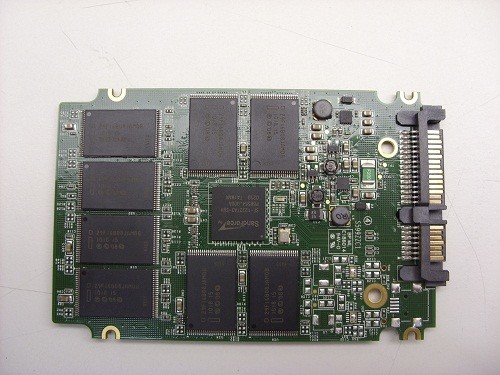
SSD data recovery

These early days of Solid State Drives, reminds me a lot of the hard drive industry as it was first developing. In those early days there were over a hundred different manufactures of hard disk drives. Now there are just 3, Seagate, Toshiba, and Western Digital. Similarly, today we find well over a hundred companies manufacturing SSDs. And just like the hundreds of early hard drive manufactures, each one is trying to distinguish it’s technologies as the best and capture the most market share. Some of their ideas will be fantastic and will be quickly adopted as standards. Other not so good ideas, may result in the demise and eventual death of many of these companies.

A quick search on the web uncovers hundreds of complaints regarding the early failure of various models of Solid State Drives. The point is … there will be a weeding out process where the weaker products and companies are culled from the herd. And as a consequence it is still a little too soon to know which SSDs and technologies to trust, and which to avoid.

There is also an ongoing debate over the life expectancy of SSDs and whether they can withstand the same amount of lifetime write cycles as a typical hard drive. And while I don’t believe this is, or will remain a problem to be concerned about, there is another rarely mentioned quirk with SSDs. If you copy data to an SSD and detach it from any computer or power source, the data will eventually disappear! This is because SSDs use electronic components which are “charged” to represent a digital 1 and over time this charge leaks out and all the bits return to digital zeroes. So if you think you can copy your precious baby pictures to an SSD and put it away for 10 or 20 years, think again! Actually, just how long the data will be retained is open to argument and something no manufacture appears to mention. I have heard data retention times as low as 1 or 2 years and perhaps as high as 10 years from some authorities. So be careful, or be sure to periodically attach your SSD to a computer or power source so that the data will be refreshed. By the way, I have connected and booted up an old 20MB Seagate ST225 hard drive that has been sitting on a shelf for just under 20 years and all the data was intact and readable.

Contender#2 … Online or web based storage really does promise perfection, or at least so it appears on the surface. But what guarantees do you really have that your data will be there when you need it? Everything is out of your control. And if the web is down or inaccessible, then you basically have no data.data recovery Ontario

To illustrate my concerns, a recent experience of mine may help. Having used Google’s Gmail for almost 10 years with never a problem, I recently persuaded my wife to open her own Gmail account for her own personal emails. Then six months after the switch, her emails suddenly disappeared. Of course it was my fault for persuading her to switch over to Gmail, so I was tasked with getting her emails back … What I found was rather discerning; there is no real process, and definitely no person to help you recover your mailbox data should such a calamity bestow you. Google basically says “Oh well, what do you expect when something is free?” To which what can one say? Of course the solution is to use an email agent like Eudora and download your emails to your local machine. But then doesn’t that defeat the purpose of on-line storage?

Not to pick on Google, (they should be prepared to defend their “web only” cheerleading), but I have another example based on their product, Google Docs. It is touted as a web based replacement for MS Office. It allows a user to create, edit and store MS Office type documents on the web. But after my experience with Gmail, I must wonder what recourse there will be if suddenly all your documents go missing? I hope this problem of no accountability for the safety of a user’s data is isolated to those offering free storage services. But with Google setting the precedent of giving storage away for free I am afraid other web based program providers will do the same.