Posts Tagged ‘Toronto hard drive recovery’

What is a CRASHED hard drive?

Thursday, December 12th, 2013

We hear the words “my hard drive has crashed” at least a hundred times a month and yet it is seldom what we discover when we open the lid of someones “crashed” hard drive. The picture below shows two Seagate 500 GB hard drives we recently received for data recovery. Both drives were declared crashed by their owners! However only one appears to be physically crashed.

data recovery toronto

The drive on the left is in pristine condition. The disks are extremely shiny and consistent across the entire surface of the disk surface. The clients problem was determined to be a bad PCB or printed circuit board.

The drive on the right is not so pristine and has physically CRASHED! The smooth shiny disk surface has been scored and ringed by constant contact with the heads while the disks were spinning. This amount of damage could only occur if the drive was left running for a long period after the initial contact damage. Click on the picture for a closer more shocking look.

The drive on the left should be recoverable. The drive on the right is NOT recoverable.

If you require a price estimate on our data recovery services, follow this link for a quick reply … Canada’s Data Recovery Experts

Levels of Data Recovery for Hard Drives

Thursday, August 30th, 2012

Toronto, Ontario, Canada.

Data Recovery Service Providers often categorize hard drive data recoveries into different levels and Memofix Data Recovery Services is no exception. While we don’t provide flat level pricing to individual consumers, we often provide our MACC or Memofix Authorized Care Centre partners with flat rate pricing based on three categories or levels of data recovery. Our definitions of these levels are described below and can be helpful in preparing yourself for the costs and degree of difficulty involved with each increasingly complicated recovery scenario.

LEVEL 1

Level 1 is the lowest level and requires the least expertise and resources. Level 1 means the hard drive is still 100% fully functional. It is recognized by the computer and if the user was to reformat their hard drive they would be able to continue to use it, albeit without their original data.

Level 1 type problems are NOT the fault of a failing hard drive. Level 1 type problems ARE the result of damage, corruption or deletion of all or part of a hard drive’s file system. These actions could have been done deliberately, accidentally, or even unknowingly. The file system is “actual data” written on the hard drive and for our purposes, it can be thought of as a big index that points to the locations on the hard drive where a particular file or folder is stored.

If that index is damaged or corrupted, the operating system may not be able to locate a particular file or folder. Or if the index is for a file or folder used by the operating system, then the drive may not be able to boot or be accessed using conventional methods.

Examples of Level 1 type problems would include;

  • Deleting a file or folder
  • Formatting your hard drive
  • Restoring the operating system
  • Boot Virus Infection

Many level 1 data loss situations can be remedied by a tech-savvy end-user using readily available data recovery software. However there are precautions and the peace of mind that only a professional data recovery service company can give you, so if your data is absolutely CRITICAL to retrieve, do NOT attempt this. However, if you can afford to take the risk or just can’t afford the cost of professional help please read an earlier blog I wrote on the subject of do-it-yourself data recovery … http://www.memofixdatarecovery.com/blog/index.php/diy-data-recovery-do-it-yourself/


LEVEL 2

Level 2 is the middle level and requires more expertise and resources then level 1. Level 2 means the hard drive is not functioning properly but the problem(s) will not require work to be done in a clean room environment. Level 2 data loss situations are normally something an end-user cannot solve themselves. Nowadays even switching a PCB is not a simple process, as the drives HDA (head disk assembly) is fine tuned to work with the same PCB it was manufactured with. In fact, the drive’s PCB contains stored values which determine critical settings used by the heads to position and read data optimally. PCBs from the same model hard drive and with the exact firmware can NOT be simply swapped out unless these stored values are first transferred to the new replacement PCB.

Examples of Level 2 type problems would include;

  • Defective PCB or Printed Circuit Board electronics
  • Overwrite or corruption to the hard drive’s “system area” (special files used exclusively by the hard drive for its own operation and maintenance.
  • Corruption to the drive’s firmware.
  • Excessive read errors or hard media defects that are not the result of weak or bad heads.
  • Issues with full disk encryption or file encryption


LEVEL 3

Level 3 problems indicate a major failure with the hard disk drive. Level 3 means the hard drive WILL require extensive cleanroom work to enable any recovery. Typical level 3 recoveries involve head crashes where the drive’s heads have come into contact with the disk surfaces. This usually causes damage to the both the disks and the heads. To recover any data the drive must first be made functional again. First we purge the sealed head disk area of any free particles and then we replace the heads from a new and exact version of the original hard drive. Then we attempt to copy off the used areas of the bad hard drive. During this process the heads will often go bad again due to the damage on the disks. So we must repeat this procedure until we have imaged or copied off all of the used areas on the bad hard drive. This process can take 2 days to 2 months in extreme cases. In the worst cases, the damage is so severe that newly installed heads are instantly destroyed and no recovery will be possible. Another common level 3 scenario occurs when a hard drive is dropped and the spindle motor that spins the disks is seized. This requires the transfer of the disks onto a new motor and typically requires multiple head xplants as well.

Examples of Level 3 type problems would include;

  • Damaged heads and disks
  • Seized or non-spinning spindle motors
  • Stiction, where the heads have become stuck to the disks
  • Fire or water damage
  • Dropped, knocked over, bumped, or physically abused hard drives


So to be brief and to summarize,

  1. If a client or user has deleted a file/folder or reformatted AND their hard drive was and is still working perfectly, then it is a LEVEL1 data recovery scenario.
  2. If the drive was physically abused in any way, or if it makes any unusual noises it is likely a LEVEL 3 data recovery scenario.
  3. For anything else, a LEVEL 2 data recovery scenario is most likely.

In a future blog we will discuss USB flash, camera cards and SSD data recovery levels.

RAID Data Recovery and Physical Damage

Wednesday, February 15th, 2012

One of our best Toronto data recovery partners recently had a RAID data recovery case involving eight hard disk drives configured in a RAID 5 setup. As you may know, RAID 5 allows the failure of any 1 hard drive and can be rebuilt with no data loss. But unfortunately in this RAID data recovery situation, there were two defective hard drives. Further investigation revealed that one one of the hard drives had actually failed 5 months ago and the stale data residing on it was of no value to the client. This left our data recovery partner with all their hopes pinned on the one remaining defective disc drive which had apparently just failed and was the ultimate reason for their RAID failure.

When they contacted Memofix later that morning, we asked them if there were any loud clicking or other unusual noises coming from the hard disk drive. They said no, but they noted that the hard drive model was not being reported properly by the SCSI BIOS at boot up. The model was displayed properly, BUT the capacity was indicated as 0 bytes!

After conferring with a few of our RAID data recovery techs we advised the client that the problem was most likely a corrupted module in the hard drive’s “system area” and we suggested we could fix it very easily. The “system area” is a storage area on the hard drive reserved by the drive itself for storing unique settings required by the hard drive to function. If a hard drive can’t read some of the modules, it often reports a zero byte size which prevents any access to the stored data.

As we are located in the Toronto area, the partner packaged up the defective hard drive and brought it immediately to Memofix for further analysis. When we first hooked up the drive, there was a very light, almost indecipherable ticking noise. It did not sound serious and in fact our data recovery experts still believed the problem was related to a corrupted system area. However our attempts to repair the module were unsuccessful as the hard drive could not write back the changes we made. It appeared we had an issue with the hard drive’s head assembly that would need to be fixed first. So we opened up the hard drive under class 100 conditions in our Toronto data recovery lab to get a better look. And boy did we get a better look … see the picture we took below. :-( Notice the heavily crashed area where the smooth platter surface has been roughed up severely as well as an additional ring of damaged at the inner hub of the platter.
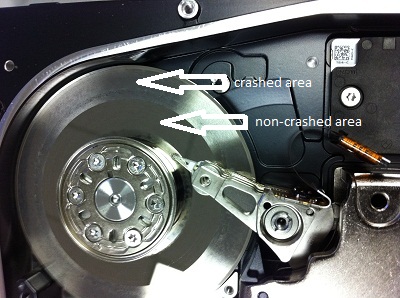
There will be no data recoverable from this crashed hard drive! It just goes to show you that even the best data recovery specialists can be fooled as it’s not always possible to hear severe damage with your ear.

By the way, even though this 8 drive RAID array had two bad hard drives, Memofix was still able to rebuild the RAID with the one stripe being bad throughout the RAID. This results in the recovery of 5 good chunks of data , followed by 1 bad chunk of data through out the volume. The RAID data recovery results may not be exactly stellar but the client was able to regain many smaller document type files.

raid recovery toronto

badly crashed SAS or Serial Attached SCSI hard drive

SAS SCSI Drive involved in a terrible crash

Toronto Data Recovery

Monday, January 30th, 2012

As the morning sun peeks through the skyscrapers of downtown Toronto and the warmth of its rays tickle your face, your world seems so safe, so tranquil, so at peace. You press the power on your laptop computer and are mildly surprised when the familiar beeps fail to materialize. Looking at your screen you see nothing but a flashing cursor. So with minimal concern you reset the power, gaze out over a waking Toronto and diligently wait for the familiar beeps before heading for your coffee. But unbeknownst to you, today will be a little different than the last 934 days. Today your computer won’t boot! Today you lost your data! Today you need data recovery!

Panic sets in as your brain begins to assess the gravity of the situation. You remember the 37 page proposal you’ve been working on non-stop for 3 weeks. Usually you would have copies of your data stashed on your desktop at work or even on your computer at home. But again, this time is different, there is no backup! GULP! The most important client you’ve had in years is expecting it tomorrow. If you get the contract, your worries will evaporate for months to come, maybe even years. If you don’t, well things could get really tough around here. ..

data recovery Toronto

Toronto Data Recovery

Every day in thousands of businesses and homes across the Toronto GTA, across Canada and across the world, a similar scenario is unfolding. Data is being lost!

What would you do? Where would you seek help? Are you located in the Toronto area or close by in the golden horseshoe, perhaps Hamilton, Oakville, Kitchener, Waterloo, or even Markham?

If you’re like our Toronto friend above, Thomas McAllister, you called your IT manager for help. Once the IT manager determined that the hard drive had an operational problem, he recommended Memofix Data Recovery Services, Toronto’s oldest data recovery service provider.

Thomas called us just after 9 am Toronto time and the severity of his situation was not hidden in his voice. It was apparent he needed his data recovered by tomorrow’s sunrise or he would need to start working on his resume. To Thomas the situation was that critical. After discussing his case with him, we were able to assure him we had the parts in stock at our Toronto facility and we’re ready to attempt his data recovery within the hour of it being received.

By 11am we received his Toshiba laptop for hard drive data recovery. A quick analysis determined that one of the 4 heads was no longer functional. Within an hour we had replaced the complete defective head assembly and had the hard drive imaging, albeit with some read errors. Thankfully the disk drive was only 160GB and by 3pm our imaging of the used areas was complete. Although the data recovery had some damaged files as a result of the read errors, the most critical file was in pristine shape and was tested with no errors. Due to the small size of the file we were able to email it to Thomas at his office in downtown Toronto. By 3:30pm, Thomas was breathing a little easier and our mission was complete.

Now, not all our data recovery cases can be completed this fast, but if you’re in the Toronto area, be aware that our data recovery service lab, located in Vaughan, has the most extensive inventory of hard disk drive parts in Canada. While other Toronto data recovery service providers must wait days for parts and likely even charge more, we are often able to complete a data recovery in the same day. If time is not your friend … call on Toronto’s Memofix Data Recovery Services.

Data Recovery Second Chances

Thursday, December 1st, 2011

Here is a story that our head of client services in Toronto wishes me to tell. It’s a story that happens just a little bit too often …

A few weeks back we had a gentleman drop by with a Western Digital hard disk drive for possible data recovery services. The client was quite anxious so we did a while-u-wait evaluation and quickly discovered the disc drive couldn’t spin up because it had a defective PCB or printed circuit board. After reading off the original NVRAM memory contents* and transferring them onto a compatible PCB we soon had the drive spinning again. However we still couldn’t access the client’s data and further analysis revealed there was a second more complicated problem with the drive’s SA or “system area” modules, (kind of a secret operating system stored on the drive’s disks or platters and for its own exclusive use). After some attempts to repair the damaged SA modules it became apparent that it would take further research and time to solve the corruption. We did however believe we had enough information to quote the customer and we proceeded to do just that.

With multiple hard drive problems we don’t typically charge twice as much but we do add a premium and this recovery was quoted at $800. And as often happens, the client was aghast at the figure and decided to decline our data recovery quote. Fair enough, we realize the real value of the data can only be determined by the owner so we packed up the case and handed it back to the gentleman. See this older blog post “Data Recovery Pricing and Why were not the Cheapest” to better understand the data recovery pricing process.

A week or so goes by and we get another visit from the same gentleman. This time he is ready to agree to our quote and he leaves the drive with us. However, once we get the disk drive back into the lab, we see stickers on it from one of our competitors, the largest data recovery company in the world ! And worse yet, the drive’s bubble or sealed environment where the disks are located had been opened.

Oh oh, why would they open the drive? Our initial evaluation revealed no problems with the actual disc media or the read/write heads, so we better take a look. Under class100 clean room conditions we open the hard drive and find a crash forming on the top surface minimally. The crash has formed a ring and can only be created by continuing to operate a crashing hard drive. We then remove the head assembly and inspect each head for damage and contamination. This process reveals additional crashes have developed on the lower disk surfaces. The damage is so severe; the odds are against us recovering anything of value!

We contact the client who admits he did bring it to a competitor BUT he swears it was only for another evaluation and quote. He was trying to find a better price. After “evaluating” his hard drive recovery for 2 days, the other data recovery company told him it was unrecoverable!

This is where the illusion of two totally different outcomes must be addressed and the difference in data recovery processes exposed! Here’s what happened …

The world’s largest data recovery company receives a hard drive for data recovery. The drive is received and they immediately attempt to recover all the data possible. If they can’t recover any data they declare it unrecoverable. If they can recover some data they send the client a list of what they can recover and a firm quote. The recovery is already attempted, the results are already in. There is no proper “do no harm” evaluation or diagnosis. There is little chance of anyone doing any better once they are finished with it. Any 2nd chances are effectively destroyed!

What makes matters worse is what happened with this case. What would have been a 99% chance of a successful recovery with Memofix Data Recovery Services turns into a 100% unrecoverable situation. Whether the new damage was caused by mishandling during its transportation or whether it occurred during our competitors “evaluation” cannot be said, BUT I can tell you the result is the same. Somebody is not going to see their data ever again.

IF a data recovery company can’t give you an evaluation without doing further harm to your hard drive then they don’t know what they are doing, period! Memofix stands by every evaluation we perform and furthermore our processes do NO harm. Consequently if you get a 2nd opinion after a Memofix diagnosis it should confirm exactly what we discovered. Of course actual data recovery pricing for the same diagnosis may differ between competitors, especially in Toronto.

IF a data recovery company uses a process where they attempt to recover the data immediately from any data recovery case they receive, don’t use them. Even if they successfully recover your data, their attempts may have denied anyone else a chance of recovering your data AND consequently they can hold you over a barrel as they have the last obtainable copy of your data in the world.

Remember, the 1st attempt at recovering data from a hard disk drive is typically the most successful. The longer a failing hard drive is operated, the worse your chances of seeing your data again. Choose a data recover provider with the same care that you would use to choose a surgeon, your data may depend on it.

*PCB swapping on most HDDs is not a straight exchange (even with an exact firmware PCB), as the PCB stores settings specifically tuned for its original set of disks and heads. .