Data Recovery, recovering Hard Drive data, RAID data recovery

Kindness Changes Everything!


Memofix was recently asked to help out a fellow Canadian who had lost the latest pictures of his deceased wife after his computer became submerged in the recent Calgary and High River, Alberta floods. Memofix’s expertise with water damaged hard drives was invaluable in recovering the data and putting a smile on a saddened face. Here’s a letter of appreciation we recently received for our gratuitous assistance.

Despair to HOPE!

This is a story of how a few acts of kindness can build hope in a person’s life

My name is Rick Ellis and I am one of the thousands of displaced citizens of High River, AB after the floods of 2013 but I consider myself lucky to have met a few “angels” during the anguish of these times.

I lost my wife Chris AKA Princess on the 14th of June, 2013. Less than a week later, on June 20, we were hit by the worst flood in our history. I had gotten our computer, Ipod and cellphone out before the flood but left them at my place of work not dreaming that they would be in any danger there. More than a week later they let my employers back into the building to retrieve valuables and \my employers, Tony and Penny Marshall of Highwood Crossing Foods, who are angels in their own right, retrieved my bags for me, one that held my clothes , one that held our valuables,computer etc.and one of important documents. Upon arriving at the TIDE loads of hope caravan I opened my trunk to retrieve my bag of clothes that had been sitting in the flood waters for over a week. A volunteer came out to help me unload my clothes and when he grabbed my bag with the electronics in it I broke down and told him of my wifes passing and that I was going to try and recover any info I could off of them. This complete stranger then offered to make a few phone calls to see if he could help me. This truly caring person was David Brodie, vice president, Western Canada of Citizen Optimum. He was from Vancouver and yet he was out in the middle of this disaster helping people unload their few remaining clothes to be washed for free by TIDE.Within two days I received a call from Mr Brodie to take all my electronics into Future Shop in Shawnessy, Calgary, and they would see what they could recover. Please remember that these devices held all of our recent and last pictures, music and memories. He asked me to speak to Rob Kean, general manager for the Shawville Blvd store, When I went in Rob greeted me like an old friend and his IT wiz Andy said that they would do what they could to retrieve whatever info they could. Remember these devices had been sitting in flood waters for more than two weeks. From here my thanks go out to countless people that I have never met but their assistance has made a difference in both my and my children’s lives, three great sons, two and hopefully three great dauthers in law,and two plus three more on the way grandchildren. Larry Shulman@memofix.com, [email protected], and all the great people at FUTURE SHOP. On Jul 30 I got a call from Rob Kean saying that they had retrieved some of my lost data. I must say that I was a compleat puddle (my boys description of how I break down) when I went into the store and not only had they retrieved all the info from my old computer but also downloaded all the info onto a brand new laptop, complete with an emergency backup drive, a brand new ipod 5, I’m still trying to figure out how to run these, headphones, sony speaker system and A large part of my memories to share with my grandchildren. To all these people who have helped pull me out of my despair, THANK YOU. I think all of you must have seen the last piece of art my wife bought. “Kindness changes everything” I am going to try and attach it to this email but if it doesn’t work please email me and I will see if I can rectify this.

I know that there are still some prople trying to retrieve our last phots off of my wifes Iphone but even if you don’t, you are still part of Chrissy’s angels.

Thanks to all is not enough

The puddle man

Rick Ellis

Tape Backup Gets Squeezed by The Cloud and SSDs

For the past couple of years we have been telling our customers and social media followers that Tape Is Not Dead. But the past 12 months has put increasing pressure on a backup technology that business has relied on for decades. Memofix is one of the few repair facilities in North America that repairs hard drives and we continue to support customers of HP, IBM and Quantum tape drives, among others. However we see the signs that tape is quickly being pushed out of IT operations by Cloud and Solid State Drives (SSDs).

In our conversations with storage OEMs, customers and industry contacts there’s no surprise that Cloud backup is becoming the backup and data recovery option that many companies are moving to. Local storage is not going away and the move to disk-to-disk backup has been underway for years. But the Cloud is quickly replacing tape as the guarantee for business continuity. It provides offsite security while eliminating the majority of administration associated with tape backup processes, and there’s no need for expensive equipment purchases or upgrades. It was a logical move for Memofix to offer Cloud Backup solutions in order to continue serving the thousands of customers who have relied on us for storage technology and services for 25+ years.

How are SSDs affecting the use of tape for data backups? SSD Manufacturers and systems integrators are selling flash technology with the emphasis on savings. The primary saving comes from a reduction in power consumption and reduced impact on IT cooling systems. But we are also hearing more pitches that tout the speed of SSDs and the productivity gains that companies can achieve, particularly when dealing with large data sets and industries where response is critical. As SSDs grow in capacity and come down in price, they are starting to push traditional HDD storage into a Disk-to-Disk backup role. This means the tape drive infrastructure is rendered obsolete or its role is greatly reduced.

In a backup market that has plenty of new sexy technologies, tape continues to be the solid low-cost performer, albeit less exciting. It’s a little bit like shopping for a new car. IT managers and business owners can either afford to drive out of the showroom with the leading solutions in Cloud, SSD and disk-to-disk, or they have to settle for the economy model that everyone thinks is already obsolete. Whatever you’re driving, we can help you tune up your backup strategy.


Want to be a Hero?

Memofix Data Recovery Services is looking for a few talented data recovery technicians. If you have a passion for problem solving, an unquenchable lust for knowledge and really enjoy helping people and businesses recover their irreplaceable data, we may have a home for you.

As a data recovery technician, you will join our team of proven data recovery professionals in our quest to become the most technically capable data recovery service company in the world. To become the greatest, we are looking for experts in many areas. We need skilled hard drive surgeons experienced in resuscitating damaged and crashed hard drives. We need PC3000 masters with in-depth knowledge of hard drive system areas (secret OS of the hard drive). And we need file system specialists with an intricate understanding of the various operating systems as well as a thorough understanding of RAID variations and rebuilding techniques.

If you have 2 or more years of experience in the areas listed below, we want to talk to you;

  • Diagnosing and identifying hard drive problems.
  • Diagnosing and repairing of defective hard drive PCBs including NVRAM transfers.
  • Identifying defective heads and replacement techniques in a cleanroom environment.
  • Dealing with seized spindle motors.
  • Transplanting of disks into a new body and motor.
  • Using the PC3000, Data Extractor and other specialized hard drive tools.
  • Specialized techniques such as individual head imaging.
  • Performing hard drive hot swaps with a system area compatible donor drive and PCB.
  • Identifying, repairing and rebuilding file system structure damage in FAT, NTFS, MAC and Linux type operating systems.
  • Identifying striping schemes and pertinent parameters in various flavors of RAID.
  • Repairing and Rebuilding RAID arrays physically and virtually using various software tools.

Memofix offers competitive salaries, equal opportunities, a full benefits package, and a wonderful work environment for all of our employees.

If you have the skills, aptitude, and desire to join a team dedicated to becoming the best at recovering the world’s data, please send your resume to me at [email protected]. Please reference “Hero Ad” in your email subject line.


Top 5 Worst Mistakes A HDD User Can Make!

Or Mistakes I See Every Day That Can Be Easily Avoided
A Diatribe by Rob Armstrong, Memofix Data Recovery Engineer

Every day in Data Recovery labs across the globe, hard drives (HDDs) are received from people who were convinced they knew what to do when their HDDs failed. Unfortunately, most have been horribly misinformed by friends, family, sweaty nightmare, rumor and/or innuendo, or even worse poor Search Engine results written by non-professionals who think they know HDDs inside and out. The truth is, I have been in the Data Recovery industry for close to seven years, and I learn more about hard drives and each manufacturer and model EVERY DAY. It is not a simple or straightforward undertaking, and is unfortunately one of those things in life that is best left up to the professionals…for no other reason than most, if not all, Data Recovery Labs have a free evaluation service. If you attempt to “fix” your HDD at home, you could conceivably damage the drive beyond the point where it can be recovered – even by an accredited lab.
So here is the advice of a Data Recovery Tech who just wants the public to be better informed as to what they should do when the unthinkable happens (and yes, I am aware that if people heed my advice, we will be receiving fewer cases for recovery):

1. If the HDD is Dropped or Physically Traumatized in Any Way

Whether the device is running or not, once dropped, you should not apply power again. If you are truly concerned with not losing your data – send it in to a data recovery lab right away. Some would advise to apply power just once to see if you can get access – even for a short window of time – to copy off everything on there before it fails for good. Here’s the problem with that thinking: if you dropped the drive and the heads inside the drive physically bent due to the impact, then when you apply power, the heads now come into physical contact with the platters (whereas before the trauma they floated above the surface by several microns) and your data is scraped off at 7200 rotations per minute – becoming unrecoverable.

2. If You Have Sporadic Access to Your HDD

While working, you see the “hourglass” icon come up…too many times…or it takes waaaay too long to save, or sometimes your HDD boots to Windows OK, sometimes it doesn’t. Your HDD defaults to the “blue screen of death” sometimes – but not every time – you boot. These could be indicators that your drive is failing either physically or logically as bad sectors proliferate (reported as “Read Errors”) or your hardware may be slowly failing. In any case, the next time you have access to your HDD, COPY IT! All of your critical files and folders, profiles, e-mail documents, anything you deem important. You may never get another chance, and I’ve heard of many instances where consumers just kept rebooting until they had access – then did not back up once they have it. And no - putting your HDD into a refrigerator is not going to help.

3. If a Drive Fails in Your RAID Array

Hard drives can fail at any time without any type of warning (I know – you didn’t want to hear that), and therefore quite often, one drive in a RAID array will fail well before the others. Obviously, the way in which the data is written to a RAID makes it extremely simple to rebuild should one drive fail (with parity, each drive’s contents are re-buildable using the other drives). However, when multiple drives fail simultaneously – send the array into a Data Recovery lab. Once again, you will get a FREE evaluation, which will determine EXACTLY what is wrong with the RAID and what it will take to recover the data. Too many times have we seen RAID arrays where the consumer has replaced too many drives, kept the power on damaged drives too long, or “accidentally” reformatted the whole RAID after rebuilding didn’t work right away. Again, how important is your data?

4. If You Use One External for Both Mac and PC

Stop it. You just stop that right now. In this day and age, external HDDs are cheap enough to buy one for each of your O/S’s, and moving your HDD from one system to the other and back can cause your HDD to fail. In the end, it comes down to filesystem difference and the incompatibility of the two O/S’s. The way data is stored and written in a Mac environment is VERY different from the way a PC writes, and most systems have a difficult time resolving both O/S’s. You can’t mount a Mac drive in Windows (unless using a third-party program), and vice-versa, so you shouldn’t be using the same HDD with both systems. I’m sure some of you will yell and scream after hearing this advice, and have used one external HDD for both Mac and PC without any problems – but if the possibility exists that you will lose everything, isn’t it worth two externals?

5. If You Use Your USB Device for Storage

Again, stop it. Years ago, I assisted a Data Recovery company with customer service while also working in their lab, and many an argument was had with consumers over the definition of a “backup”. A backup is a secondary copy of your data. That means it exists not only in two locations or folders, but on two completely separate drives. This is the only way to become completely secure in the knowledge your data is safe from loss. As such, USB devices (aka thumb drives, USB sticks) should be used only for transferring data from one HDD to another immediately. Too many USB devices have been received that were smashed because it ended up forgotten and on the bottom of the purse, or lost and chewed up by the family dog (no, really). Do not store any data on your USB device that is critical for any extended period of time – unless you have a true backup on another HDD.

So there you have it. The early days of Data Recovery were a lot like the introduction of Science into public discourse hundreds of years ago. There were scientific methods we were using along with basic computer know-how to recover data – proven methods – but there was also a “fringe” element to recovery, mixing science and…guesswork. We would adjust the lid on a drive, believing that by doing so, the airflow inside the drive or magnetic field would affect the voice coil to get better results. I even remember sitting at my workstation all day and holding a drive, because I believed that if I let go of the drive it would stop working – some superstitious nonsense about my personal electromagnetic field affecting the HDD. Basically if the method worked for one person, we would all try it – regardless of how little sense it made. That was then.
Now, we as Data Recovery Technicians know exactly how to recover data from any HDD, using proven scientific method – no more guesswork. And that is why you should ignore rumor and poor forum scuttlebutt when it comes to the recovery of your critical data, and just send the drive in for a free evaluation. When the unthinkable happens. Which it shouldn’t, now that I’ve given you 5 ways to avoid it!

RAID Data Recovery and Physical Damage

One of our best Toronto data recovery partners recently had a RAID data recovery case involving eight hard disk drives configured in a RAID 5 setup. As you may know, RAID 5 allows the failure of any 1 hard drive and can be rebuilt with no data loss. But unfortunately in this RAID data recovery situation, there were two defective hard drives. Further investigation revealed that one one of the hard drives had actually failed 5 months ago and the stale data residing on it was of no value to the client. This left our data recovery partner with all their hopes pinned on the one remaining defective disc drive which had apparently just failed and was the ultimate reason for their RAID failure.

When they contacted Memofix later that morning, we asked them if there were any loud clicking or other unusual noises coming from the hard disk drive. They said no, but they noted that the hard drive model was not being reported properly by the SCSI BIOS at boot up. The model was displayed properly, BUT the capacity was indicated as 0 bytes!

After conferring with a few of our RAID data recovery techs we advised the client that the problem was most likely a corrupted module in the hard drive’s “system area” and we suggested we could fix it very easily. The “system area” is a storage area on the hard drive reserved by the drive itself for storing unique settings required by the hard drive to function. If a hard drive can’t read some of the modules, it often reports a zero byte size which prevents any access to the stored data.

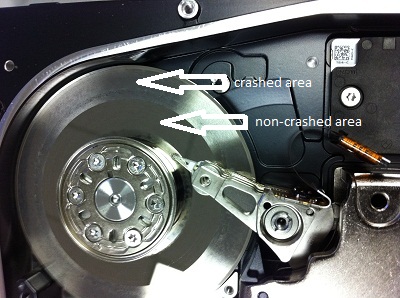
As we are located in the Toronto area, the partner packaged up the defective hard drive and brought it immediately to Memofix for further analysis. When we first hooked up the drive, there was a very light, almost indecipherable ticking noise. It did not sound serious and in fact our data recovery experts still believed the problem was related to a corrupted system area. However our attempts to repair the module were unsuccessful as the hard drive could not write back the changes we made. It appeared we had an issue with the hard drive’s head assembly that would need to be fixed first. So we opened up the hard drive under class 100 conditions in our Toronto data recovery lab to get a better look. And boy did we get a better look … see the picture we took below. 🙁 Notice the heavily crashed area where the smooth platter surface has been roughed up severely as well as an additional ring of damaged at the inner hub of the platter.

There will be no data recoverable from this crashed hard drive! It just goes to show you that even the best data recovery specialists can be fooled as it’s not always possible to hear severe damage with your ear.

By the way, even though this 8 drive RAID array had two bad hard drives, Memofix was still able to rebuild the RAID with the one stripe being bad throughout the RAID. This results in the recovery of 5 good chunks of data , followed by 1 bad chunk of data through out the volume. The RAID data recovery results may not be exactly stellar but the client was able to regain many smaller document type files.

raid recovery toronto
badly crashed SAS or Serial Attached SCSI hard drive
SAS SCSI Drive involved in a terrible crash